Since when does “owning your audience” mean owing a SaaS company for every subscriber?
For a newsletter pulling $5,000 a month in paid subscriptions, Substack’s 10% cut is $6,000 a year — and closer to $8,000 once Stripe fees stack on top.
In January 2024, Casey Newton’s Platformer left Substack for self-hosted Ghost and said the move would save the publication “tens of thousands of dollars a year.”
Self-hosting Ghost is the version of “owning your audience” you can actually price. You install the open-source software, point your domain at it, and the only fees go to your virtual private server (VPS), registrar, and email vendor. No platform takes a cut.
What Is Self-Hosted Ghost?
Self-hosted Ghost is the open-source version of the Ghost publishing platform installed on a server you own and operate. It’s the same software that powers Ghost(Pro), Ghost’s managed hosting service, running on infrastructure you control.
Ghost is MIT-licensed, lives on GitHub, and has been open source since launch.
Three deployment paths exist for Ghost:
- Ghost(Pro): Ghost’s official managed hosting at $15, $29, or $199 a month for annual subscriptions. If you go this route, Ghost handles updates, email infrastructure, and uptime.
- Self-hosted on your own VPS: You provision a Linux server, install Ghost, and run it yourself. This guide explains how it works.
- Managed self-hosting via third parties: Services like Pikapods or MagicPages run Ghost for you. They’re cheaper than Ghost(Pro) and require less work than self-hosting, but you don’t have root access.
“Self-hosted Ghost” almost always means option two: Ghost on a VPS you administer.
No platform fee, no member cap, no theme constraints, full database access.
The trade-off is that you’ll need to restart the service when MySQL crashes after an Ubuntu kernel update. (Yes, that is English.)
Why Self-Host Ghost Instead of Using Substack or Ghost(Pro)?
Self-hosting Ghost makes financial sense once paid subscription revenue crosses roughly $250 a month.
Below that, Substack’s free tier costs nothing absolute, and the 10% bite is small. Above it, Substack’s revenue share costs more than a VPS, often by a factor of five or more.
| Platform | Monthly cost (annual plan) | Revenue share | Member limit | Custom domain | Custom theme |
|---|---|---|---|---|---|
| Substack | $0 | 10% + Stripe processing fees (~13–16% effective)* | Unlimited | Yes (paid) | No |
| Ghost(Pro) Starter** | $15 (yearly billing) | 0% | 1,000 | Yes | No |
| Ghost(Pro) Publisher | $29 (yearly billing) | 0% | 1,000 | Yes | Yes |
| Ghost(Pro) Business | $199 (yearly billing) | 0% | 10,000 | Yes | Yes |
| Self-hosted Ghost | ~$15–$30 | 0% | Unlimited | Yes | Yes |
| * ~2.9% + $0.30 per transaction, plus a 0.7% fee for recurring subscriptions** Ghost(Pro) Starter supports free newsletter subscribers only. Paid memberships and subscription revenue require Publisher or above. | |||||
Ghost(Pro) tiers come from Ghost’s pricing page. Substack’s 10% comes from Substack’s help center. The “13–16% effective” accounts for Stripe’s 2.9% + $0.30 card processing, plus the 0.7% Stripe Billing recurring fee that lands on every subscription charge.
Here’s an example from Ghost:
A newsletter with 1,000 paying subscribers at $5/month earns $60,000 a year.
- On Substack, the platform fee alone is $6,000.
- On Ghost(Pro) Publisher, it’s $348.
- On a self-hosted 4 GB VPS plus Mailgun, it’s roughly $660 a year ($20 VPS + $35 Mailgun × 12).
That’s a $5,300 swing per year on a single newsletter at a modest scale.
Substack is free until you make money. Once you do, the cut grows with your revenue.
Ghost inverts that model: you pay a flat monthly rate, and your revenue stays yours no matter how much you earn.
What Are the System Requirements for Self-Hosting Ghost?
The software runs on Ubuntu with Node.js, MySQL 8, and a reverse proxy. Ghost’s official install docs put the floor at a Linux server with at least 1 GB of RAM, though the Docker Compose preview docs use a 2 GB / 1 CPU droplet as their baseline example.
Treat that as the real minimum, not the marketed one.
Here’s how those requirements break down and what they mean in practice:
| Component | Required | Notes |
|---|---|---|
| OS | Ubuntu 22.04 or 24.04 LTS | Ghost-CLI is Ubuntu-only |
| Node.js | Per Ghost’s current install docs | Ghost pins the version per release |
| MySQL | 8.0 | No MariaDB, no SQLite, no PostgreSQL |
| Reverse proxy | Nginx (Ghost-CLI) or Caddy (Docker) | Handles HTTPS and routing |
| Mailgun (bulk) + SMTP (transactional) | Mandatory if you send |
A reverse proxy is the public front door to your server. It accepts HTTPS traffic, terminates encryption, and hands requests off to Ghost on a private port.
The “1 GB minimum” is true for a Ghost site that only serves posts. Add a newsletter, Mailgun, ActivityPub, Web Analytics, and RAM goes up.
Our Self-Managed VPS line features NVMe storage, full root access, unmetered bandwidth, and predictable pricing. For most Ghost installs, we recommend starting with Stack 4 and scaling up only when your traffic or subscriber count demands it; most newsletters never need more.
Stack 8 is there when you’re running higher-traffic publications or have ActivityPub federation turned on.
Now let’s see how DreamHost Stack tiers map to real-world Ghost workloads:
| Scenario | RAM | DreamHost tier |
|---|---|---|
| Personal blog, no newsletter | 1–2 GB | Stack 4 |
| Newsletter under 10,000 subscribers, ~50,000 monthly visits | 4 GB | Stack 4 |
| 10,000+ subscribers, multiple publications, or ActivityPub* | 8 GB | Stack 8 |
| * Full ActivityPub self-hosting requires the Docker Compose install path, not Ghost-CLI | ||
CPU matters far less than RAM for Ghost — newsletters are write-light and read-cacheable. NVMe only becomes relevant when MySQL is under pressure, typically past 25,000 subscribers.
How Do You Install Ghost on a VPS?
There are two ways to install Ghost on a VPS.
The go‑to option for production setups is Ghost‑CLI; it’s stable and well‑supported. The newer Docker Compose setup is still in preview, but it’s expected to become the default soon.
Before getting started, double‑check the official Ghost install docs, as major version updates often introduce breaking changes.
Method 1: Ghost-CLI (the Established Path)
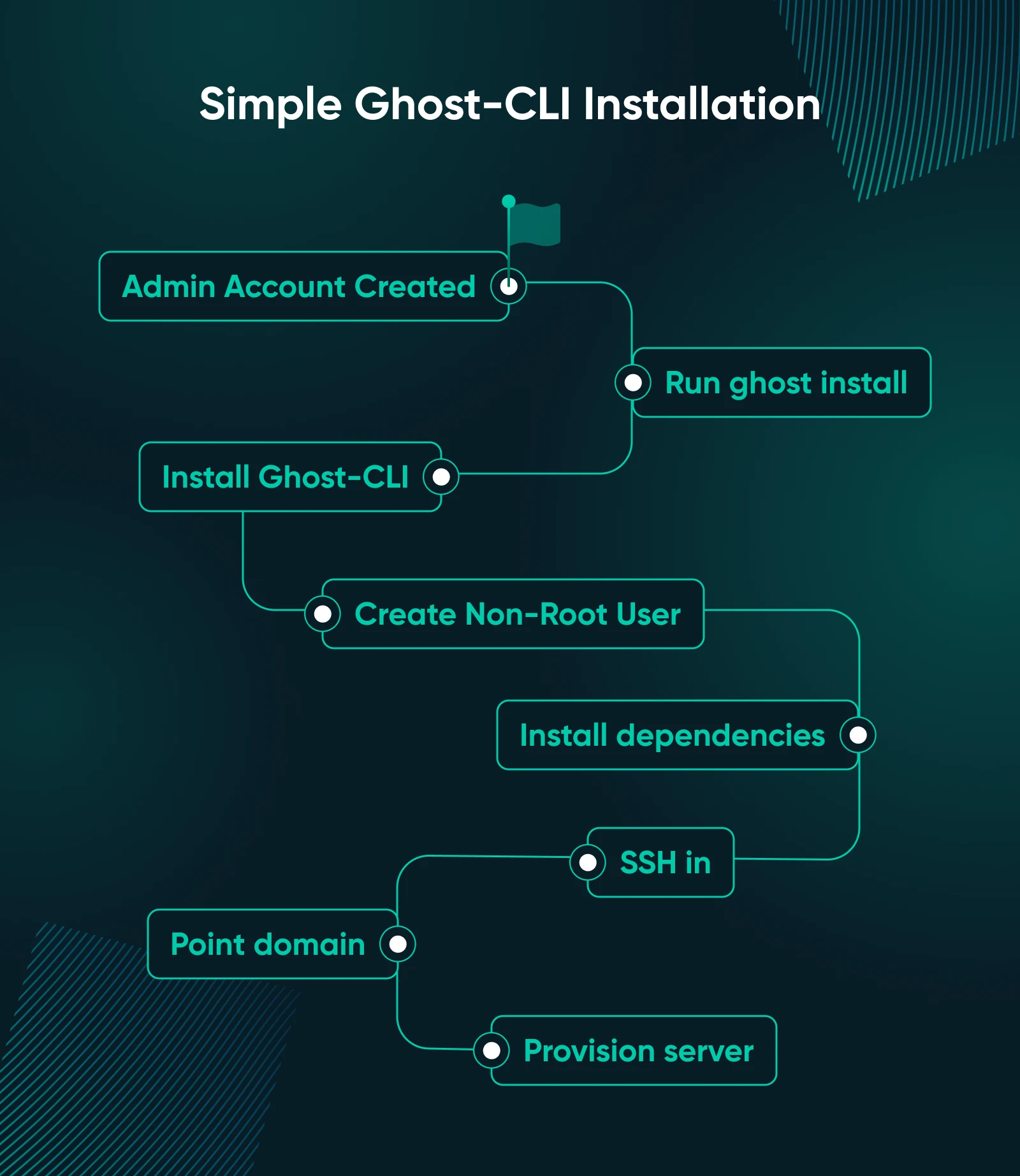
Ghost-CLI has been the official install method since Ghost 1.0 and is still what Ghost recommends in mid-2026.
- Provision an Ubuntu 22.04 or 24.04 server with at least 2 GB of RAM. At DreamHost, we recommend provisioning at least 4 GB of RAM if you’re planning to send newsletters.
- Point your domain’s A record at the server’s IP address.
- SSH into the server. SSH (Secure Shell) is the encrypted command-line connection to your VPS.
- Install Node.js, MySQL 8, and Nginx via apt.
- Create a non-root user. Ghost-CLI won’t install as root, and that’s a good thing.
- Run
`npm install ghost-cli@latest -g.` - Run
`ghost install`and answer the prompts (domain, MySQL password, and email). - Visit “https://yourdomain.com/ghost/” and create your admin account.
Ghost-CLI handles the Secure Sockets Layer (SSL) certificate via Let’s Encrypt, configures Nginx, and starts Ghost as a systemd service. Most installs take 15 to 30 minutes.
For the apt commands, Nginx setup, and systemd config, follow the official Ghost install guide.
Method 2: Docker Compose (Ghost’s Preview Path)
Ghost is currently testing a “batteries-included” Docker Compose stack that bundles Ghost, MySQL 8, and Caddy into one `docker compose up -d` command. This is expected to become the default install method, but it’s not quite there yet.
Here’s how to get it running:
- Provision an Ubuntu server with Docker 20.10.13 or higher.
- Clone Ghost’s reference Docker Compose configuration.
- Generate strong MySQL passwords with
`openssl rand -hex 32`. Ghost’s docs warn that database environment variables can’t be changed after the first boot, so set them carefully the first time. - Edit the Caddyfile to point at your domain.
- Run
`docker compose pull && docker compose up -d.` - Visit “https://yourdomain.com/ghost/” to create the admin user.
The Docker path is faster to spin up and easier to upgrade in place.
A potential drawback is that you’ll find fewer community troubleshooting guides, and since it’s still in preview, you might run into edge cases that break in ways the Ghost‑CLI install wouldn’t.
Both methods handle HTTPS through Let’s Encrypt and automatically renew certificates on a cron job. Automatic doesn’t mean guaranteed, though, so confirm renewal is working around day 60, well before the 90-day expiration.
How Do You Set Up Email for a Self-Hosted Ghost Newsletter?
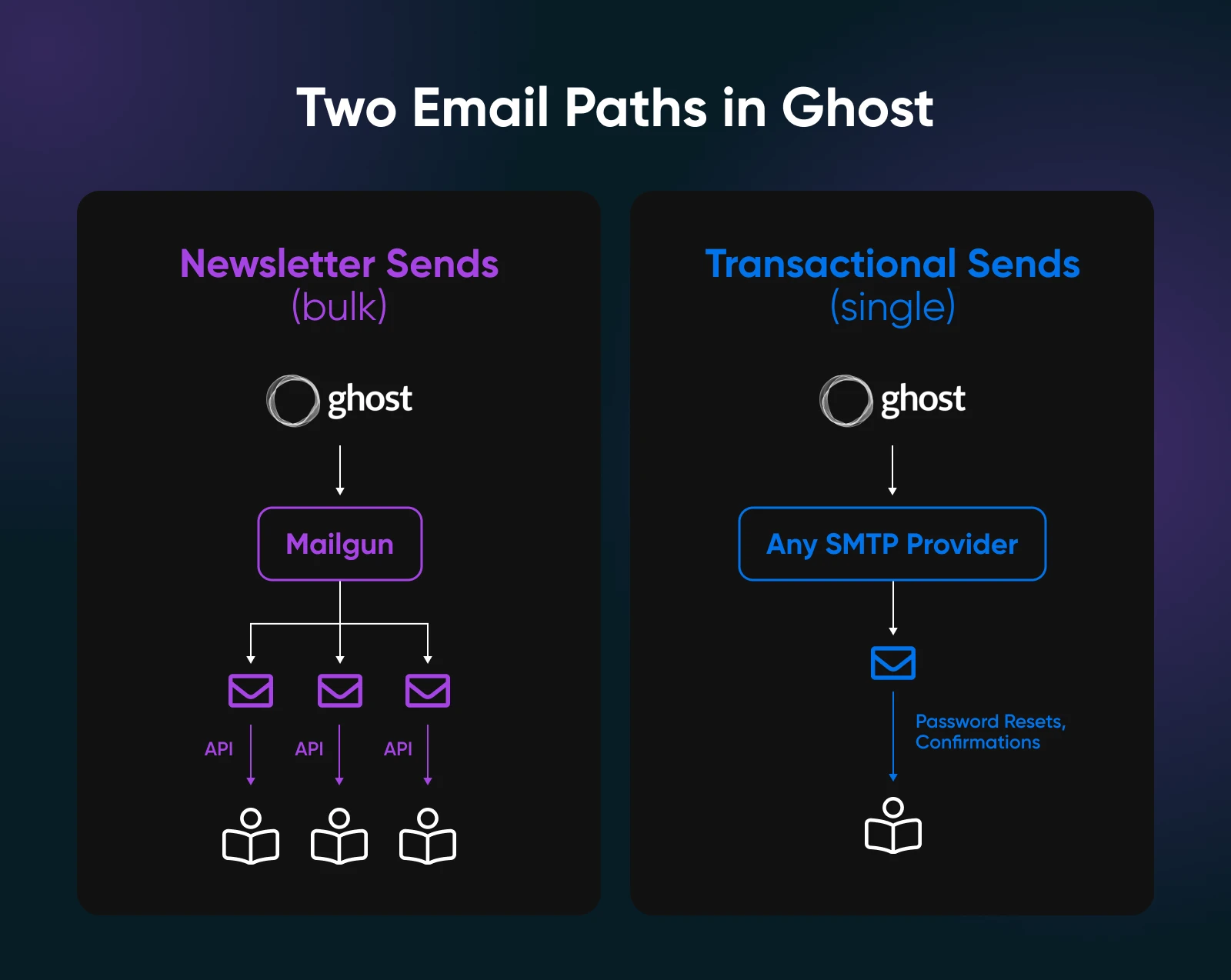
Self-hosted Ghost needs two separate email setups. Bulk newsletters run through Mailgun, the only bulk provider Ghost integrates with.
Transactional emails like password resets, signup confirmations, and welcome messages can use any standard SMTP provider. This is the part most install guides skim over. Get it wrong, and your subscribers will notice before you do.
Bulk Newsletter Email (Mailgun)
Connecting Mailgun is mostly a DNS configuration job. Set it up once, and you won’t need to touch it again.
Simply follow these steps:
- Create a Mailgun account and add a sending subdomain (`mail.yourdomain.com` is conventional).
- Add the SPF, DKIM, and DMARC records from Mailgun to your DNS provider. These three records tell email providers like Gmail and Outlook that your messages are legitimate.
- Wait for DNS to propagate so Mailgun can verify the domain.
- Drop your Mailgun API key and sending domain into Ghost Admin under Settings > Email newsletter.
- Send a test newsletter and check Gmail headers to confirm SPF/DKIM/DMARC pass.
Mailgun’s 2026 pricing is straightforward.
- Foundation: $35/month, 50,000 sends, $1.30 per additional 1,000 emails.
- Scale: $90/month, 100,000 sends, $1.10 per additional 1,000 emails.
A newsletter that goes out twice a week to 5,000 subscribers lands at 40,000 sends, which fits well within the Foundation tier. At 10,000 subscribers, that doubles to 80,000 sends — at which point you’re either paying $74 on Foundation with overage or moving to Scale at $90 flat.
Transactional Email (SMTP)
For transactional email, add your SMTP credentials to your Ghost environment variables (or config.production.json for Ghost-CLI installs) by setting mail__transport=SMTP.
Any provider with a port 587 endpoint works, including Mailgun, SendGrid, Postmark, or Amazon Simple Email Service (SES). Most creators just reuse Mailgun for both, since transactional volume is a fraction of newsletter sends.
How Much Does It Really Cost to Self-Host Ghost?
A typical self-hosted Ghost newsletter costs $15 to $30 a month. That covers your VPS, domain, and Mailgun.
By comparison, Ghost(Pro) Publisher runs $29 a month flat, while Substack takes around 13–16% of every paid subscription.
With self-hosting, your costs scale with your subscriber count. Ghost(Pro) and Substack scale with revenue.
Here’s what self-hosting typically costs, broken down by component:
| Component | Monthly cost | Notes |
|---|---|---|
| VPS (4 GB, e.g., Stack 4) | Confirm with your provider | Comparable 4 GB VPS services run $12–$25/month.DreamHost Self-Managed VPS pricing to be confirmed. |
| Domain | ~$1 | ~$9.99/year for .com domains |
| Mailgun (Foundation) | $35 | 50,000 emails/monthFirst month free |
| Backups + monitoring | $0–$5 | Provider-dependent |
| Total typical | $15–$30 before newsletters$50–$80 at scale | For a newsletter under 10,000 subscribers |
The $15–$30 figure covers a Ghost site with blog posts and a free-tier newsletter. A paid newsletter sending two weekly issues to thousands of subscribers lands closer to $50 to $80 a month, which is still cheaper than Substack at the same revenue.
Here’s where the cost differences between platforms become most noticeable:
- Under $250/month MRR (monthly recurring revenue): Substack’s free tier is structurally cheaper than running anything yourself.
- $250–$1,500/month MRR: Self-hosted breaks even quickly. The 10% Substack take is now bigger than your VPS bill.
- Over $1,500/month MRR or 10,000+ subscribers: Self-hosted saves real money. Ghost(Pro) Business at $199 is a reasonable middle path if you want managed hosting without the revenue cut.
A $20/month VPS is less than the Stripe processing fee on a single $200 paid subscription. That’s what you trade away by staying on Substack.
When Is Self-Hosting Ghost the Wrong Call?
Self-hosting Ghost is the wrong call if you’ve never used a command line, your newsletter earns under $250 a month, or you’d rather focus on writing than maintaining a server. Sometimes the right answer is a managed service, and pretending otherwise just wastes your time.
Below are some specific situations where self-hosting fails the cost-benefit test:
- First-time website owner. Start with Ghost(Pro) at $15/month or stay on Substack until you have revenue worth defending. The skills you don’t have yet won’t surface during launch week.
- Newsletter under $250/month MRR. Until your 10% bite is bigger than a $20-a-month VPS, stay where you are.
- Not comfortable with SSH and basic Linux. Self-hosting means you’re the person at 11 PM on a Saturday running
`journalctl -u ghost`because subscribers can’t log in. - You won’t tolerate occasional outages. MySQL can run out of memory after a kernel patch, and Caddy updates can break admin routes. These things don’t happen often, but they do happen — and none of them are your problem on Ghost(Pro).
- You need phone support during a crisis. VPS hosting typically includes ticket and callback support, but not a 24/7 phone line. If “I need a human right now” is your stress response, managed hosting was built for you.
- You’re approaching 50,000 sends a month and have never configured SPF, DKIM, or DMARC. Deliverability issues can easily cost more than Ghost(Pro) Business’s $199 plan. A fresh Mailgun IP takes weeks to season into Gmail’s good graces, and Ghost(Pro) is the better call for a launch that can’t survive that delay.
If you earn more than $250/month in paid subscriptions, want full control over the database and themes, and are comfortable enough with a terminal that `ghost update` doesn’t trigger anxiety, self-hosting pays for itself the day you finish the install.
How Do You Migrate a Substack Newsletter to Self-Hosted Ghost?
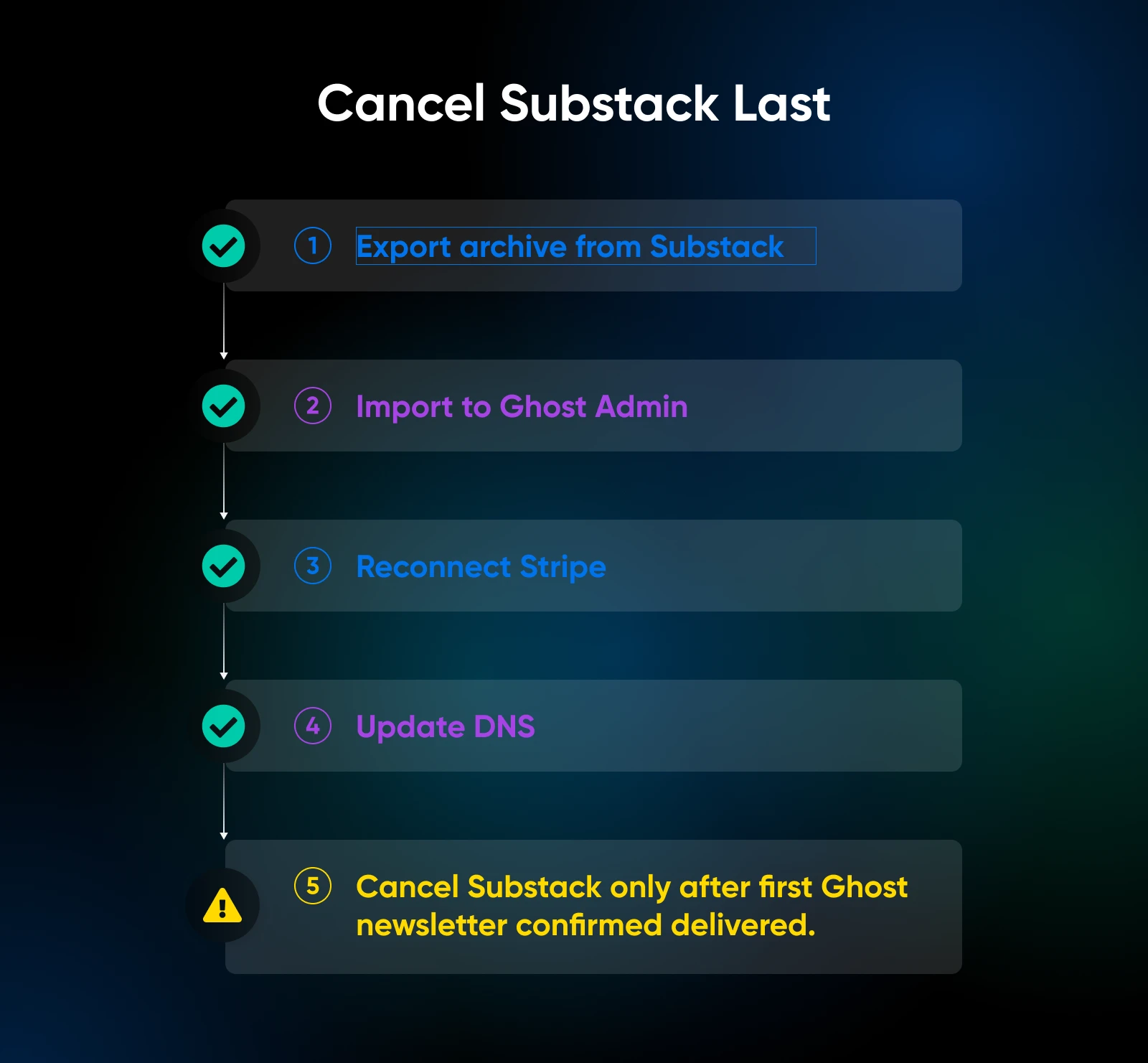
Ghost includes a built-in Substack importer that moves posts, members, paid subscriptions, and Stripe billing to your self-hosted Ghost site without breaking payment continuity. The migration takes most creators a weekend.
Here’s how to do it:
- Export your Substack archive from publication settings. You’ll get a CSV of members and a ZIP of posts.
- Open Ghost Admin and go to Settings > Migration > Import/Export
Select Substack from the list of options. - Reconnect your Stripe account inside Ghost. Subscriptions transfer automatically, and paying subscribers won’t be re‑billed. Note that Substack continues collecting its 10% fee on those existing subscriptions until each subscriber’s billing cycle renews under Ghost.
- Update DNS to point your custom domain to the Ghost server.
- Cancel Substack only after you’ve sent at least one newsletter from Ghost and confirmed deliverability.
Ghost’s Substack migration docs cover edge cases, and Molly White’s Citation Needed walkthrough explains the gotchas of a midweek production migration.
Should You Ghost Substack?
Self-hosting Ghost makes sense once paid subscription revenue crosses about $250 a month. Below that, Substack costs nothing. Above it, the platform fee is often the most expensive line item in the business. Ghost erases that line.
If you choose to self‑host, you’ll be the one patching Ubuntu and watching MySQL memory usage. In return, you keep every dollar your subscribers pay. Whether that trade‑off is worth it is up to you.
Multiply the platform fee by 12 and decide.
Then get back to writing instead of procrastinating by reading this article.

Own Your Entire Stack. Apps, AI, Databases, and More.
Keep every credential and conversation on a server you control, with NVMe speed and unmetered bandwidth built in.
Explore VPS Hosting PlansFrequently Asked Questions About Self-Hosting Ghost
Still on the fence? Here are some questions most creators have before switching to self-hosted Ghost.
Is Ghost CMS free to self-host?
Yes, Ghost is free and open source under the MIT license. Self-hosting costs only the server, domain, and email service you choose, typically $15 to $80 a month, depending on subscriber count.
How much RAM does self-hosted Ghost need?
Self-hosted Ghost needs at least 1 GB of RAM for a personal blog and 4 GB for a newsletter with 10,000+ subscribers. DreamHost Self-Managed VPS Stack 4 (4 GB) covers the newsletter baseline. Stack 8, on the other hand, handles high-traffic publications or ActivityPub federation.
Should I use Docker Compose or Ghost-CLI?
Use Ghost-CLI for production. It’s the established path Ghost recommends and has the most community troubleshooting content.
Docker Compose remains Ghost’s preview install method as of 2026. Choose it only if you’re comfortable experimenting on the leading edge.
Does self-hosted Ghost include email?
No, self-hosted Ghost requires bringing your own email. Mailgun is the only bulk provider Ghost integrates with for newsletters (Foundation tier $35/month for 50,000 sends). Transactional mail uses any SMTP provider.
How does Ghost compare to Substack on cost?
Ghost takes 0% of subscription revenue versus Substack’s 10% (effectively 13–16% after Stripe fees). A newsletter earning $60,000 a year keeps roughly $5,000 more on Ghost. Break-even versus a self-hosted server lands around $250/month MRR.
Can I migrate from Substack to self-hosted Ghost?
Yes, Ghost has a built-in Substack importer that moves posts, members, paid subscriptions, and Stripe billing to a self-hosted Ghost site. Paying subscribers keep their Stripe cards intact during migration.
Is self-hosting Ghost worth it?
Self-hosting Ghost is worth it if you have basic command-line comfort and a paid newsletter earning more than $250/month. Below that line, Substack’s free tier or Ghost(Pro) Starter at $15 costs less time and roughly the same amount of money.
