Most small business owners didn’t sign up to become search experts.
You started a business to do the thing you’re actually good at: running a bakery, designing websites, fixing roofs, cutting hair. But along the way, the job grew. First, you needed a website. Then you needed to learn SEO and figure out how to rank #1. Then you had to show up in featured snippets.
And now, you need to understand how to show up inside an AI-generated answer at the top of Google.
At a certain point, it starts to feel less like running your business and more like chasing a moving target. But most of these shifts are just small tweaks to the same game, changing how your content gets chosen and displayed rather than rewriting the rules.
AI Overviews look like a major leap, but underneath, they still rely on the same core ideas that powered snippets and SEO fundamentals: clear answers, strong structure, and content that helps your customers solve their problems. This means you can keep your existing strategy and focus on packaging your content so Google’s AI can easily choose it.
That’s what we’re here to do.
What are AI Overviews and when do they appear?
An AI Overview is the AI-generated answer that appears at the top of many Google search results. It summarizes information from multiple web pages into a short response and cites links to its sources so searchers can click through for more depth. If your page is one of those cited sources, that’s showing up in an AI Overview.
Google says AI Overviews use a customized Gemini model working alongside its existing Search systems, including the Knowledge Graph and the quality and ranking systems that have powered Google for years.
More About Google
Google is the world’s most-used search engine, handling billions of searches every day. It is the flagship product of Google LLC, an Alphabet Inc. subsidiary that also makes Gmail, YouTube, Google Maps, Chrome, and Android. Google earns most of its revenue from advertising on search results, YouTube, and partner sites.
They’re designed to surface information that’s “backed up by top web results” and include links to supporting content so users can dig deeper, per Google’s May 2024 update on AI Overviews.
Google has kept building on the feature: its March 2025 announcement introduced AI Mode, a chat-style search experience that “expands what AI Overviews can do” with follow-up questions, and noted AI Overviews were already used by more than a billion people.
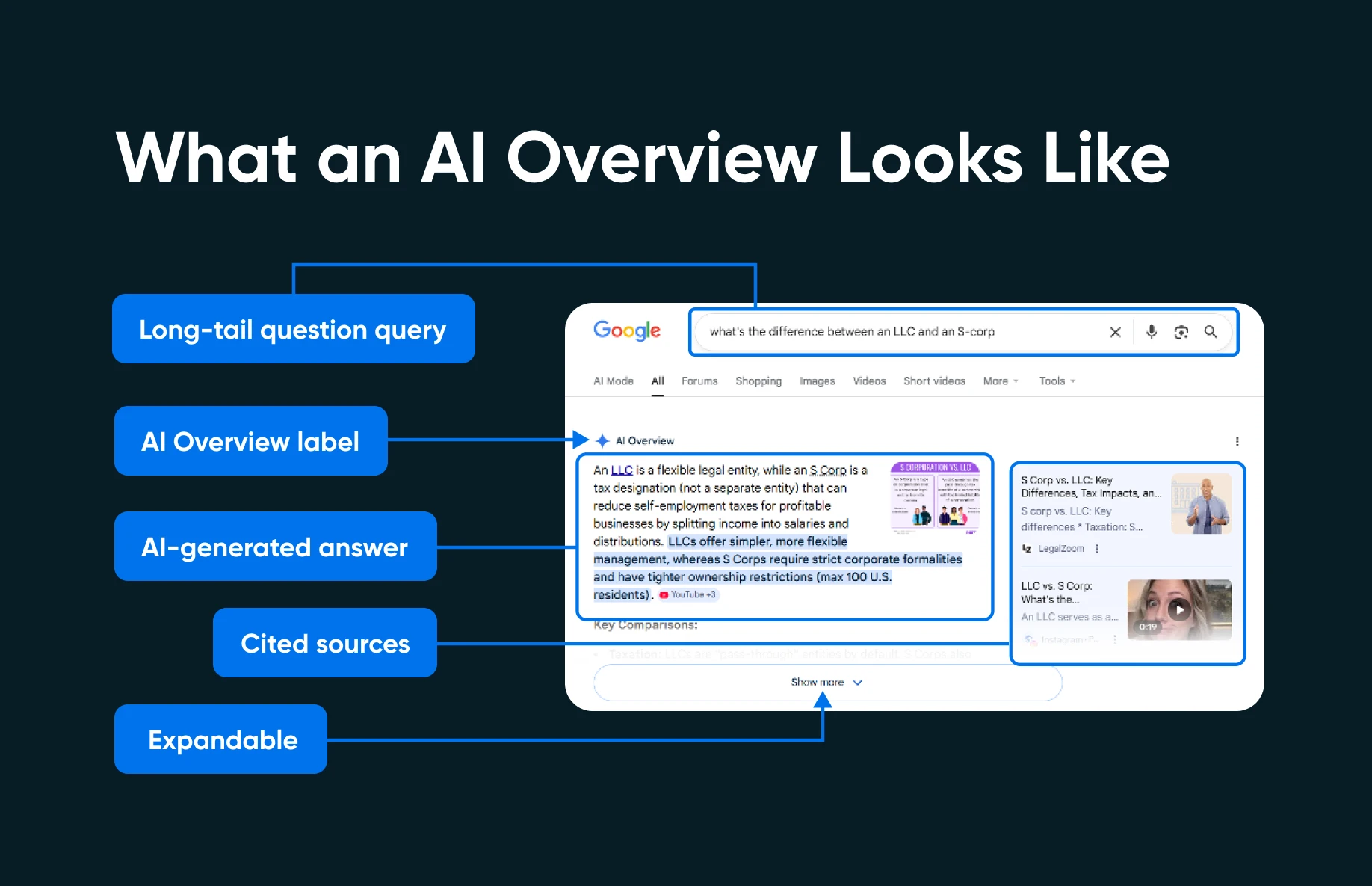
Not every search triggers an AI Overview: in Pew Research Center’s March 2025 study, only around one in five Google searches produced one. Not every searcher can see one, either. Google publishes the full list of countries, territories, and languages where AI Overviews are available (the language list alone runs from Afrikaans to Zulu), and notes they’re a core Search feature that can’t be turned off. If you or your customers aren’t seeing them, check availability first — but the query itself may simply not trigger an AI Overview.
Where they’re available, AI Overviews show up most often for certain kinds of searches. Per Pew Research Center’s analysis of 68,879 Google searches made by 900 U.S. adults in March 2025 (published July 2025), two patterns stood out:
- Longer queries: 53% of searches with 10 or more words triggered an AI Overview, compared to just 8% of short one- or two-word searches.
- Question-based searches: Queries starting with who, what, when, or why triggered an AI Overview 60% of the time.
Complex, multi-part topics are the third pattern, and that observation comes from Google itself: its May 2024 update describes AI Overviews as “helping with more complex questions that might have previously taken multiple searches or follow-ups.” In other words, searches where someone is trying to understand something, not just navigate to a specific website.
This tells you something important about where to focus your efforts. If your content answers specific questions in your niche, like “how much does a new roof cost in Denver” or “what’s the difference between an LLC and an S-corp,” you’re targeting exactly the kinds of queries that trigger AI Overviews.
What about local searches?
If you serve one city or region, the play is the same, just localized. Build a page for each service-plus-location question customers actually ask (“how much does a new roof cost in Denver” is a page, not a footnote), open it with a direct answer, and keep your Google Business Profile complete and current so Google has consistent information about who you are and where you work. A location-specific question is still a question, so the structure advice below applies to it just as much.
It’s also worth noting that Google compares the two features itself: its May 2024 update says AI Overviews’ accuracy is “on par with” featured snippets, “which also uses AI systems to identify and show key info.” In our experience, the formats that win featured snippets tend to be the same ones AI Overviews cite, so optimizing for one is rarely wasted on the other.
Rank first, get cited second
The best starting point for appearing in AI Overviews is ranking well for the query in ordinary organic search: pages outside the top results are less likely to be cited. Google’s documentation for site owners is blunt about it: “The best practices for SEO remain relevant for AI features in Google Search (such as AI Overviews and AI Mode). There are no additional requirements to appear in AI Overviews or AI Mode, nor other special optimizations necessary” (Google Search Central, “AI features and your website”).
Third-party research points the same way. SE Ranking’s September 2025 guide to AI Overview optimization puts ranking first: get “your pages to rank in the top 10 results,” because “AI Overviews often cite these pages.” So treat the structural tactics below as a multiplier rather than a shortcut. If your page sits on page 3 for a query, restructuring alone is unlikely to earn a citation — keep working the SEO fundamentals that earn a top-10 spot, and structure the page so it’s the easiest one to quote once you get there.
How to get your content to show up in Google’s AI Overviews
AI Overviews reward good information, but how you present it matters just as much. Google’s AI needs to extract a clear, coherent answer from your page, so if your content happens to be buried in long paragraphs without clear structure, the system will likely pull from somewhere else instead.
Three structural tactics make the biggest difference:
1. Put the direct answer first
This is the single highest-impact change you can make. For every key section on a page, write a 2-3 sentence “answer block” immediately below the header that gives the reader, and the AI, the core answer right away.
Do it this week:
- Open your top-performing blog post.
- Identify the main question it answers.
- Write a direct 2-3 sentence answer immediately below the first H2.
- Bold the single most important fact.
- Let the rest of the section expand on that answer with detail, examples, and context.
2. Use headers that match real questions
Your H2s and H3s act as important signals. When Google’s AI breaks down a user’s query into subtopics, it’s looking for pages that clearly address each one; headers that match the actual questions people ask make your page a natural fit.
The easiest way to find those questions is to use Google itself. Search your target keyword and look at the “People Also Ask” box that appears in the results. Those questions tell you directly what related queries users are exploring. If your headers match those questions, you’re aligned with how the AI system thinks about your topic.
Do it this week:
- Google your primary keyword.
- Write down every question that appears in the People Also Ask section.
- Compare those questions to the headers on your existing page.
- Restructure your H2s and H3s to match the real questions.
- Add new subsections for questions you haven’t covered yet.
A quick way to test your work: paste the post into an AI assistant like Gemini or ChatGPT and ask which of those questions it can answer from your text alone. Whatever it misses, your page isn’t answering clearly enough. And if you’d rather not retitle headers by hand, the DreamHost SEO Toolkit tracks your keywords and generates optimized post titles and headers in one click from your WordPress dashboard.
3. Use lists, tables, and scannable formats
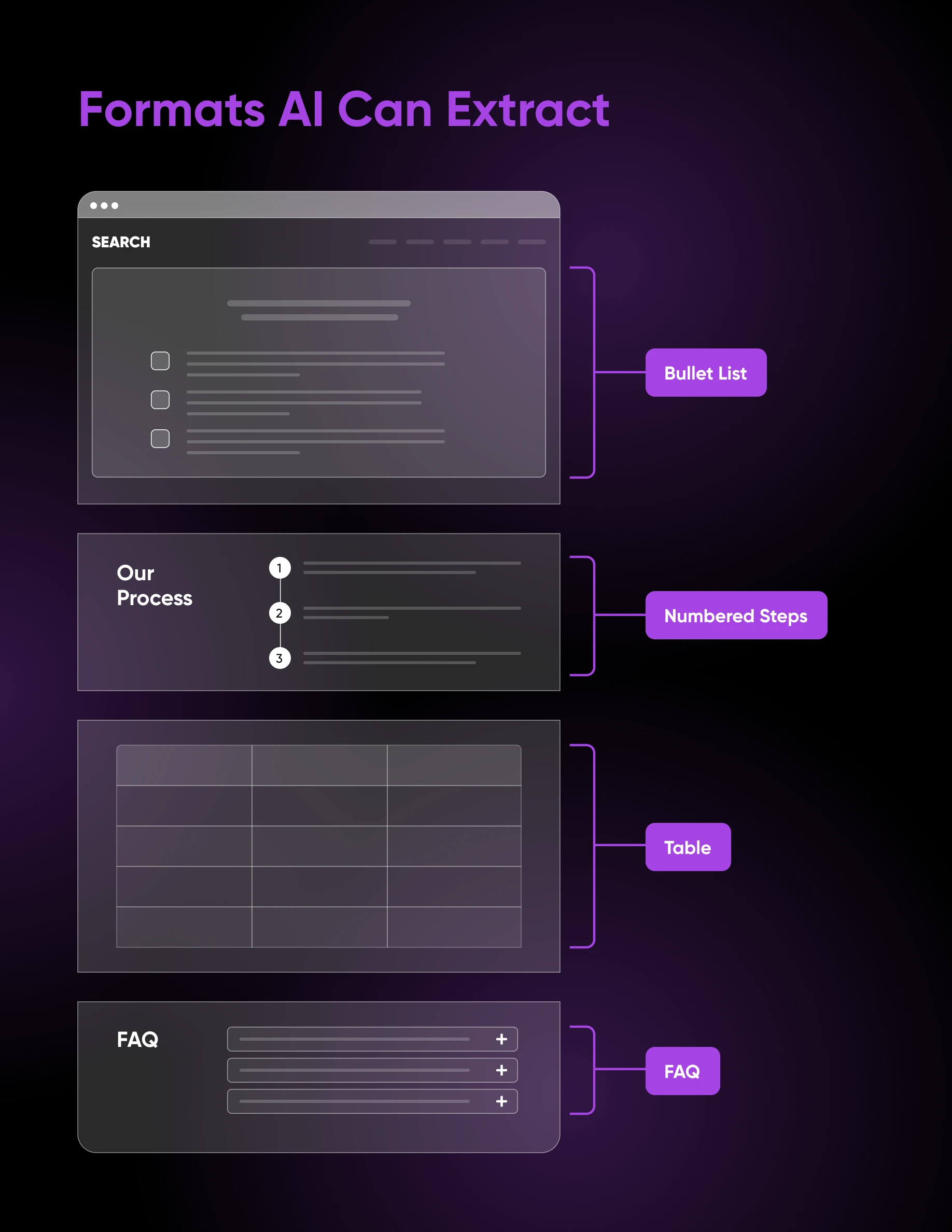
Google’s AI features and snippet formats reward content that’s structured for extraction. When you present information in a list, a table, or a clearly labeled step-by-step format, you make it easy for the AI to identify discrete pieces of information and pull them into a summary.
This doesn’t mean every section should be a bulleted list. But any time you’re comparing options, listing steps, or presenting multiple related items, structured formatting will outperform a wall of prose, both for human readers and for AI systems.
Do it this week:
- Scan your top pages for any section that describes three or more comparable items in paragraph form.
- Convert it to a bullet list or a comparison table.
- Add a brief intro sentence before the list and a short closing sentence after.
Authority signals that make Google trust your answer
Structure decides whether your answer is easy to lift; authority decides whether it’s worth lifting. Google’s guidance on helpful, reliable, people-first content asks creators to self-assess exactly these signals, starting with whether the content provides “original information, reporting, research, or analysis.” SE Ranking’s September 2025 guide draws the same conclusion for AI Overviews specifically: “Fact-check your content, showcase author and brand expertise, and get mentions from other reputable resources.”
For a small business, that looks like:
- A real byline: Put a named author with relevant credentials on your posts. “Written by our head roofer, 15 years in Denver” beats anonymous corporate prose.
- Sourced, dated claims: Name and date every statistic you cite, and link the source. Unattributed numbers read as opinion.
- Mentions elsewhere: Earn brand mentions on reputable third-party sites (like local press, industry directories, or supplier pages) so your expertise is visible beyond your own domain.
- Kept-current pages: Refresh dated statistics and re-verify your answers on a regular cadence. SE Ranking’s guide lists regularly updating content “with new data, statistics, and insights” as a freshness signal that can improve your chances of being cited.
Tracking your AI Overview appearances
You can’t improve what you can’t measure. Here’s how to know whether your pages are showing up in AI Overviews.
Google Search Console’s methodology documentation explains how impressions and positions for AI features are counted. And since June 2026, Google has been rolling out a dedicated Generative AI performance report in Search Console that shows your AI Overview and AI Mode impressions directly. It’s reaching properties gradually, so check whether yours has it. Either way, the key details worth understanding:
- Impressions have specific rules: For an AI Overview impression to count, your link must be scrolled or expanded into view.
- All links share one position: Every link inside an AI Overview is assigned the same position value in Search Console. This is different from traditional organic results, where each link has its own position.
- Your existing totals already include AI features: Search Console’s Performance report doesn’t break out AI Overview data; it’s rolled into your overall numbers. That means your impressions and clicks may already reflect AI feature appearances without you realizing it. If your property has the new Generative AI performance report, use it to see those impressions broken out, though it currently covers only impressions rather than clicks or queries.
How to check your AI Overview appearances by hand
You don’t need a paid tool to verify the queries that matter most. A manual spot-check works:
- List your 5–10 most valuable queries (the ones your pages target).
- Search each one on Google while signed in, from a country and language where AI Overviews are available.
- If an AI Overview appears, expand it fully and check the cited sources for your pages.
- Log the results in a simple spreadsheet and recheck monthly, since AI Overviews and their citations change over time.
AI Overviews are less scary than you think
When you zoom in on AI Overviews, you’ll see Google is still trying to do what it’s always done: surface the most useful answers. That means your job hasn’t really changed.
The businesses that show up in AI Overviews aren’t necessarily the biggest or most established. They’re the ones that stack the odds in their favor: solid rankings, visible expertise, and answers structured so Google’s AI can lift them cleanly. Even then, a citation is never guaranteed, and the ones you earn can change over time.
Once you start thinking that way, AI Overviews become a lot less scary and start looking like another distribution channel you can use strategically to grow your business.
FAQs about showing up in AI Overviews
How do I get into Google AI Overviews?
Rank well organically for the query, then make your answer easy to extract: a direct 2–3 sentence answer under a question-matched header, with lists and tables where they fit. Google says there are no additional requirements or special optimizations beyond standard SEO best practices.
Why is my content not showing in AI Overviews?
Usually one of three reasons: the query doesn’t trigger an AI Overview, your page doesn’t rank high enough organically, or your answer is buried in prose the AI can’t cleanly extract. Also check availability — AI Overviews only appear in the countries and languages Google lists.
Can you turn AI Overviews on or off?
Not as a searcher: Google calls AI Overviews a core Search feature that “cannot be turned off,” though the “Web” filter shows plain links. Site owners get more control — per Google’s Search Console documentation, you can exclude your own site from Search generative AI features entirely.
How long does it take to show up in an AI Overview?
There’s no fixed timeline. Because AI Overviews draw on pages that already rank well, the real wait is earning a strong organic position for the query. After restructuring a page, recheck your target queries every few weeks since AI Overviews and their citations change often.

Is Your Website Invisible to AI Search?
Nearly 7 in 10 Google searches now end without a click. This 40-page ebook gives small business owners an action-ready GEO plan to show up in Google’s AI Overviews, ChatGPT, and Perplexity — no agency, no dedicated SEO team required.
Get The Playbook