
More than 2 in 5 websites run WordPress (W3Techs, August 2026) — and for over a decade, its default image pipeline depended on what was largely one person’s work: Danack.
Danack, the online name used by Dan Ackroyd, maintained Imagick single-handedly from 2014 for over a decade — a PHP extension that enables WordPress to use ImageMagick for image processing. In 2025, PHP Foundation developer Jakub Zelenka joined him as co-lead maintainer and shipped the extension’s recent releases.
via GIPHY
Pretty much every time you or a client uploads an image to WordPress, or you see a thumbnail on a website, there’s a pretty good chance Danack’s open source contributions made it possible.
While it may seem outlandish that just one person is fully responsible for maintaining what’s become a critical piece of tech upon which WordPress websites rest, unsung heroes like him are actually more common than those outside of the web development community realize.
In an age of burgeoning, powerful, but faceless, AI tools, join us in exploring and celebrating the individual people who still make the web possible.
What is Imagick?
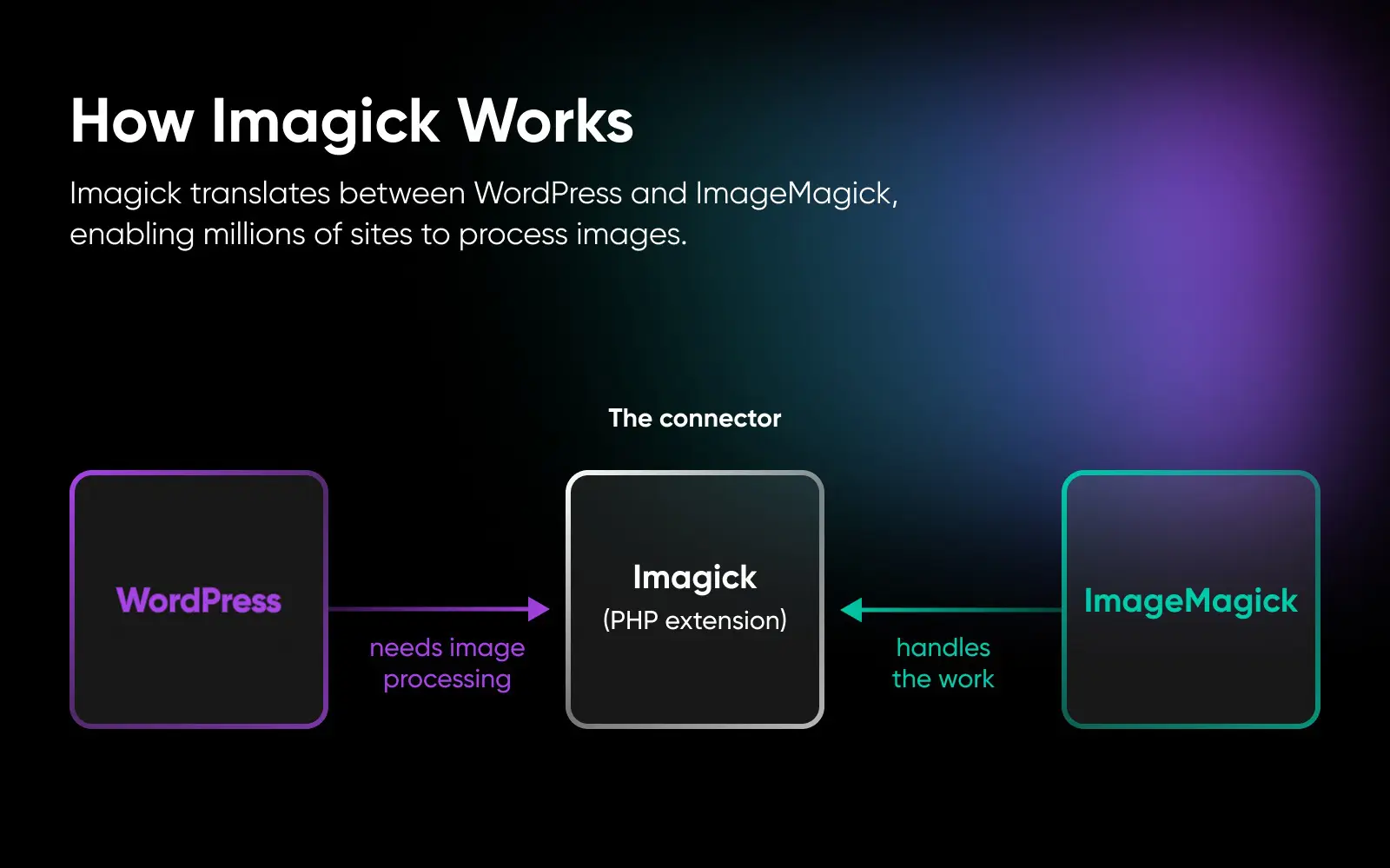
Imagick is a free, open-source PHP extension (written in C) that lets PHP applications like WordPress use the ImageMagick image-processing library. When Imagick is available on a server, WordPress uses it by default to resize, crop, and convert images, powering every thumbnail your site generates.
Understanding why that matters starts with getting to know the tool Imagick was built to serve: ImageMagick.
ImageMagick is an open-source program for creating and editing images, especially in bulk. It reads and writes more than 100 image formats — JPEG, PNG, GIF, WebP, TIFF, and PDF among them — and can resize, convert, compose, and animate images from a script or another program. Unlike consumer-facing apps like Photoshop, it doesn’t have an easy-to-use interface to do this. That’s why it’s most often integrated into other tools via API.
Sounds pretty useful, right?
Right.
Except…it doesn’t work directly with WordPress.
Enter Imagick.
Imagick is an extension, written in C (the same language PHP itself is built in), that acts sort of like “connective tissue,” allowing WordPress and ImageMagick to work together.
How do you install or enable Imagick?
Odds are you won’t have to: many WordPress hosts ship Imagick pre-enabled, and WordPress switches to it automatically when it’s there. On a server you manage yourself, install it from your Linux distribution’s package manager (on Ubuntu or Debian, sudo apt install php-imagick) or build it with PECL (pecl install imagick), then make sure extension=imagick is set in your PHP configuration and restart your web server. On Windows, the project publishes prebuilt DLLs with each release. And on shared or managed hosting without shell access, look for a PHP extensions toggle in your control panel, or ask support to enable it for you.
Danack and the Imagick story
So who keeps this connective tissue alive? Because of the (ironically) offline and privacy-minded way that many people who work online are, we don’t know that much about Danack’s backstory.
The self-proclaimed “recovering video game developer” began as a web programmer at Sun Microsystems in the late 90s. He became the lone maintainer of Imagick in 2014 and carried it single-handedly for over a decade, supported primarily through GitHub Sponsors, until Jakub Zelenka stepped in as co-lead maintainer in 2025. Danack’s long stewardship, plus his commitment to improving PHP as a whole via RFCs, makes it clear he is just as much a champion of open-source technology as we are.
Open Source
In software development, open source projects are free for anyone to download, use, modify, and distribute. WordPress is one great example of open source software, although it’s far from the only one.
What is it that makes the choice to preserve Imagick so important? Let’s look at just how much of the web leans on it.
What makes Imagick a pillar of the modern web?
If Imagick is available on a server, WordPress will automatically prefer it over GD as its default image processor. It’s easy to use and it’s become one of the most well-known tools of its type thanks to its functionality — even compared to the PHP-native GD library.
Comment
byu/cangaroo_hamam from discussion
inPHP
Yeah, we’re talking about the same WordPress that powers just over 41% of all the websites on the internet, per W3Techs (August 2026).
That means millions of sites (more than 2 in 5, even) depend on Imagick to enable WordPress to use ImageMagick for image processing.
To put it plainly: if Imagick were to stop working, WordPress would fall back to the GD library. Sites wouldn’t go dark, but they’d degrade: PDF previews would stop generating, color profiles would be stripped from resized images, less common formats would stop processing, and regenerated thumbnails could lose quality. For image-heavy sites, especially stores, those regressions can noticeably hurt image quality and publishing workflows.
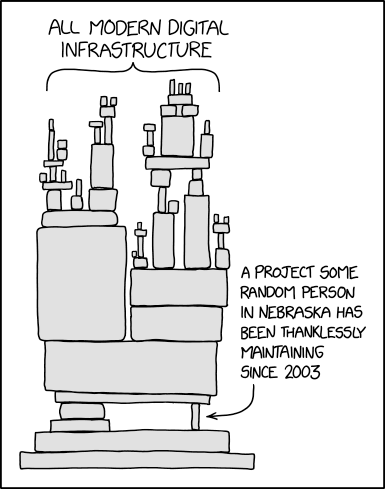
Imagick, a relatively small piece of individually maintained software, helps keep image processing working across millions of WordPress sites.
It’s a great example of where we are today with technology dependency — where many larger systems rely on small, often-overlooked, and critically under-maintained tools to function properly.
Imagick vs. GD: which one is your site using?
WordPress supports two image engines and chooses between them automatically: Imagick when it’s available, GD when it’s not. GD is PHP’s built-in library, dependable for basic JPEG, PNG, GIF, and WebP work, but it strips color profiles and supports far fewer formats. Imagick handles the long tail (TIFF and PDF previews among them), preserves color data, and generally produces better-looking resizes. (Gmagick, a similar wrapper for the GraphicsMagick library, also exists, but WordPress core only uses Imagick or GD.)
Want to know which engine your site is using? In your WordPress dashboard, go to Tools → Site Health → Info → Media Handling. The active editor reads WP_Image_Editor_Imagick when Imagick is doing the work, and WP_Image_Editor_GD when your site has fallen back to GD.
The security side of image processing
There’s another reason this maintenance work matters: image processing is a classic attack surface. Every upload form that accepts images hands ImageMagick a file created by a stranger. The best-known example is 2016’s “ImageTragick” flaw (CVE-2016-3714), which let attackers execute code on a server via a crafted image — and, as WordPress core noted at the time, it affected WordPress sites whose hosts had ImageMagick installed.
The Imagick project’s own guidance is blunt about the precautions: run image processing with the fewest privileges possible, verify that an uploaded file really is the type it claims to be (check its “magic bytes,” not just the file extension), and use ImageMagick’s security policy to disable formats and features your site doesn’t need. Good hosts and up-to-date software handle much of this for you — one more behind-the-scenes job that depends on maintainers shipping patches.
Other examples of tech dependency — and the people behind them
The situation with Imagick is not all that unusual.
In fact, several aspects of the web are built on a complex network of dependencies just like it. Let’s take a gander.
Contact Form 7 for WordPress

With more than 10 million active installations, Contact Form 7 is a massively popular plugin that powers simple contact forms for WordPress.
More than a decade on, it’s still maintained by its author, Takayuki Miyoshi, and their company, Rock Lobster, which we suspect is made up of just a handful of people, if not only Miyoshi alone. In fact, at WordCamp Asia 2026, Miyoshi announced that version 6.2 will be Contact Form 7’s final feature release, with maintenance continuing for security and compatibility only.
Contact Form 7 is old (in the scheme of plugins), has a huge install base, and is maintained by a very small number of people. This, too, is a classic case of tech dependency and a recipe for potential disaster if maintenance stumbles.
The XZ Utils hack
XZ Utils is a free set of tools that help with lossless data compression.
After a years-long pressure campaign that began in 2021, its founder and head maintainer gave co-maintainer status to a user who had cozied up to them and gained their trust. This new maintainer, going by the name Jia Tan, signed off on version 5.6.0 in February 2024, which introduced a dangerous backdoor that would allow malicious actors to access the entire operating system once installed.
This backdoor was ranked among the most severe security vulnerabilities, but was thankfully caught before the version was widely adopted.
So, it’s easy to wonder if, had a larger team been involved in the management and testing of the newest version of XZ Utils, it would have ever been released at all.
Left-pad and NPM
In 2016, indie developer Azer Koçulu removed the small-but-mighty package they had built — left-pad — from NPM, which is the default package manager for Node.js. This action was in response to NPM taking over one of Koçulu’s other projects, which they did to resolve a legal dispute with a large instant-messaging app.
In the developer’s words: “This situation made me realize that NPM is someone’s private land where corporate is more powerful than the people, and I do open source because Power To The People.”
As it turns out, thousands of projects depended on this handful of code!
When major tools like Node and Babel stopped building, thousands of open-source projects worldwide broke, and NPM took the “unprecedented” step of restoring the unpublished package to stop the bleeding.
The reality of maintaining critical open-source infrastructure
We believe open-source technology is incredibly important to the modern internet, and yet it also exists in an incredibly delicate limbo.
First, it’s a fragile setup. The digital world we rely on every day often depends largely on a handful of largely unpaid people (shoutout to the XZ hack for bringing this to light). That means many crucial open-source tools are just maintained in someone’s spare time.
If these behind-the-scenes heroes get sick, burned out, or simply move on, things can unravel shockingly fast.
It’s also often thankless for these volunteers. Maintainers rarely get recognition when everything runs smoothly, yet they have to deal with all the backlash when something breaks.
In Danack’s case, there have been times when updates didn’t roll out as quickly as users wanted, and people got upset.
His response? If this software is so important to you, then support it!
“ … if having OpenSource projects be maintained is of value to you, please look at sponsoring the work I do: https://github.com/sponsors/Danack Or you can contact me via email if for any reasons going through github sponsors is not desirable.”
How to recognize and support technology’s unsung heroes
The next time you upload an image to your WordPress retail site, close a deal that started with one of your website’s online forms, or rely on really any piece of software working behind the scenes, take a moment to appreciate the individuals who make it possible.
But don’t stop there. If you’re able, supporting these maintainers is essential to keeping the modern internet stable and resilient.
As an independently owned hosting company, we pride ourselves on supporting open-source projects at DreamHost with our developer-friendly tooling.
We hope you’ll join us in celebrating their commitment and generosity, and dedicate whatever real, ongoing support you can to keep the community thriving.

Unbeatable WordPress Hosting
Reliable, lightning-fast hosting solutions specifically optimized for WordPress.
See MoreFAQs about Imagick
What is Imagick?
Imagick is a PHP extension that connects WordPress to ImageMagick, enabling image processing like resizing, cropping, and thumbnails.
Who maintains Imagick?
A developer known as Danack maintained it single-handedly for over a decade, supported primarily through GitHub Sponsors; since 2025, PHP Foundation developer Jakub Zelenka has co-maintained it and shipped the recent releases.
Why is Imagick so important?
It powers WordPress’ image handling for millions of websites, making it a critical but overlooked piece of web infrastructure.
How can I support Imagick or similar projects?
You can sponsor maintainers like Danack on GitHub (https://github.com/sponsors/Danack) or contact them directly if needed. Supporting open source helps keep the web stable.
