If you updated a site in spring 2025 and noticed nothing, that was the point. Think of WordPress 6.8 as the maintenance visit that also replaced the locks: most of the work was quiet tightening, but one security change had been 17 years in the making.
WordPress 6.8 “Cecil,” released on April 15, 2025, was a polish-focused major release whose headline changes were bcrypt password hashing (the first such change since 2008), built-in speculative loading for faster page transitions, and Style Book support for classic themes. More than 900 contributors from 60+ countries built it; the name honors jazz pianist Cecil Taylor.
A lot has happened since: WordPress 6.9 “Gene” arrived in December 2025, and WordPress 7.0 “Armstrong,” the current major release, shipped in May 2026. The 6.8 branch still receives courtesy security backports (most recently 6.8.6 on July 17, 2026, which patched a critical SQL-injection vulnerability), but if you’re running 6.8 today, the practical advice is simple: update to 7.0.
Still, 6.8 deserves its place in the record books, mostly for a security change years in the making. Here’s what actually shipped, what changed along the way, and which pre-release proposals never made it in.
The headline change: bcrypt password hashing
WordPress 6.8 strengthened password security by updating the hashing algorithm from phpass portable hashing to bcrypt, making password hashes significantly more difficult to crack. It was the first change to how WordPress hashes user passwords since 2008. For security folks, this understated update was the release’s landmark: the new locks.
The update also shifted application passwords, user password reset keys, personal data request keys, and recovery mode keys from phpass to BLAKE2b hashing via Sodium, a faster, more secure cryptographic option.
These security enhancements required no administrator action. Existing sessions remained valid, and users weren’t forced to change passwords. WordPress simply rehashes each password with bcrypt the next time a user logs in or updates their credentials. Application passwords and security keys created before WordPress 6.8 stayed valid, and post passwords continued using phpass while the core team researched next steps.
For the technical details, see the core team’s bcrypt announcement.
Speculative loading: faster page transitions by default
WordPress 6.8 integrated speculative loading into core to improve page load performance. This technique uses prefetching to load resources the browser anticipates users will need. Start to click a link, and the next page may already be on its way. The result: faster page transitions and a smoother browsing experience.
The implementation built on the Performance Team’s Speculative Loading plugin. By default, core prefetches links with a “conservative” eagerness setting to minimize potential issues, and it only activates for logged-out visitors on sites with pretty permalinks enabled. Developers can customize the behavior with the new “wp_speculation_rules_configuration” filter, or exclude specific paths with “wp_speculation_rules_href_exclude_paths.”
The result is one of those rare performance wins that requires zero configuration: anticipated resources load in the background, site transitions feel faster, and compatibility is preserved for everyone else. Oiled hinges: you only notice that the door swings easier.
A restructured Style Book — now for classic themes, too
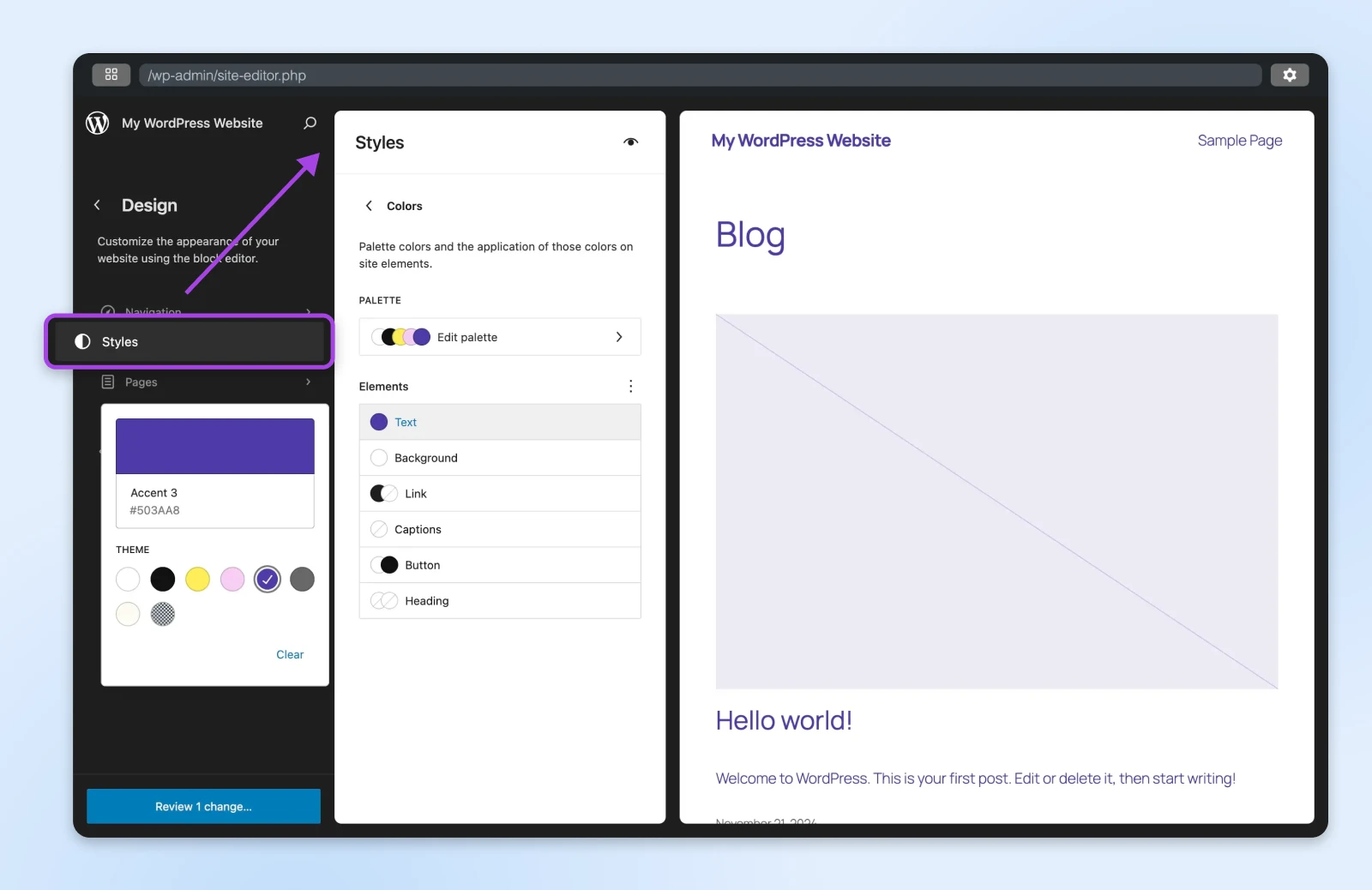
The Style Book, the tool for previewing and managing your site’s block styles in one place, got a structured new layout with clearer labels in 6.8. Typography, colors, and block styles are easier to navigate, with changes previewed in the panel as you move through the options.
The bigger story: 6.8 brought the Style Book to classic themes for the first time. If a classic theme supports editor styles or includes a theme.json file, its users get the same organized style overview that block themes enjoy, a meaningful step in closing the gap between the two theme worlds.
Persistent rendering mode, saved per post type
Since 6.8, users can choose whether the editor displays the site’s template while editing content or shows only the content being added, and that preference now persists between sessions, saved per post type. Pages default to showing the template and content together.
The option lets you see how content will interact with the final published page by rendering template blocks without making them editable. Because the setting is remembered, you don’t need to reconfigure your preferred view each time you edit.
Starter content in the Block Inserter
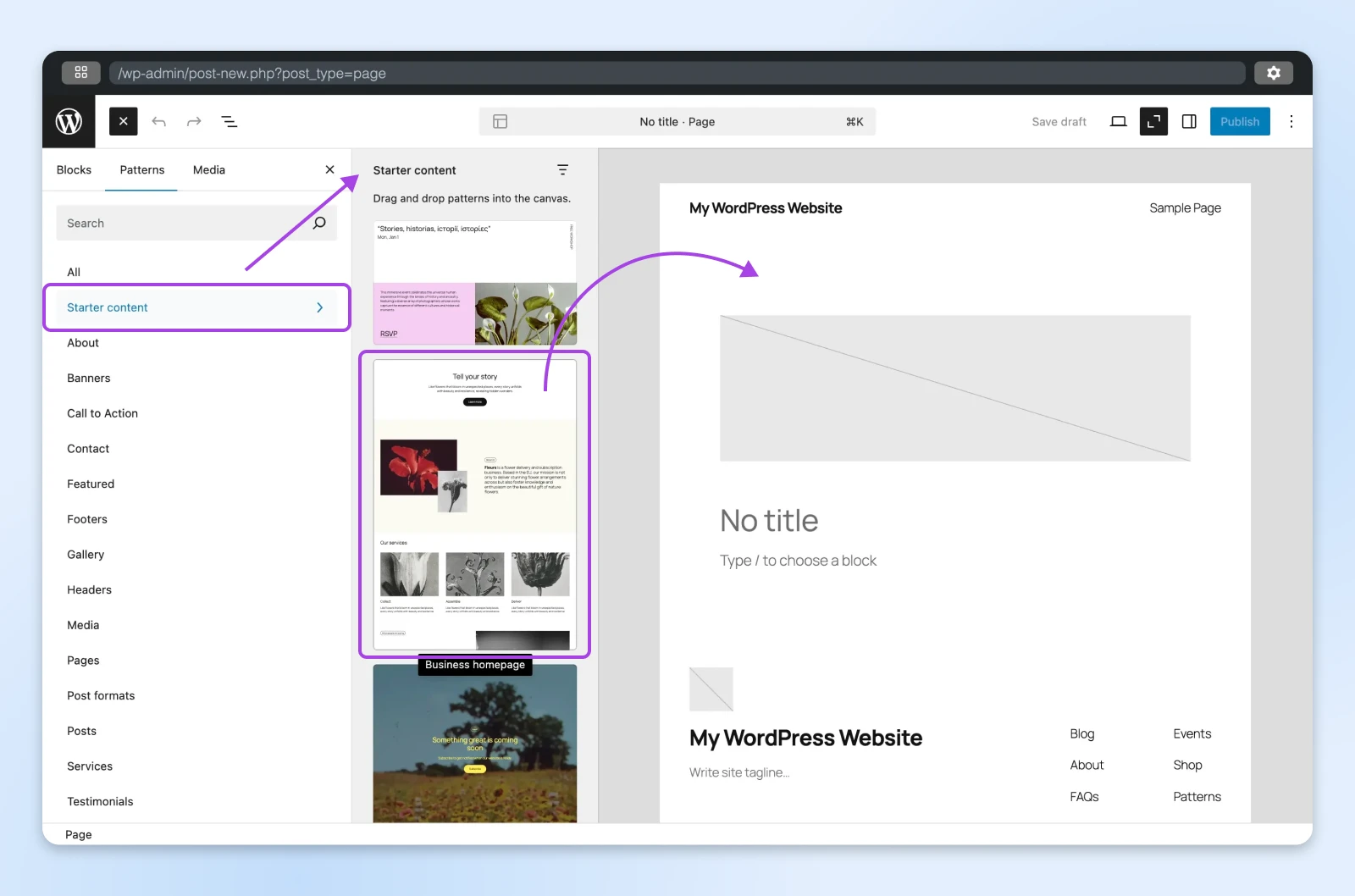
WordPress 6.8 made starter content easier to reach: starter patterns now appear under their own “Starter Content” category in the Block Inserter, alongside the blocks and patterns you already use. The familiar starter-content modal didn’t go away; it gained a preference toggle, so you can turn it off if you’d rather work from the inserter alone.
The updated workflow is consistent with the overall block editing experience: new users get a smoother start, and experienced site builders can pull predefined layouts into a page without breaking stride.
Smarter WP_Query cache keys
On the developer side, 6.8 optimized how the “WP_Query” class generates cache keys. Array-type query arguments are now normalized (sorted and de-duplicated) before the cache key is built, so two queries that are effectively identical finally resolve to the same cached result instead of triggering duplicate database work.
WP_Query
WP_Query is a PHP class that you can use to construct queries to the WordPress database. It enables you to customize how posts or pages are rendered on the page without writing SQL queries.
Because “WP_Query” powers so much of WordPress, that improvement adds up across a site. The biggest gains appear on sites without a persistent object cache. The core team’s dev note on the WP_Query changes has the details.
What else shipped in WordPress 6.8
Beyond the headliners, the release closed more than 300 Core Trac tickets (104 enhancements and feature requests, plus 170+ bug fixes) and folded in another 387 enhancements and 525 bug fixes for the Block Editor, per the WordPress 6.8 Field Guide. Highlights:
- Query Loop improvements: You can now exclude sticky posts from Query Loop results, a small change that ends a long-running layout annoyance.
- Zoom Out, everywhere: The zoomed-out view for arranging patterns became available in every editor view.
- Editor quality-of-life: Cut and copy joined the block options menu, and a one-click reset clears color changes on an element.
- Block upgrades: The Cover block added a resolution control, the Details block gained a name attribute and HTML anchor support, the Image block toolbar can now set a featured image, and the Gallery block got lightbox support.
- Data Views refinements: The management screens in the Site Editor picked up usability improvements, including better density and field controls.
- New tools for block developers: A new “query-total” block landed in core, and the Navigation block’s aria-label support was fixed for assistive technology.
- 100+ accessibility fixes and enhancements: A broad cleanup spanning every bundled theme, navigation menu management, the customizer, and simplified labeling.
What didn’t make it into WordPress 6.8
Pre-release coverage (including an earlier version of this article) tracked several proposals that ultimately didn’t land in 6.8. For the record:
- A core accessible-tooltip API: The proposed standardized tooltip system didn’t ship.
- Registration security warnings: The planned warning for the risky combination of open registration plus a privileged default user role didn’t ship in 6.8.
- Text prefixes on admin notices: The “Error:/Warning:/Success:” prefix proposal remains an open ticket, not a shipped feature.
- Border support for older bundled themes: Twenty Twenty-One and Twenty Twenty-Two didn’t gain border controls in this cycle.
- “Learn WordPress” links in the dashboard widget: Proposed, but not merged.
That’s the nature of WordPress release cycles: proposals earn their way in only when they’re ready, and “deferred” is just a normal part of the process.
WordPress 6.8 point releases: the full timeline
The 6.8 branch kept moving after launch day. The full point-release record:
- 6.8.1 (April 30, 2025): A short-cycle maintenance release fixing 15 bugs across Core and the Block Editor.
- 6.8.2 (July 15, 2025): A maintenance release with roughly 35 bug fixes.
- 6.8.3 (September 30, 2025): A security release — the branch’s last update while it was still the current version of WordPress.
- 6.8.5 (March 10, 2026): A security backport. (6.8.4 was tagged but never formally released to the public.)
- 6.8.6 (July 17, 2026): A critical security backport patching the SQL-injection vulnerability CVE-2026-60137. Any 6.8 site below this version needs the update immediately.
WordPress 6.8 to 7.0: what to expect when you upgrade
Jumping from 6.8 to 7.0 means absorbing two major releases at once. Along the way, 6.9 added Notes (block-level commenting) and an expanded Command Palette, and 7.0 introduced an AI Client in Core plus a fully modernized admin — expect the dashboard to look noticeably different the first time you log in.
A safe upgrade sequence:
- Back up everything, files and database, before you touch the version number.
- Update plugins and themes first, and check that anything critical lists compatibility with 7.0 — two majors of core changes is where outdated extensions break.
- Run the core update from Dashboard → Updates, or test the jump on a staging copy first if you have one.
- Click through your site afterward: the front end, forms or checkout, and anything a plugin renders.
If you’d rather not babysit version numbers at all, DreamHost WordPress Hosting keeps the newest version of WordPress available in your panel and applies automatic core and security updates.
WordPress 6.8 FAQ
When was WordPress 6.8 released?
WordPress 6.8 “Cecil” was released on April 15, 2025, named for jazz pianist Cecil Taylor. It was 2025’s first major release; 6.9 “Gene” followed on December 2, 2025.
Is WordPress 6.8 still supported?
Only the newest major release (currently WordPress 7.0) is officially supported. Older branches like 6.8 receive security backports as a courtesy, with no guarantee — the most recent is 6.8.6 (July 17, 2026), which patched a critical vulnerability. If you’re still on 6.8, plan your update now.
What did WordPress 6.8 change about passwords?
It switched user password hashing from phpass to bcrypt, the first such change since 2008, and moved application passwords and security keys to BLAKE2b hashing. No action was required: passwords rehash automatically at the next login.
What came after WordPress 6.8?
WordPress 6.9 “Gene” (December 2, 2025) brought Notes and an expanded Command Palette, and WordPress 7.0 “Armstrong” (May 20, 2026) added AI to core along with a modernized admin. Our WordPress 7.0 guide covers the current release in depth.
What are the WordPress 6.8 maintenance releases?
Five point releases followed 6.8: maintenance releases 6.8.1 (April 30, 2025) and 6.8.2 (July 15, 2025), then security releases 6.8.3 (September 30, 2025), 6.8.5 (March 10, 2026), and 6.8.6 (July 17, 2026). WordPress 6.8.4 was tagged but never formally released.
WordPress 6.8 in the rearview
WordPress 6.8 pitched itself as a quiet polish release, and mostly it was: a maintenance visit done well. But bcrypt hashing and core speculative loading gave it more staying power than the “fewer new features” framing suggested. The best way to honor it? Run the current release: WordPress 7.0 “Armstrong” carries every one of these improvements forward, plus everything that’s shipped since. Back up first, then update from Dashboard → Updates.