
Imagine renting an apartment in a large building.
You choose the size that fits your needs and have full control over your space—with some sensible guardrails in place. When your needs grow, it’s easy to rent a bigger unit. And importantly, your apartment isn’t affected by whatever your neighbors are doing in theirs.
That’s a simplified way to think about what a VPS is.
A VPS (virtual private server) is a virtual machine with its own dedicated CPU, RAM, and storage, carved out of a more powerful physical server. It gives you much of the power and control of your own server at a fraction of the cost of renting the whole machine.
We’ll revisit the apartment analogy throughout this guide as we unpack how a VPS works behind the scenes, and the choice that trips up first-time buyers: managed vs. unmanaged VPS hosting.
By the end, you’ll be able to answer two key questions: Do you actually need a VPS? And if so, which kind?
What is a virtual private server, anyway?
A VPS, short for virtual private server, is a virtual machine (VM) hosted on a powerful physical server. Your application or website lives in an isolated VM with allocated resources, reducing interference from other VPSs on the same physical machine.
The term VPS is made up of three parts:
- Server: A server is a powerful computer that stores all the data and files for a website or application. When you type a domain name into your browser, a server delivers that site to your screen.
- Virtual: Virtualization technology splits one physical server into multiple virtual machines. It’s still one piece of hardware, but it operates like several separate servers.
- Private: Your virtual server and its resources are reserved exclusively for you. RAM, CPU power, and storage are not shared with other users.
In practice, a VPS gives you most of the advantages of a dedicated server without the high cost of dedicated hosting. For small businesses, developers, and growing websites, it’s often the sweet spot.
How VPS hosting actually works
VPS hosting uses virtualization technology to create isolated servers (like apartments in a building), even though the physical server (the building) is shared.
Your hosting provider creates this isolation by running a piece of software called a hypervisor on top of the physical server. (KVM, an open-source virtualization technology built into the Linux kernel, is a widely used one.) The hypervisor carves the machine into individual virtual machines, each with its own reserved RAM, CPU, and storage that can be scaled up as your needs grow.
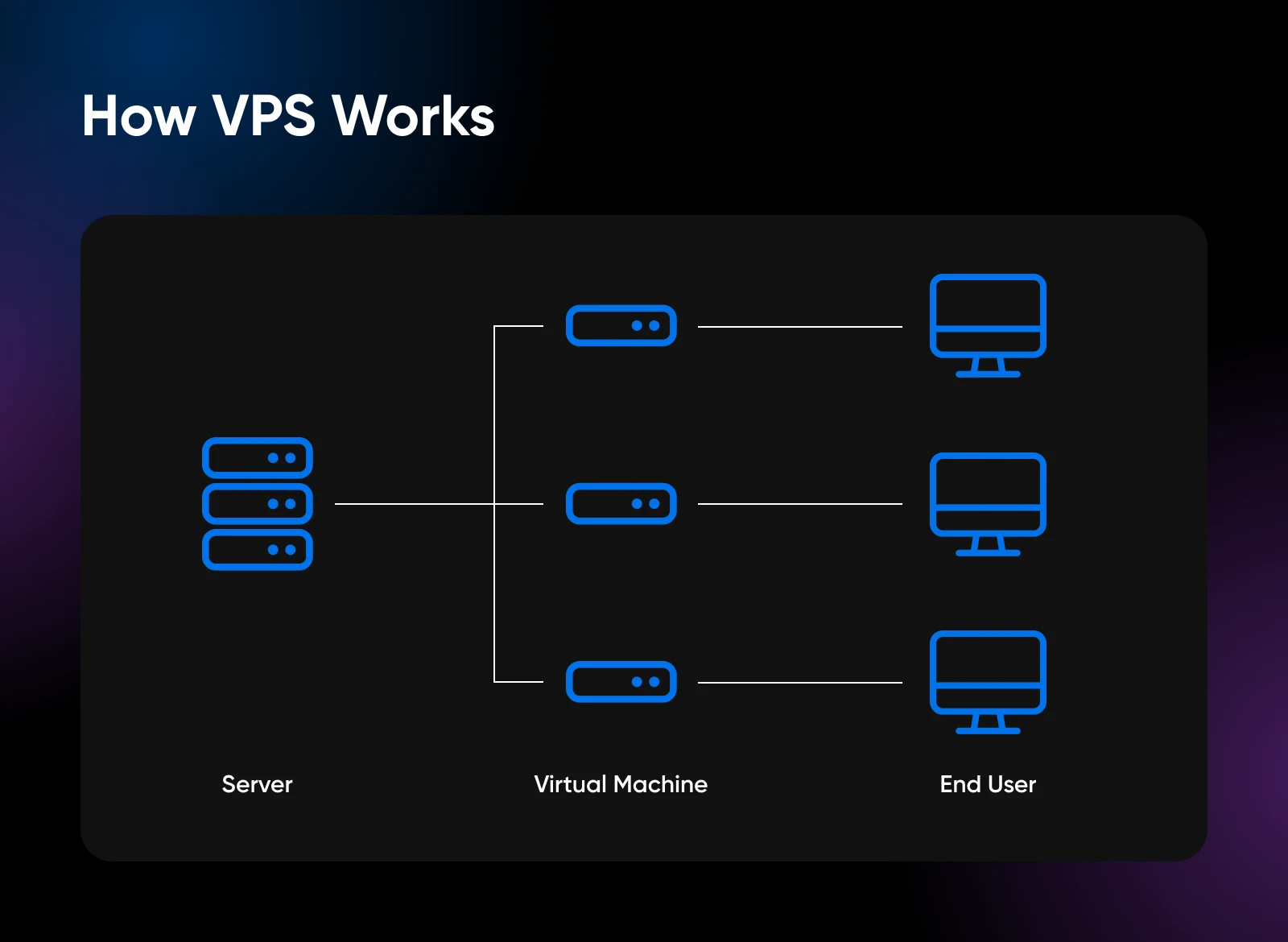
On a well-run VPS with truly dedicated resources, the other sites on the machine can’t consume your allocated CPU or RAM, no matter how busy they get.
Within your VM, you (or your host, more on that shortly) can install an operating system—usually a Linux distribution like Ubuntu or Debian—plus whatever software your project needs: a web server, a database, a control panel that makes day-to-day management point-and-click, or developer tools like Docker.
The bottom line: A VPS gives you your own private, isolated environment with dedicated resources, thanks to virtualization. Your site lives in its own space, with CPU, RAM, and storage that aren’t shared with anyone else.
Pros and cons of VPS hosting: Is it worth the upgrade?
The trade-off is straightforward: more power and control than shared hosting, at a fraction of dedicated prices. Here’s the honest scorecard. (You’ll see “managed” and “unmanaged” below — that choice gets its own section shortly.)
| VPS Hosting Pros | VPS Hosting Cons |
| Dedicated CPU, RAM, and storage that other sites can’t touch | An unmanaged VPS takes serious technical skills to run well |
| Full control to optimize server settings and install custom software | Costs more than entry-level shared hosting |
| Easy to scale CPU cores, RAM, and storage as traffic grows | You still don’t control the physical hardware |
| Sites are isolated from one another for added security | Quality varies: some providers oversell resources or meter bandwidth |
| Managed plans add expert support and maintenance |
Shared vs. VPS vs. dedicated vs. cloud hosting
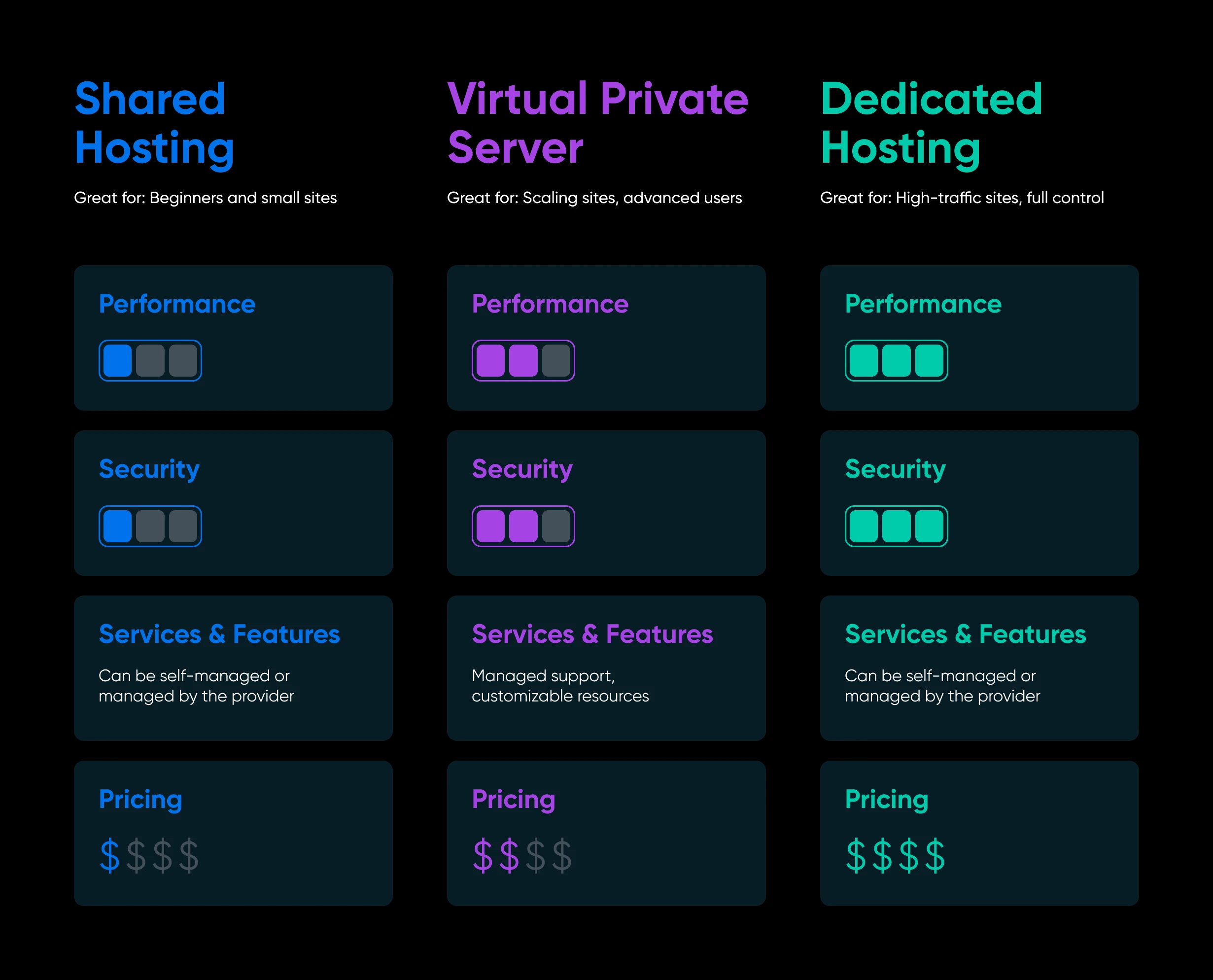
When you’re choosing a web hosting plan, VPS sits in the middle of a spectrum. Here’s the quick tour.
Shared hosting
Shared hosting is the budget-friendly starting point, and it’s perfect for those just getting started with a website. You share resources like CPU, RAM, and storage with other website owners on the same server. (This class of hosting is what DreamHost sells as web hosting.)
Think of it as renting a room in a shared apartment: affordable, but if a housemate throws a party — a traffic spike on a neighboring site — everyone feels it.
Dedicated hosting
Dedicated hosting gives an entire physical server to just your site. You get 100% of the resources and total control over the hardware and software, which is why it’s the priciest option.
It’s best reserved for sites with heavy technical demands: very high traffic volumes, large financial transactions, strict compliance requirements, or custom operating system needs. For a deeper comparison, see our guide to VPS vs. dedicated hosting.
VPS hosting
VPS hosting is the middle ground. The physical server is shared, but your website runs in its own isolated environment with dedicated resources: your own operating system, storage, CPU, and RAM, separate from everyone else on the machine.
It’s like renting your own full apartment: same building as others, but your unit has its own walls, utilities, and address. You get much of the control and stability of dedicated hosting at a fraction of the cost. We’ve broken down the differences in detail in our shared vs. VPS hosting comparison.
Cloud hosting
Cloud hosting runs workloads on pooled infrastructure and can make it easier to scale resources with demand. It’s powerful, but monthly bills can be harder to predict: on several major cloud platforms, bandwidth beyond your included allowance is billed per gigabyte.
For most projects, a modern VPS with generous resources delivers most of the practical benefits with a flat, predictable bill. Curious about the differences? Here’s our take on the benefits of cloud hosting.
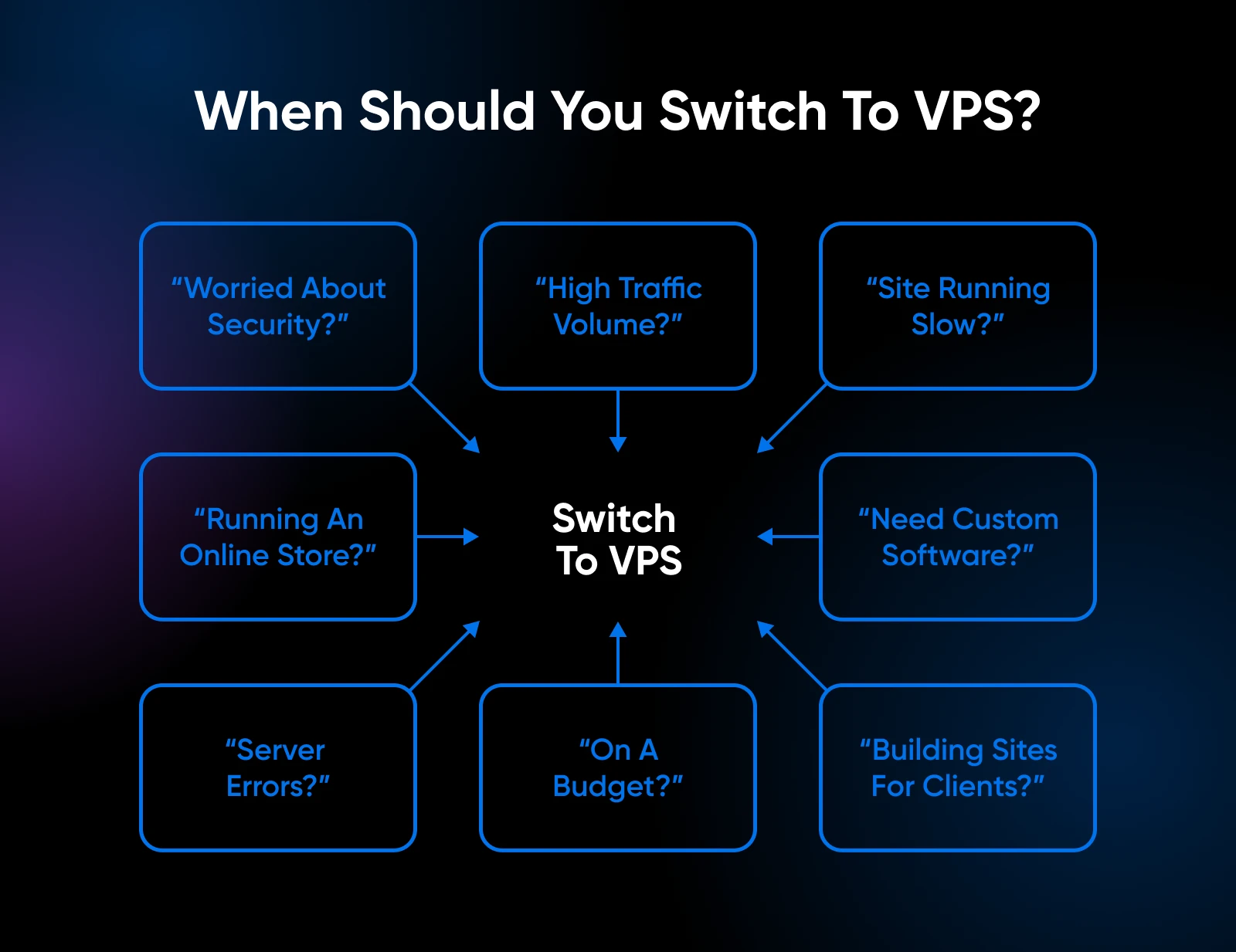
8 signs you’ve outgrown shared hosting and need a VPS
1. You’re worried about security
Shared hosting offers basic security, but a VPS gives you an isolated environment plus room for advanced measures: custom firewall rules, hardened configurations, and full control over how SSL/TLS and backups are set up. That isolation matters most for sites that process payments or store sensitive data.
SSL
SSL stands for Secure Sockets Layer. SSL is a protocol for maintaining a secure connection and protecting sensitive data to keep internet users safe during online transactions, login sequences, and more. Transport layer security (TLS) is the successor to SSL that’s in place today and handles vulnerabilities even more effectively.
2. You start to experience high traffic volume
Shared hosting works great at low visitor counts, but it struggles when your site takes off. With a VPS, you get dedicated CPU and RAM that absorb traffic swells without slowing down. Pick a provider with unmetered bandwidth and the spike won’t cost you extra, either.
3. Your website is consistently running slowly
On shared servers, you’re competing for resources. As your site grows, you can max out limits like RAM, and suddenly pages take forever to load. A VPS gives you room to keep scaling without frustrating load times.
4. You have an online store
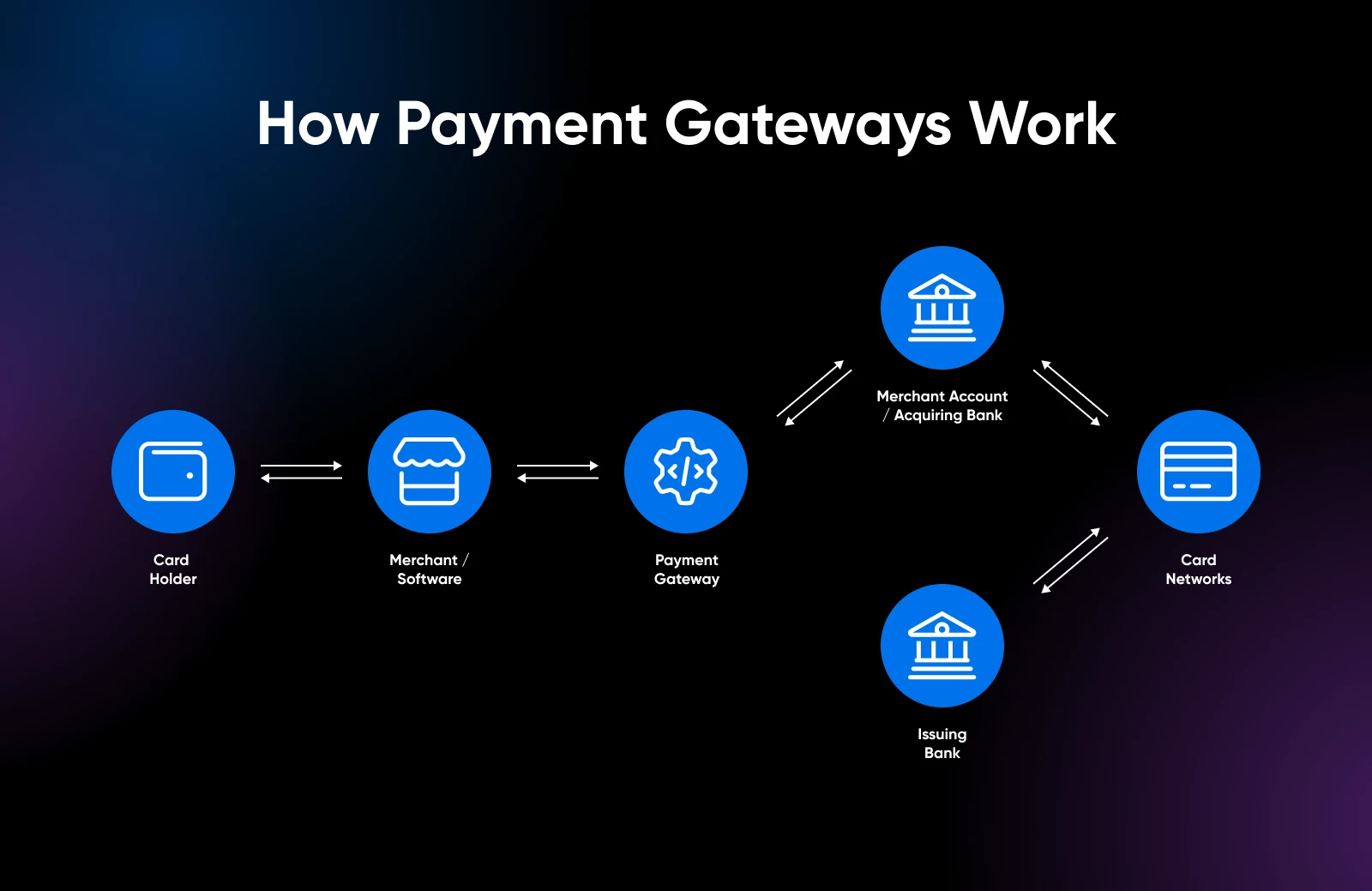
If you’re launching an online store, it’s time to upgrade. If your business stores, processes, or transmits cardholder data, PCI DSS applies. A VPS provides isolation and configuration control, but the hosting type alone does not establish compliance. It also removes the risk that another site on your server causes performance problems during your biggest sales day.
5. You need to install custom software
Shared hosting is built for common platforms like WordPress. But the moment your project needs custom software — a Node.js app, a specific database, or any of the developer tools covered later in this guide — you need the freedom a VPS provides to install and configure exactly what the project requires.
6. Downtime and error messages are costing you sales
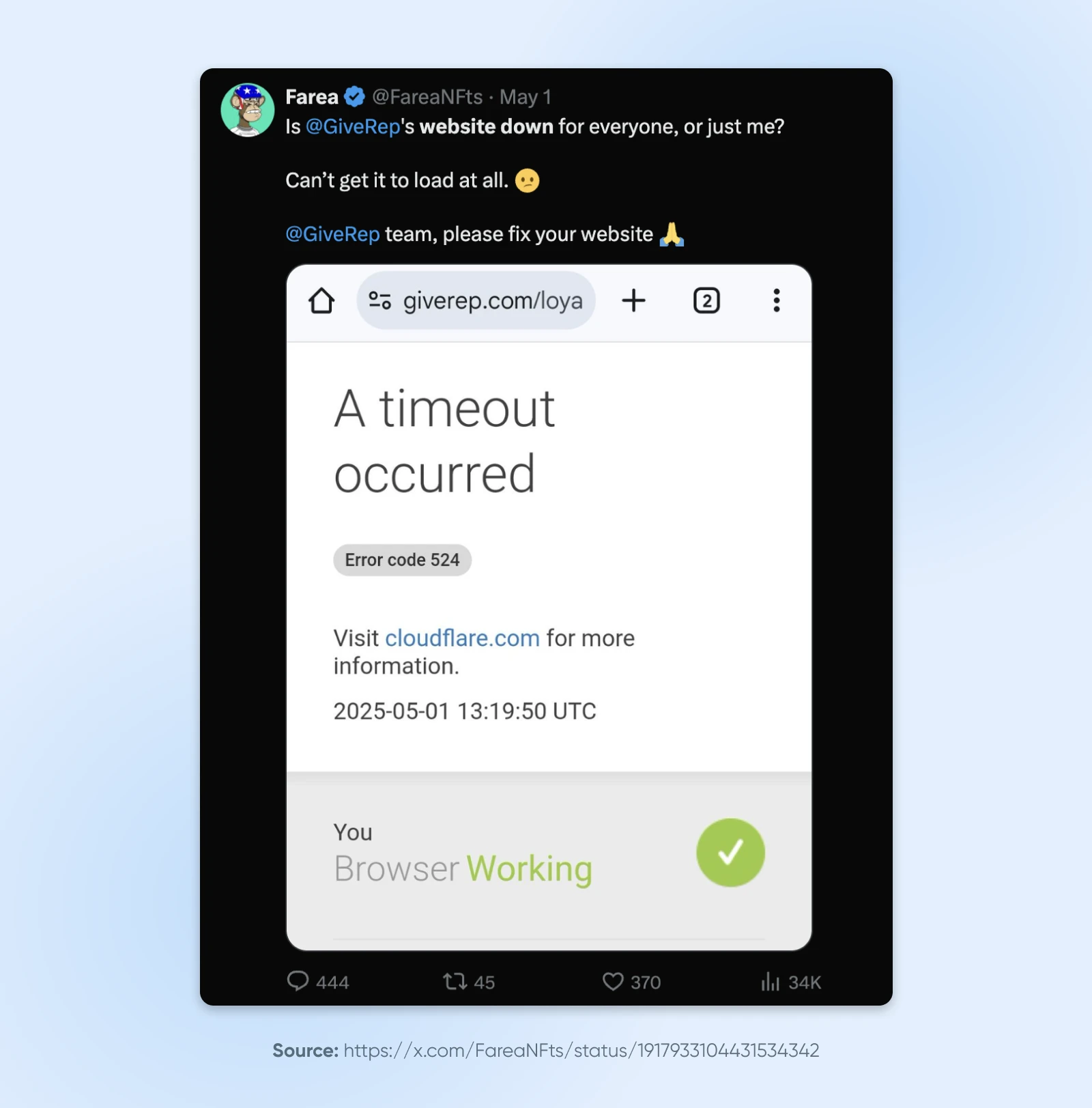
If your visitors keep hitting 503s or other server errors, your current hosting is struggling to keep up. Downtime costs you sales, and frustrated customers tend to say so publicly on social media. Dedicated VPS resources remove the most common cause: your site fighting its neighbors for capacity.
7. You need dedicated-level power without the dedicated price
Sometimes you know dedicated hosting would be great, but the budget says no. A VPS is the middle ground: more RAM, better performance, stronger isolation, and more storage than shared hosting, at a fraction of dedicated prices.
8. You build websites for your clients
If you manage client sites, you can’t afford slow performance or downtime on someone else’s dime. A VPS lets you host multiple sites with room to scale RAM and storage as your client roster grows.
Managed vs. unmanaged VPS: Which should you choose?
So the signs point to a VPS. There’s one decision left: every provider will ask you to pick between two very different products, managed and unmanaged (often called self-managed) VPS hosting.
Back to the apartment building: a managed VPS is like a full-service building with a superintendent. Maintenance, repairs, and security are handled for you. An unmanaged VPS is a bare unit with no superintendent: nobody tells you what color to paint the walls, but when the plumbing leaks at 2 a.m., that’s your problem.
What a managed VPS includes
With a managed VPS, the hosting company keeps the server itself healthy: operating system updates, security patches, monitoring, and backend maintenance. You focus on your website or business, while the provider handles server-level work covered by the plan’s management scope.
The trade-off is less low-level control. DreamHost’s Managed VPS, for example, doesn’t offer root access, because the provider is responsible for keeping the machine stable.
What an unmanaged (self-managed) VPS includes
With an unmanaged VPS, you get a clean Linux server and full root access. You install the OS packages you want, configure the firewall, apply security updates, set up backups, and troubleshoot issues yourself.
That’s not a downside if you’re comfortable in a terminal—it’s the whole point. Developers choose self-managed VPS hosting precisely because nothing stands between them and the server: run Docker containers, host custom apps, spin up automation tools, or self-host AI models.
| Managed VPS | Unmanaged (Self-Managed) VPS | |
| Server setup and OS updates | Handled by your host | You handle them |
| Security patches | Applied for you | You apply them |
| Backups and monitoring | Built in | You configure them |
| Root access | Often limited | Full root access |
| Software freedom | Curated stack, optimized for websites | Install anything that runs on Linux |
| Skills needed | None beyond running your site | Comfortable with the Linux command line |
| Time investment | Minimal—“set it and forget it” | Ongoing maintenance is on you |
| Typical cost | Higher monthly fee, support included | Lower monthly fee, your time is the cost |
| Best for | Business owners, agencies, growing sites | Developers, tinkerers, technical teams |
How to decide in 30 seconds
- Choose managed if your website makes money and you’d rather not think about server patches. The extra monthly cost is usually cheaper than your time (or an emergency sysadmin).
- Choose unmanaged if you know your way around Linux, want root access, and plan to run more than a website—apps, containers, automations, or AI tools.
- Still torn? Ask yourself one question: “If the server broke right now, would I enjoy fixing it?” If yes, go self-managed. If the thought makes you sweat, go managed.
DreamHost offers both: Managed VPS, with our team handling updates, security patches, and monitoring, and VPS Hosting, the self-managed option with full root access and Docker support.
What can you run on a VPS in 2026?
A decade ago, “VPS” mostly meant “faster website.” Today, a VPS is more like a blank Linux computer that’s always on—and people run far more than websites on them:
- Websites and stores: The classic use case—WordPress and WooCommerce sites that have outgrown shared hosting, running with dedicated resources.
- Web apps and APIs: Deploy a Node.js app or Python backend with a PostgreSQL database you fully control, or stand up a Supabase backend for your next product.
- Docker containers: Package your whole stack with Docker on a VPS and deploy anything that ships as a container.
- Workflow automation: Self-host n8n to connect your apps and automate business workflows without per-task SaaS fees.
- Self-hosted AI: Run open-source AI models on your own server for privacy and cost control. Our guide to hosting AI models on your own infrastructure covers the details.
- Publishing, file sync, and more: Spin up a Ghost blog, sync files with a private Nextcloud, or run game servers and analytics.
If your ambitions lean this way, that’s a strong signal you want the self-managed flavor of VPS with full root access.
How to choose a VPS provider
Once you know which type of VPS you need, here’s what separates a great provider from a regrettable one:
- Operating system options: Look for current, well-supported Linux distributions like Ubuntu or Debian. (Windows VPSs exist, but you only need one for Windows-specific software.)
- Reliability and uptime: Your host should put its uptime promise in writing. DreamHost’s VPS Hosting plans, for example, carry a 100% uptime guarantee backed by an infrastructure SLA.
- Modern hardware: NVMe SSD storage and current multi-core processors make a real difference. If a provider is vague about hardware, that’s usually an answer in itself.
- Bandwidth policy: This is the fine print that bites later. Some providers meter bandwidth and charge per-gigabyte overage fees when a post goes viral or a bot swarm hits. Look for unmetered bandwidth with no overage charges, so a traffic spike never spikes your bill.
- 24/7 support: Even with a self-managed server, you want a human available when the network or hardware misbehaves. Confirm support is around-the-clock before you buy.
- Backups: Managed plans should include automated backups by default; on self-managed plans, make sure snapshots or backup tooling is available.
- Room to grow: Upgrading RAM, CPU, or storage should be a button, not a migration. Here’s how scaling a VPS works when it’s done right.
How much does VPS hosting cost?
Prices vary by resources (RAM, CPU cores, storage) and by how much management is included, but the trade-off is simple:
- Unmanaged VPS plans cost less per month—you’re mostly paying for the hardware, and your time handles the rest.
- Managed VPS plans cost more—because a team of experts is patching, monitoring, and supporting your server around the clock. For a revenue-generating site, that’s usually the cheapest insurance you can buy.
Watch out for hidden variables: metered bandwidth overages, paid backups, and “setup fees” can quietly inflate a cheap sticker price. You can see current pricing for DreamHost’s self-managed VPS plans and Managed VPS plans on their respective pages—both include unmetered bandwidth with no per-GB overage fees; fair-use terms apply.
VPS hosting FAQs
What does VPS stand for?
VPS stands for virtual private server: a virtualized server environment with dedicated resources, hosted on a shared physical machine.
Is a VPS just a virtual machine?
Essentially, yes. A VPS is a virtual machine sold as a hosting product: the provider owns and maintains the physical server, keeps it powered and connected, and rents you one of the virtual machines running on it. “VM” names the technology; “VPS” names the product built on it.
Is a VPS the same as a VPN?
No. Despite the similar acronyms, they’re unrelated. A VPS is a server you rent to host websites and applications. A VPN (virtual private network) is a privacy tool that encrypts your internet connection. One hosts things; the other hides things.
Do I need to know Linux to use a VPS?
Only for unmanaged plans. On a managed VPS, your host handles the server side, and you work with your site the same way you would on shared hosting. On an unmanaged VPS, command-line comfort is essential.
Can I use a VPS for personal use?
Absolutely. Plenty of people rent a small VPS for personal projects: a game server for friends, a private Nextcloud for file syncing, a self-hosted blog, or simply a sandbox for learning Linux. If it runs on Linux, it can run on your VPS.
Is a VPS worth it for a WordPress site?
If your WordPress site has steady traffic, makes money, or keeps hitting resource limits, yes. You’ll get faster load times and stability during spikes. If you’re specifically weighing WordPress options, see our managed WordPress vs. VPS comparison.
Why do traders use a VPS?
Forex and stock traders rent VPSs to run their trading platforms around the clock. A VPS lives in a datacenter and stays on 24/7, so the trading software keeps running even when the trader’s own computer is off.
Can I upgrade from shared hosting to a VPS later?
Yes, and it’s the normal path: start on shared hosting, move to a VPS when you hit the signs above. Good providers help with the move. Here’s what to expect from a VPS upgrade.
Time to make the move?
It’s easy to assume slow pages and random crashes are just part of being online. They’re not. If your site makes money and you recognized yourself in more than one of the signs above, those slowdowns are costing you sales, and you’re ready for the fix.
The good news: you now know exactly what to look for.
- Want performance without the sysadmin work? DreamHost’s Managed VPS gives you dedicated resources, Auto-Boost RAM protection during traffic spikes, and a team that handles updates, patches, and monitoring for you.
- Want full control? DreamHost’s VPS Hosting hands you root access, your choice of Linux distro, and Docker + KVM support on AMD EPYC servers with NVMe SSD storage—backed by a 100% uptime guarantee.
Either way, bandwidth is unmetered with no per-GB overage fees, so a busy month never turns into a surprise invoice. Your neighbors’ parties stop being your problem.

When You Expect Performance Get DreamHost VPS
Big or small, website or application – we have a VPS configuration for you.
See More