You’re spinning up a VPS, and you open the OS dropdown.
Ubuntu 26.04 LTS…
Ubuntu 24.04 LTS…
Ubuntu 22.04 LTS…
Maybe a 25.10 interim release if you’re feeling adventurous. (You’re not.)
Does it really matter?
Sure, there are some differences between your options.
But, really, the point of picking an Ubuntu version is making your life easier when you’re looking for documentation or tutorials, rather than trying to optimize a benchmark.
You don’t want to spend the next two years having to triple-check every source to see if it’s really telling you which kernel features you can rely on, when you’ll have to plan a release upgrade, or which language runtimes you’ll be fighting on day three.
In most cases, the best option becomes obvious once you know what you’re actually choosing between. Here, we walk you through exactly that — which version to pick, why Ubuntu dominates VPS hosting in the first place, and when a different distro is actually the smarter call.
When Should You Pick Ubuntu 24.04 for a New VPS?
In 2026, default to Ubuntu 24.04 LTS for any new VPS unless you have a specific reason to stay on 22.04. The win conditions for 24.04 are durable enough that “I’ll just use what I’m used to” stops being a real argument.
Three reasons to pick 24.04 (Noble Numbat):
- Two more years of standard security support. Ubuntu 24.04 LTS gets standard security maintenance through May 2029 and Extended Security Maintenance (ESM) through May 2034. Ubuntu 22.04 LTS standard support ends May 2027, and ESM ends in May 2032. Starting fresh on 22.04 today buys you a release upgrade in about 9 months that you could have skipped.
- Kernel 6.8 vs. 5.15. Ubuntu 24.04 ships Linux 6.8, which supports Multi-Gen LRU page reclamation (useful on a 2 GB or 4 GB VPS where memory pressure is the realistic failure point, though Canonical moved to disable it by default in the 6.8 kernel, so check your box before relying on it). The dependable win is better io_uring performance, mostly visible to databases.
- A current default toolchain. Ubuntu 24.04 ships Python 3.12, PHP 8.3, PostgreSQL 16, OpenSSL 3.0, and systemd 255. 22.04 still ships Python 3.10 and PHP 8.1 by default. Both work. The older base just means more PPAs and third-party repos in your install scripts, and a higher chance that a tutorial written this year skips you entirely.
Three reasons to stay on 22.04 for now:
- A critical dependency hasn’t been ported to Python 3.12 or PHP 8.3. Most of the popular libraries caught up within 12 months of release. Some niche ones didn’t. If your stack depends on one of them, 22.04 buys time without losing security coverage.
- You’re inside a hard change-freeze. Compliance audits, an enterprise customer’s go-live window, a peak-traffic quarter — standard support on 22.04 runs through May 2027. That’s enough runway to ride out almost any freeze.
- You’re going to jump straight to 26.04 LTS via a fresh rebuild. Ubuntu 26.04 LTS was released in April 2026, and in-place upgrades from 22.04 land on 24.04 first, so a direct jump means a parallel build and cutover. If you’re already on 22.04, one migration project beats two spread across 2026 and 2028. But this only works if your hard deadline is the May 2027 cutoff.
Teams regularly spend three days debugging a Python 3.10-only dependency they discovered after the upgrade. The “just upgrade everything” instinct is right 80% of the time and expensive the other 20%. The whole reason these three exceptions exist is to give you permission to be in the 20% on purpose.
What about 26.04 LTS for a brand-new box? Fair question. Ubuntu 26.04 LTS (Resolute Raccoon) shipped in April 2026 with standard security support to May 2031 and ESM to May 2036, per Canonical’s release cycle. If you like being early, it works. Most teams, though, wait for a new LTS’s first point release before trusting it in production, and third-party repos and tutorials are still finishing their 26.04 porting. For a new VPS in 2026, 24.04 is the boring middle: current enough to skip an upgrade, mature enough that the repos and tutorials have finished porting.
Ubuntu 22.04 vs 24.04: What’s Different Under the Hood?
The biggest practical differences between versions 22.04 and 24.04 are the kernel (5.15 vs. 6.8), the default Python (3.10 vs. 3.12), and the PHP toolchain (8.1 vs. 8.3), plus two extra years of standard security support.
Everything else is downstream of those changes.
| 22.04 LTS (Jammy) | 24.04 LTS (Noble) | What changes | |
|---|---|---|---|
| Codename | Jammy Jellyfish | Noble Numbat | Naming only |
| Release date | April 2022 | April 2024 | Two-year LTS cadence |
| Standard support ends | May 2027 | May 2029 | +2 years on 24.04 |
| ESM ends | May 2032 | May 2034 | +2 years on 24.04; free Ubuntu Pro for personal use on up to 5 machines |
| Linux kernel | 5.15 (HWE 6.8 available) | 6.8 | MGLRU support; better io_uring |
| Python (default) | 3.10 | 3.12 | distutils removed; faster interpreter |
| PHP | 8.1 | 8.3 | Typed class constants (8.3); readonly classes arrived in 8.2 |
| Node.js (apt) | 12 by default (NodeSource for 18+) | 18 by default (NodeSource for 22/24) | Newer default runtime available out of the box |
| PostgreSQL | 14 | 16 | Logical replication improvements |
| OpenSSL | 3.0 | 3.0 | Same major version |
| systemd | 249 | 255 | Better OOM handling, cgroup v2 maturity |
| apt sources format | /etc/apt/sources.list | deb822 (/etc/apt/sources.list.d/ubuntu.sources) | Custom repos need to be re-shaped on upgrade |
Weighing 26.04 LTS instead? Its dates, per Canonical’s release cycle: released April 2026, standard security support to May 2031, ESM to May 2036.
On paper, two of those rows matter.
In practice, four of them actually change something about your deploy script.
The kernel jump pays off the day a 4 GB box hits memory pressure.
The Python and PHP jumps are the ones that bite during a release upgrade, because deprecated patterns finally stop working.
The apt sources format change catches almost everyone the first time. A working /etc/apt/sources.list on 22.04 becomes /etc/apt/sources.list.d/ubuntu.sources on 24.04. Any custom repo files need a touch-up to match the new deb822 format.
Why Does Ubuntu Dominate VPS Hosting in the First Place?
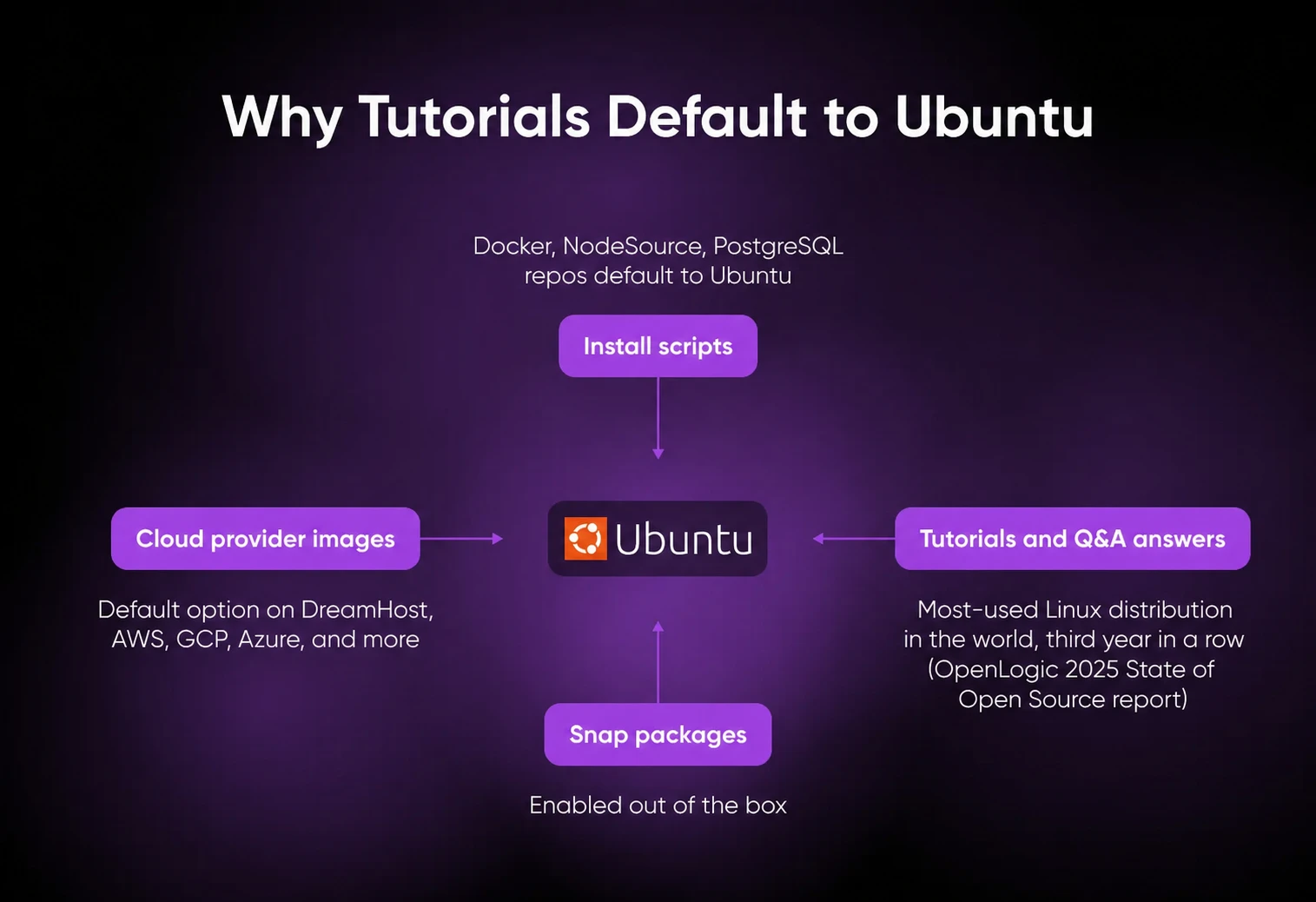
Ubuntu wins for most VPS workloads because most self-hosted projects document it first. Popularity compounds — tutorials default to it, install scripts default to it, cloud images default to it.
That’s a real, daily operations advantage when something breaks at 11pm.
The Largest deb/apt Package Base on Linux
When a self-hosted project publishes an install script, it almost always assumes Ubuntu. The NodeSource distributions repo ships Ubuntu instructions as the primary path. The official PostgreSQL apt repo is Ubuntu/Debian only. And Docker ships an official Ubuntu apt repository, with Ubuntu install instructions that most tutorials follow verbatim.
Most Tutorials and Stack Overflow Answers Default to Ubuntu
Ubuntu is the most-used Linux distribution in the world for the third year in a row, per the OpenLogic 2025 State of Open Source report. Tutorial authors write for the biggest audience, so the guides and Stack Overflow answers get written against Ubuntu first.
Basically, when something breaks in the middle of the night, the answer you find will be Ubuntu-shaped. Ask an AI assistant instead and you get the same result: trained on that Ubuntu-heavy corpus, it hands back apt commands and Ubuntu file paths by default.
First-Class Cloud Image on Every Major Provider
AWS, GCP, Azure, DigitalOcean, Hetzner, Linode/Akamai, Vultr, and DreamHost all offer Ubuntu Server as the first-class Linux image option on the provisioning screen.
(Translation: you don’t have to fight with the dropdown.)
Snap Packages Pre-Installed
Snap is pre-installed on Ubuntu Server, so self-hosted apps with snap packages are a one-line install. If you’ve got feelings about snap’s auto-refresh behavior, you’re not alone — but it’s there when you need it, which is unique among server distros.
When Should You Not Pick Ubuntu for Your VPS?
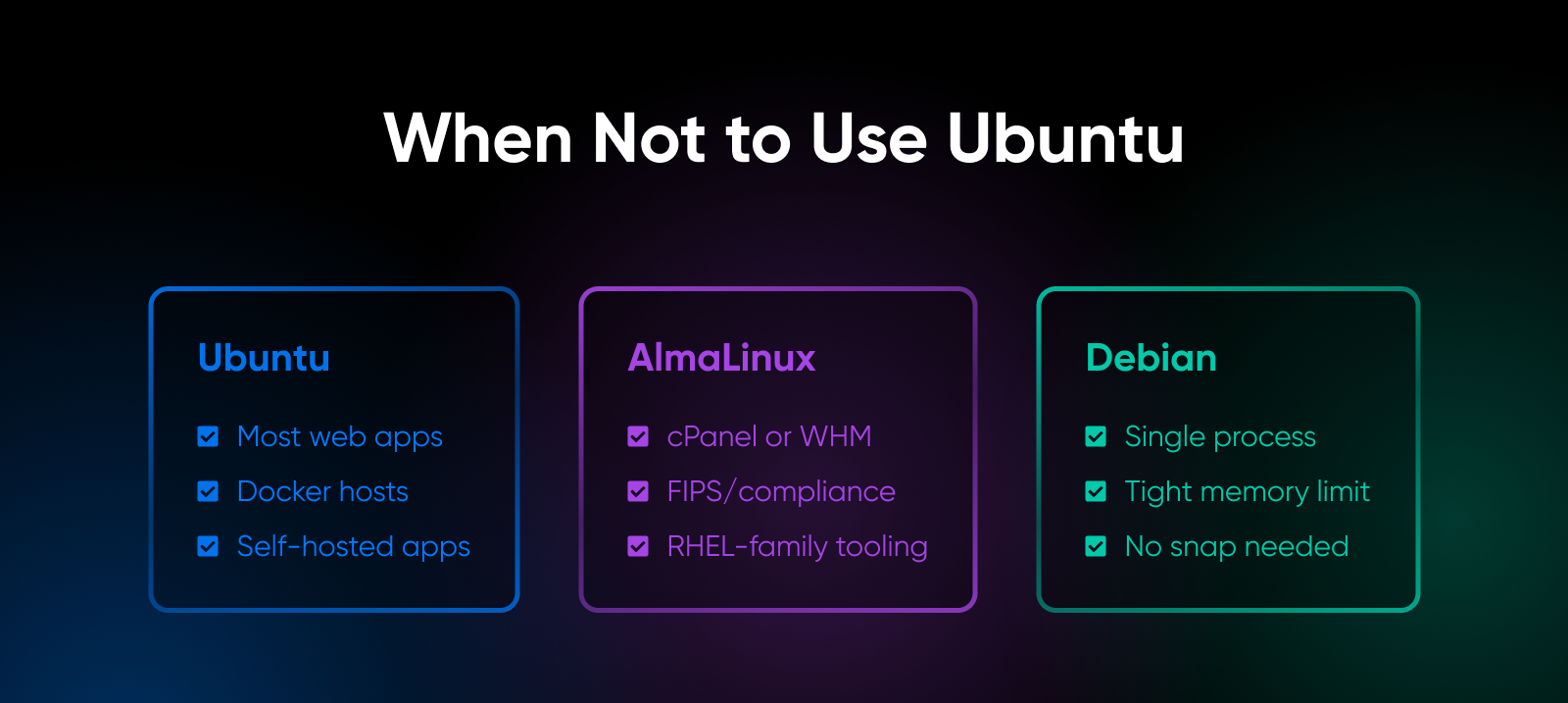
Ubuntu is the right default for most VPS workloads, but three scenarios point to a different distro.
- cPanel or WHM hosting. cPanel originally ran only on the RHEL family, and while it now supports Ubuntu LTS too, the migration story off a managed CentOS host is still cleanest on AlmaLinux 9. Same RPM tooling, same operator muscle memory, no surprise package-manager translation cost. If you’re moving a hosted-reseller workflow off a legacy CentOS box and want to keep cPanel, AlmaLinux 9 is the natural target.
- Strict compliance or FIPS-only requirements. Some regulated environments (FedRAMP, DoD, finance back-office) standardize on the RHEL family for FIPS-validated cryptographic modules. AlmaLinux OS 9.2 carries FIPS 140-3 validated cryptographic modules. Ubuntu Pro’s FIPS add-on closes most of the gap, but if the compliance officer wants RHEL-family lineage, AlmaLinux is the cleaner conversation.
- A RAM-constrained box running one process. Debian 13 (Trixie) runs leaner than Ubuntu out of the box (no snapd, less default clutter). On a tightly sized box where every 200 MB matters, the smaller default footprint is worth picking up. Debian 13 is well-supported on any VPS, and since DreamHost’s entry-level Stack 4 (4 GB) comes with a Debian 13 image ready to go, the headroom is there if footprint is the priority.
The bottom line: AlmaLinux fits the cPanel and compliance crowd, Debian fits the resource-constrained and “boring stable” workloads. Ubuntu fits everyone else.
What Workloads Does Ubuntu Run Best on a VPS?
Ubuntu fits almost every common VPS workload. These four are where the documentation and packaging edge is most obvious — the install path is the one the project’s own docs use.
| Workload | Why Ubuntu fits | Recommended baseline |
|---|---|---|
| Node.js / Python / PHP web apps | NodeSource, deadsnakes, and Ondřej Surý’s PHP repos all default to Ubuntu install paths | 4 GB |
| Docker and container hosts | Docker’s official apt repo is Ubuntu-first; cloud-init defaults are well-documented; one-line installer scripts assume Ubuntu | 4 GB |
| Self-hosted SaaS alternatives (Nextcloud, n8n, Ghost, Supabase, GitLab CE) | Every app ships an Ubuntu Docker image or a deb-aware install script first | 4 GB to 16 GB by app |
| Postgres or MySQL on the same box | The official PostgreSQL apt repo is Ubuntu/Debian only; MySQL ships first-class deb packages | 4 GB baseline, 8 GB for larger datasets |
For most of these workloads, DreamHost’s VPS Hosting Stack 4 plan (4 GB RAM) is the baseline. It can run a modest Node app with Postgres and Redis, but traffic, dataset size, and tuning set the real limit. Step up to 8 GB if you’re running storage-heavy or multi-service stacks.
The OS choice is where Ubuntu pulls ahead. Everything below that layer is mostly interchangeable.
How Do You Actually Set Up Ubuntu on a VPS?
Spin up the Ubuntu image, log in over SSH, create a non-root user, configure UFW, and enable unattended-upgrades. The first 15 minutes get you to a baseline production-ready box. Everything after that is specific to whatever app you’re installing.
- Pick 24.04 LTS at provisioning. Almost every provider has Ubuntu 24.04 LTS as a one-click image. On DreamHost’s Ubuntu VPS, Stack 4 (4 GB) is the baseline for most workloads.
- Log in over SSH with your key, not a password. Cloud images use cloud-init to inject the SSH key you uploaded at provisioning. First login is ssh root@<your-ip> or ssh ubuntu@<your-ip>, depending on the provider.
- Create a non-root user and lock SSH password auth. Run
adduser deploy, thenusermod -aG sudo deploy. Copy the SSH key over, and setPasswordAuthentication noin /etc/ssh/sshd_config. Reload sshd. Test the new SSH connection in a second terminal before you close the root session. (Every sysadmin has locked themselves out at least once.) - Turn on the firewall. Run
ufw allow OpenSSH, thenufw enable. Open ports for the actual app as you go (ufw allow 443/tcp for HTTPS, and so on). UFW (Uncomplicated Firewall) is the friendly wrapper around iptables that ships with Ubuntu by default. - Enable unattended security updates. Run
apt install unattended-upgrades. Ubuntu will auto-apply security patches in the background. It’s the single biggest set-it-and-forget-it hardening win, yet it’s the one most install guides skim past because it’s not flashy.
For the full procedure with output checks and edge cases, the Ubuntu Server Guide is the canonical reference.
How Should You Plan a 22.04 to 24.04 Migration?
You have until May 2027 before Ubuntu 22.04 loses standard security support. That’s long enough to plan a calm migration, and short enough that you should put a date on the calendar this quarter and stop calling it future-work.
Still on 20.04 LTS? That clock already ran out — standard support ended in May 2025, and only ESM via Ubuntu Pro covers it (through May 2030). And do-release-upgrade is sequential, so a 20.04 box hops through 22.04 before reaching 24.04; a fresh parallel build is usually the faster path.
Two viable paths:
- In-place upgrade with
do-release-upgrade. Works on most stock servers. Faster and cheaper. Riskier on anything heavily customized. Always run it on a clone of production first. - Parallel new VPS with a DNS cutover. More work, less risk. Spin up a fresh 24.04 box, install the stack, copy the data, switch DNS, and decommission the old one. Most production teams pick this path because the rollback is “change DNS back.”
In-place upgrades tend to blow up for a few key reasons: the Python 3.10 to 3.12 jump (some libraries still aren’t 3.12-clean a year after release, especially anything that touches distutils or older asyncio patterns), and the apt sources format change that silently breaks any custom repo file you forgot to migrate.
Test both before you flip the switch.
If you’re on 22.04 and weighing your options, 26.04 LTS is already out — which means one migration project instead of two is still on the table. That works only if your hard deadline is the May 2027 standard-support cutoff, and your stack isn’t already fighting Python 3.10.
Where Do You Click Next?
Open the provider’s image dropdown, and pick Ubuntu 24.04 LTS. That’s the answer for almost everyone reading this.
The cases where 22.04 still earns its keep are narrow and shrinking every quarter. On Ubuntu 24.04 LTS, standard security support runs through May 2029, ESM through May 2034, and the longest runway of any mainstream Linux distro now belongs to Ubuntu 26.04 LTS: May 2031 standard support, May 2036 ESM.
DreamHost’s 4 GB VPS hosting handles most Ubuntu workloads comfortably. Step up to 8 GB for storage-heavy or multi-service stacks.
Next time someone on your team asks which Ubuntu to install, you’ve got the May 2027 and May 2029 dates ready to paste. The 30-minute version of this decision is the actual problem. The 30-second version is the answer.
Pick 24.04 LTS. Build the stack. Close the tab.

Own Your Entire Stack. Apps, AI, Databases, and More.
Keep every credential and conversation on a server you control, with NVMe speed and unmetered bandwidth built in.
Explore VPS Hosting PlansFrequently Asked Questions About Ubuntu on a VPS
Should you use Ubuntu 22.04 or 24.04 on a VPS?
For any new VPS in 2026, use Ubuntu 24.04 LTS. It gives you two more years of standard security support (May 2029 vs. May 2027), kernel 6.8 with better memory management on small boxes, and current default versions of Python (3.12), PHP (8.3), and PostgreSQL (16).
Stay on 22.04 only for narrow reasons: a specific dependency that hasn’t been ported, an active change-freeze window, or a deliberate plan to migrate straight to 26.04 LTS via a fresh rebuild (26.04 was released in April 2026).
When does Ubuntu 22.04 LTS reach end of life?
Ubuntu 22.04 LTS reaches end of standard security support in May 2027, and Extended Security Maintenance (ESM) runs through May 2032. ESM is free for personal use on up to five machines via Ubuntu Pro; commercial use requires a paid subscription.
How long will Ubuntu 24.04 LTS be supported?
Ubuntu 24.04 LTS gets standard security support through May 2029 (five years from release), with ESM extending coverage through May 2034. An optional Legacy add-on stretches that out to May 2039 for organizations that need a 15-year window.
Is Ubuntu Pro free for personal VPS use?
Yes, Ubuntu Pro is free for personal use on up to five machines. The free tier includes Extended Security Maintenance (ESM), kernel livepatch, and access to the hardened FIPS-validated package set. Anything beyond five machines or any commercial use requires a paid Ubuntu Pro subscription from Canonical, priced per machine — so for a commercial fleet, check Canonical’s current pricing and weigh a year of subscriptions against simply scheduling the 24.04 upgrade before May 2027. For most teams, the upgrade is the cheaper call.
Can you upgrade from 22.04 to 24.04 without reinstalling?
Yes, Ubuntu’s do-release-upgrade command performs an in-place upgrade from 22.04 to 24.04 without reinstalling the operating system. The process is generally smooth on stock servers and riskier on heavily customized ones. The two main gotchas are the Python 3.10 to 3.12 jump (some libraries take time to support 3.12) and the apt sources file format migration from sources.list to the new deb822 format. Always test on a clone before running it on production.
Why do most VPS tutorials use Ubuntu?
Most VPS tutorials use Ubuntu because it’s the most-used Linux distribution in the world (per the OpenLogic 2025 State of Open Source report) and the default cloud image on every major hosting provider (AWS, GCP, Azure, DigitalOcean, Hetzner, Linode, Vultr, DreamHost). Tutorial authors write against what their audience runs, which creates a self-reinforcing loop: Ubuntu has the most tutorials, so people pick Ubuntu because it has the most tutorials.
Should you use Ubuntu LTS or the latest interim release on a server?
Use the LTS release on a server. Interim releases like 24.10, 25.04, and 25.10 are supported for only nine months and require a release upgrade about twice a year. LTS releases get five years of standard security support plus five more years of ESM (10 years total, 15 with the Legacy add-on), which matches the maintenance cadence most production servers actually want. Save interim releases for desktops where the upgrade churn is part of the fun.
