A potential customer Googles your business, sees it’s open now, grabs their keys, and heads out the door. But when they arrive, they find the lights are off! The doors are locked! What gives?
Maybe they don’t leave you an angry review or send feedback — but they do go to a competitor. And just like that, you’ve lost a customer.
Trust matters, especially early in the decision process. Research from the DreamHost 2026 Local Business Trust Index shows people expect real businesses to have real websites — and the scenario we just outlined is one big reason why.
Consumers check multiple sources before trusting a business; in fact, 58% check a business website to confirm information they see on social media or Google. It’s how they avoid showing up at a business just to discover it’s closed.
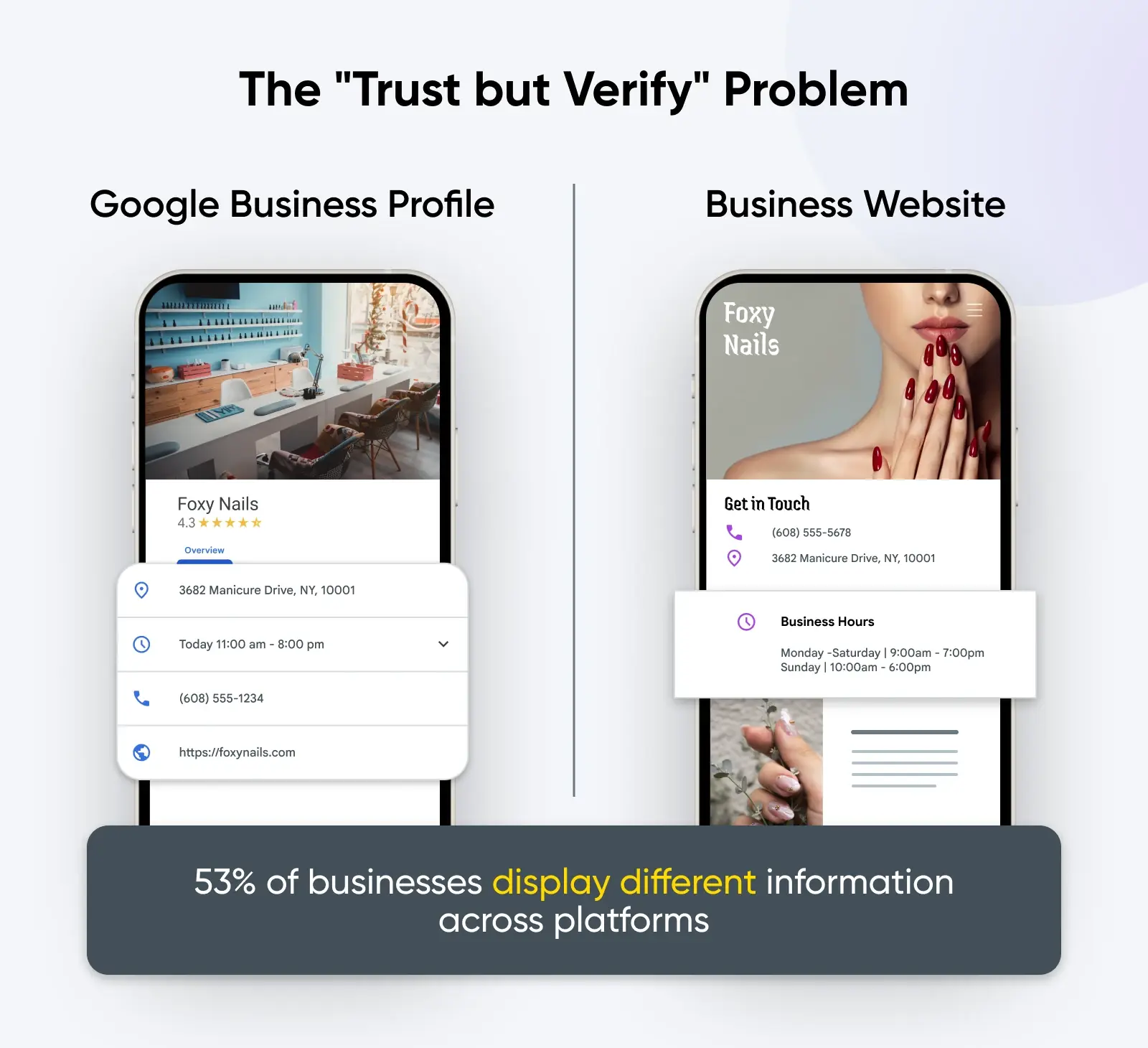
But we also learned that 53% of businesses have different information between their Google listing and their website. That’s pretty rough for shoppers who want to, as the old saying goes, “trust but verify.”
At DreamHost, we believe your website is your home base on the open web, but it’s not the only place your business lives online, and neglecting other trust signals consumers rely on can have serious consequences.
Here’s what we learned when we analyzed 230 local businesses across five common service categories, comparing what their Google listings say versus what their websites say.
Google Business Profile vs. your website: customers see one business
Customers don’t really experience your business as separate channels like “your Google Business Profile” and “your website.” They just experience you — your business — and they expect trustworthy information everywhere you exist online.
Our 2026 Local Business Trust Index shows that Google is usually the first stop for consumers looking for information about a business — 67% say they start with a Google search when looking for a local business. But crucially, your website is the confirmation step: 58% of consumers say they “often” or “always” check a business website to confirm information they’ve encountered on social media, Google Business Profiles, or AI tools. Those AI tools are part of the same loop, by the way: assistants and Google’s AI Overviews pull business details from your Google listing and your website, so mismatched info confuses people and becomes the wrong answer AI repeats about your business.
This shows us that people rely on websites as a credibility signal, but they don’t trust any single source on its own. Trust forms when multiple sources agree. On the other hand, if the information on multiple sources doesn’t match up, it’s likely to breed uncertainty and send shoppers elsewhere.
What if there’s no website to check?
Then the confirmation step fails before it starts. In the same Trust Index survey, 69% of consumers say a website is essential for a local business to be credible, 45% say businesses without websites feel less “real,” and 39% have declined to visit or buy from a business specifically because it lacked one. A complete Google Business Profile can help customers find you, but with nothing to verify against, shoppers looking for confirmation come up empty — and many will simply call the next name on the list.
We checked 230 businesses: here’s how often the basics don’t match
To see how often this trust system breaks down, we compared Google listings and websites for 230 local businesses across five common service categories. We looked at the details customers rely on most when deciding whether to call, visit, or book.
The results were striking: only 47% of businesses had fully consistent information across all fields we checked. That means more than half had at least one missing or mismatched detail between Google and their website.
Here’s where mismatches showed up most often:

| Business information | Missing or mismatched |
|---|---|
| Hours | 27% |
| Phone number | 18% |
| Website | 16% |
| Address | 11% |
In our analysis, some industries showed significantly higher mismatch rates than others:

| Business type | At least one mismatch |
|---|---|
| Plumbers | 89% |
| Dentists | 60% |
| Auto repair shops | 50% |
| Florists | 43% |
| Restaurants | 33% |
We don’t think this is because these industries are “worse” at managing their online presence. It’s more likely that businesses that address urgent needs, have variable hours, occupy multiple service areas, or take after-hours calls change their details more often, which makes information drift more likely.
But the higher the urgency of the service, the higher the cost of inaccurate information. When someone needs a plumber now, a wrong phone number or unclear hours may just cause them to move down their list and call someone else.
When customers encounter mismatched business information online (regardless of the industry your business operates in), it can come with a number of other risks, including:
- Lost business: The most obvious risk is that customers will simply move on to another business that looks more credible. If they see missing or mismatched hours, are they more likely to gamble with their time, or just go to a competitor who has more trustworthy information?
- Mistaken identity: A missing or incorrect website link (which our data shows happens 16% of the time) creates instant doubt for customers who go looking for your website to confirm they’ve found the right business (especially for expensive or high-stakes purchases). That gap costs real money: in our 2026 Local Business Trust Index, 14% of consumers said they’re comfortable spending $500 or more on a business website, against 1% on an Instagram or TikTok shop. If they can’t find the right site, that’s the sale you don’t make.
- Lost customers (literally): Even though address issues were less common (11% of businesses), they’re disproportionately damaging. Having the wrong address listed means a customer trying to visit your business can end up in the completely wrong place, which means accuracy here is pretty non-negotiable.
What to do when your Google Business Profile and website don’t match
The fix: audit four fields (hours, phone number, address, and website URL), then update your website first and mirror the change on your Google Business Profile. Do that whenever a detail changes, re-check quarterly, and the mismatch problem mostly takes care of itself. Below: why the drift happens, and the step-by-step for correcting your Google listing.
So why do businesses end up with inaccurate information across their website, Google listing, social media, and other parts of the internet? And more importantly, how can they fix (and prevent) these issues?

Most cases of missing or mismatched information are because of businesses growing or changing, plus the reality that business details live in more places than anyone actively thinks about day to day. Here are some common causes, plus what you can do about each one:
- You set it and forget it: Google Business Profiles and websites often get created once, then remain unchanged while the business itself keeps moving.
- What to do: Schedule a recurring check (once a quarter is a good cadence) to confirm hours, phone number, address, and website links match everywhere your business exists online.
- Too many people update your business information in different places: An owner changes hours on the website, a staff member edits Google, and an agency updates a directory, creating a classic case of too many cooks in the kitchen.
- What to do: Decide who owns “official” updates and keep one shared source of truth everyone references before making any changes.
- Your business changes faster than your listings: Moves, seasonal hours, staffing shortages, and new phone systems happen first. Updates to your online business information happen later…if at all.
- What to do: Make it a habit. Whenever something changes internally, update the website first, then mirror that change on Google, social media, and anywhere else you have business information listed online.
- Some mismatched information is intentional: For example, some businesses use a different phone number for their Google Business Profile to track lead sources. That can work, but it can also confuse customers if it isn’t handled carefully.
- What to do: Make sure there’s one clear primary number and that Google and your website don’t appear to contradict each other. Google Business Profiles support up to 2 additional phone numbers, so you can list a tracking line without replacing your primary.
- Hours change all the time (for all kinds of reasons): Holidays, weather closures, and seasonal shifts provide plenty of opportunities for mismatched information about when you’re open.
- What to do: Update holiday hours proactively and treat hours as a living detail, not a permanent setting. Google’s special hours feature exists for exactly this: set holiday or temporary hours in advance instead of rewriting your regular schedule.
- Sometimes Google changes your listing, not you: Google accepts suggested edits from users and may collect business information through automated calls and texts, so Maps can end up displaying different details than the ones you set.
- What to do: Review your profile for collected info (under “Edit profile,” select “Collected info”) and delete anything wrong, correct edits that revert, and if Maps keeps overriding a detail you’ve set, contact Google Business Profile support.
How to fix a mismatch between Google Maps, your Business Profile, and your website (step by step)
You fix a mismatch by editing your Business Profile directly from Google Search or the Google Maps app (the same listing powers both) and then making sure your website says the same thing. Here’s the process, per Google’s “Edit your Business Profile” help page:
- Settle on the correct details first. Confirm the right hours, phone number, address, and website URL, and update your website so it reflects them.
- Sign in to the right Google account. To edit your business info, you need the Google account that’s linked to your Business Profile.
- Open the editor from Search or Maps. On Google Search, go to your Business Profile and select “Edit profile.” In the Google Maps app, tap “Business” at the bottom right, then tap “Edit profile.”
- Correct the mismatched fields, then save. Hours, phone number, address, and website URL each have their own field. For holidays and temporary closures, use special hours rather than overwriting your regular schedule.
- Give it time to go live. Google reviews changes before updating them on your profile, so an edit may not appear on Search and Maps immediately — you can check its status from your profile.
- Know the re-verification triggers. Changing your business name after verification might require you to verify again, and moving to a new address means you must re-verify — so build in lead time when you move or rebrand.
- Re-check both surfaces side by side. Once the edit is live, pull up your Google listing and your website together and confirm all four fields agree.
What to do when your listing shows the wrong website (or the wrong business)
A wrong or missing website link is fixed in the same place: the website field of your Business Profile. It’s worth fixing quickly, too; our analysis found a missing or incorrect website link on 16% of the businesses we checked, and it’s the mismatch most likely to leave customers wondering whether they’ve found the right company at all.
- If you manage the profile: Edit the website field from Google Search or the Google Maps app, exactly as in the steps above, and point it at the page customers should land on.
- If the profile exists but nobody manages it: Claim and verify the Business Profile. Google requires verification before your business shows on Search and Maps, and until you claim it, you don’t control what the listing displays.
- If the listing isn’t yours to manage: Use “Suggest an edit” on the listing in Google Search or Maps, such as when another business’s profile links to your website, or a duplicate listing carries outdated details.
Accuracy is invisible when it works, and costly when it doesn’t
When we learned that 53% of businesses have conflicting information between their Google Business Profile and their website, we realized that the majority of businesses are risking valuable trust with their customers.
When your information matches everywhere, customers don’t notice. They just move forward with confidence. But when it doesn’t, they’re more likely to have frustrating experiences or just move on to a competitor that feels safer and more certain.
The good news is that this is one of the most fixable blind spots most businesses have. Treat your website and Google listing as one trust system, keep the basics aligned, and accuracy becomes an advantage.

Is Your Website Driving Potential Customers Away?
First impressions happen in under 50 milliseconds. This 42-page playbook gives small business owners practical tactics to look as credible as the big players — no agency, no redesign budget required.
Get The PlaybookFAQ: Google Business Profile and website mismatches
Why do Google Maps and my Business Profile show different information?
Usually because an edit is still in review, a user suggested a change, or Google added information it collected automatically. Re-submit the correct detail from your Business Profile, and if Maps keeps showing the old value, contact Google Business Profile support.
What should I do if Google shows the wrong website or company for my business?
Edit the website field in your Business Profile from Google Search or the Google Maps app. If nobody manages the listing, claim and verify it first. If the listing belongs to someone else, use “Suggest an edit” instead.
Google Business Profile vs. website: which do customers trust more?
Neither on its own. In DreamHost’s 2026 Local Business Trust Index, 67% of consumers start with a Google search, but 58% “often” or “always” check the business website to confirm what they found. Customers trust the pair when both sources agree.
Can I show a different phone number on my Google Business Profile?
Yes. Google lets you add up to 2 phone numbers beyond your primary one, so you can list a tracking line — and you can choose to hide your number entirely. Just make sure your profile and your website don’t appear to contradict each other.
Are my Google reviews tied to my Business Profile or my website?
Your Business Profile. Reviews are attached to your Google listing, not your site, so changing your website or its URL doesn’t move or remove them. You can display them on your website with a widget or plugin, but Google is where they live.
Methodology
We analyzed 230 local business listings across five categories: plumbers, restaurants, auto repair shops, dentists, and florists. Listings were collected using DataForSEO’s Google Maps API by searching each business category within selected metropolitan areas and reviewing the top results.
For each business, we compared the information listed on Google Maps with the information published on the business’s website. We evaluated four fields: website address, physical address, phone number, and hours.
Any missing or mismatched information on the Google listing was counted as a mismatch. If a detail existed on Google but could not be verified on the website, it was counted as accurate. Duplicate listings and national chains were excluded from the analysis.
We also used data from our nationwide survey conducted in November 2025, in which we collected responses from 1,201 Americans ages 18–64 to better understand how consumers perceive, evaluate, and trust local businesses in an era dominated by social media, AI recommendations, and platform-based shopping. Participants represented a diverse cross-section of industries and professional backgrounds, offering a well-rounded snapshot of public sentiment and real-world impacts. Respondents were asked a series of questions about local business credibility, website expectations, trust signals, spending comfort across different channels (web, social, AI), and how they verify information.
Fair use
Users are welcome to use the insights and findings from this study for non-commercial purposes, such as academic research, educational presentations, and personal reference. When referencing or citing this article, please ensure proper attribution to maintain the integrity of the research. Direct linking to this article is permissible, and access to the original source of information is encouraged.
For commercial use or publication purposes — including but not limited to media outlets, websites, and promotional materials — please contact our Corporate Communications team for permission and licensing details.
We appreciate your respect for intellectual property rights and adherence to ethical citation practices. Thank you for your interest in our research.