
There’s a moment every entrepreneur hits — usually around the 37th ChatGPT prompt of the day — when you realize you’ve spent more time managing your “productivity tools” than doing actual work.
Between your AI calendar assistant, your AI note-taker, and your AI that helps you manage your other AIs, the only thing you’ve really optimized is how fast you’re burning out.
That’s what pushed us to run a little experiment. We spent a week testing AI productivity tools across three everyday workflows — communication, content creation, and coordination with our teammates — to see which ones actually made work disappear instead of multiplying it.
We wanted to bypass the flashiest chatbots and find tools that genuinely save time and mental bandwidth. Easier said than done, we know.
Because let’s be honest about this. The AI gold rush has turned half the internet into feature bloat. Everyone’s slapping “AI” onto their product descriptions like it’s fancy hot sauce, only most of the time, we’d rather have the fancy hot sauce.
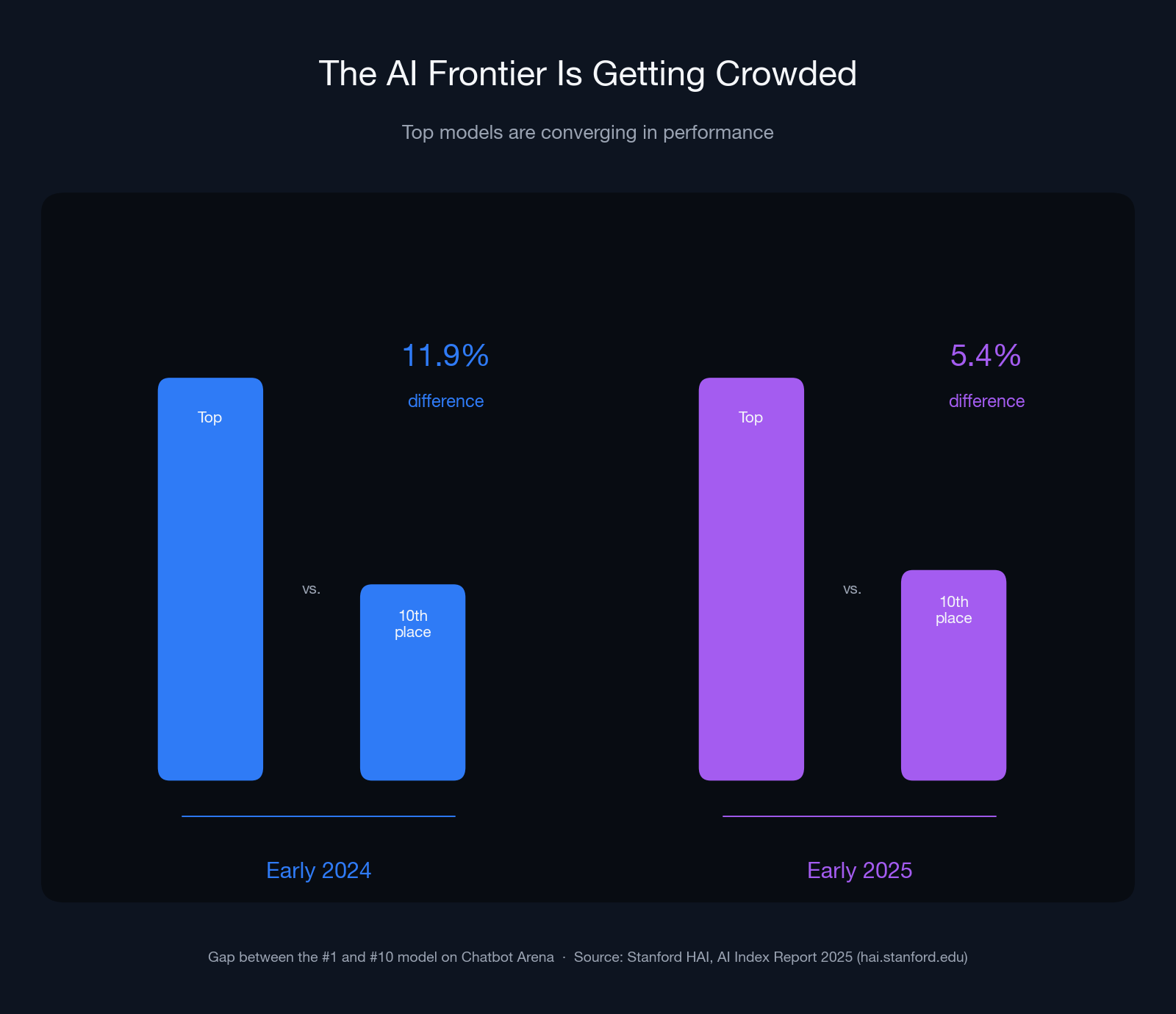
The field is crowding fast: the gap between the top and 10th-ranked models on Chatbot Arena shrank from 11.9% to 5.4% in a single year, per Stanford HAI’s AI Index Report 2025. The practical upshot? Which model powers your tool matters less than whether the tool fits your workflow.
At DreamHost, we’ve seen this play out before in web hosting: feature lists that look impressive until you realize they kind of just slow things down. Real innovation, in hosting or in workflow tools, is about simplicity, speed, and substance over hype.
So we rolled up our sleeves, fired up our browsers, and put these tools through real small-business challenges. The results? Some impressed, some imploded — and now we have some answers to one of the biggest questions business owners ask today: Which AI tools actually help you get your time back?
What makes an AI tool genuinely “productive”?
A genuinely productive AI tool delivers measurable time savings and cuts how often you switch between apps to finish a task. It makes your workflow shorter and simpler. If you’re still checking outputs, reformatting files, or second-guessing every AI suggestion, that is really just busywork disguised in a nicer interface.
When we tested tools for this roundup, we looked for tangible impact: fewer clicks, faster results, and smarter decision-making that didn’t need babysitting. The most effective tools had one thing in common: they earned their place in the workflow by removing friction.
Here’s the framework we used to separate signal from noise:
- Automation depth: Does it remove entire steps, or just speed them up slightly?
- Integration: Does it directly connect with your existing stack (e.g., WordPress, Slack, or Google Workspace) without requiring workarounds?
- Accuracy: Are outputs usable the first time, or do they need constant double-checking and cleanup?
- Adaptability: Can it learn from your patterns, or is it a one-trick prompt engine?
- Transparency: Can you see what the AI is doing, or does it feel like a black box?
With these five filters in mind, we moved to the daily workflows we use most often: communication, content creation, and collaboration.
The AI website builder that turns conversation into designer-level sites. Free with hosting.
Start Free Trial
Which AI tools actually helped us communicate faster?
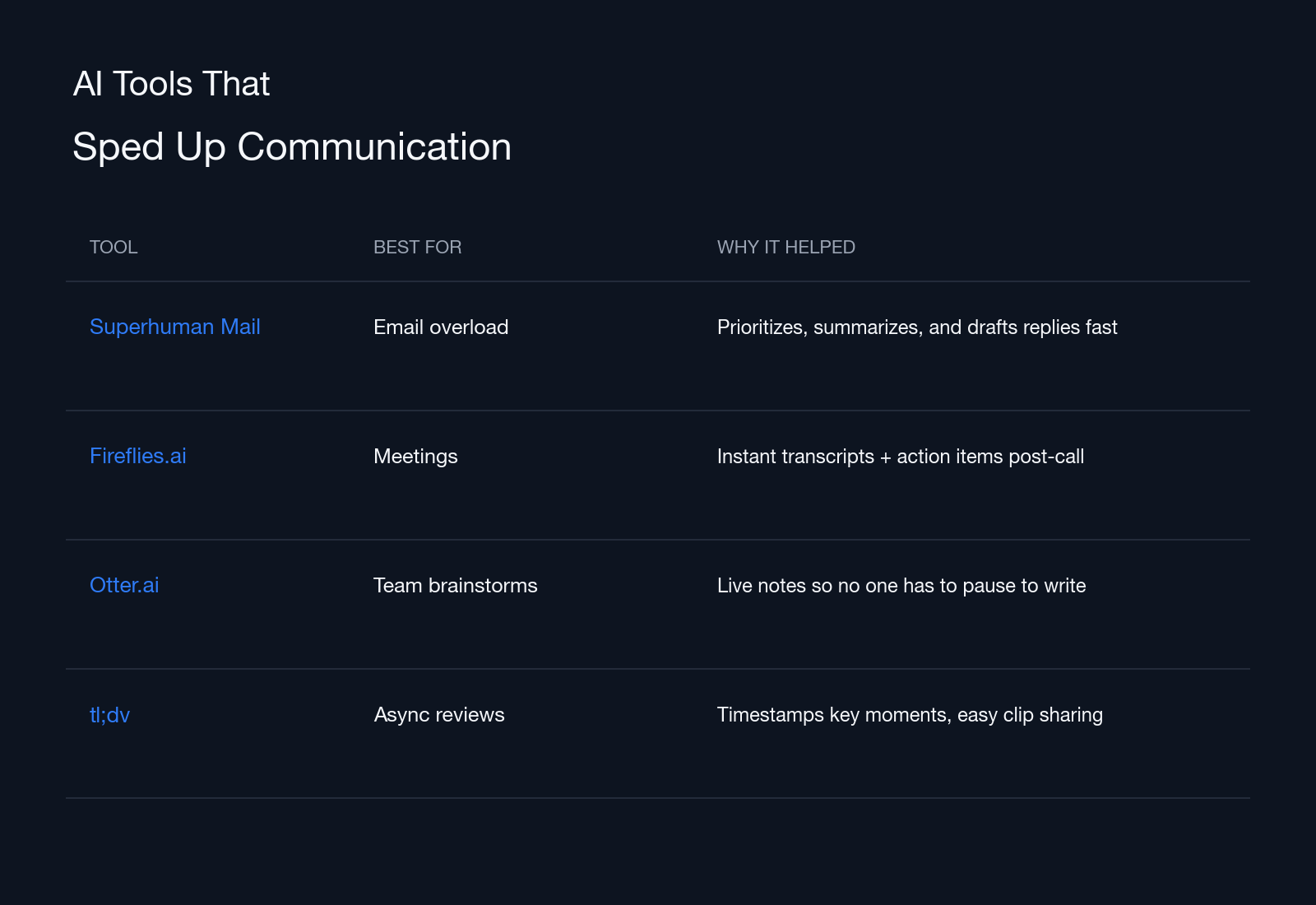
Of all the categories we tested, communication tools delivered the biggest and fastest productivity gains. AI was at its best when handling the messy, time-consuming parts of teamwork, like summarizing meetings, drafting emails, and turning conversations into actionable next steps. The right tools both sped up responses and helped prevent miscommunication.
Tools we liked:
- Superhuman Mail: The best inbox accelerator — Grammarly acquired the email client in 2025 and later rebranded the whole company as Superhuman. Its AI triages emails by priority, drafts replies in your tone, and summarizes long threads so you can catch up in seconds, instead of scrolling endlessly. If you deal with dozens of client messages or project updates daily, it can reclaim hours that could otherwise be lost to email ping-pong.
- Fireflies.ai: A clear win for meetings. It records, transcribes, and summarizes calls across Zoom, Meet, and Teams and automatically tags follow-ups and owners. For distributed teams, it’s a lifesaver when you get a searchable transcript and action list minutes after hanging up.
- Otter.ai: A favorite that we use internally to capture product brainstorms and technical discussions, letting developers focus on ideas instead of taking notes. Its live transcription and summary features are nearly flawless.
- tl;dv: Great for async teams. It timestamps key moments in recordings and creates shareable clips, making long client review calls easier to digest.
Together, these AI tools don’t just make communication faster — they make it smarter, helping you boost your productivity in ways that simplify your day.
What are the best AI tools for content and creative workflows?
Creative productivity doesn’t mean outsourcing ideas to AI. But there are ways to clear the repetitive clutter that slows down the real work. From resizing graphics to writing meta descriptions, these AI tools for creative workflows handle the tedious stuff so you can stay focused on strategy, storytelling, and quality.
Tools we liked:
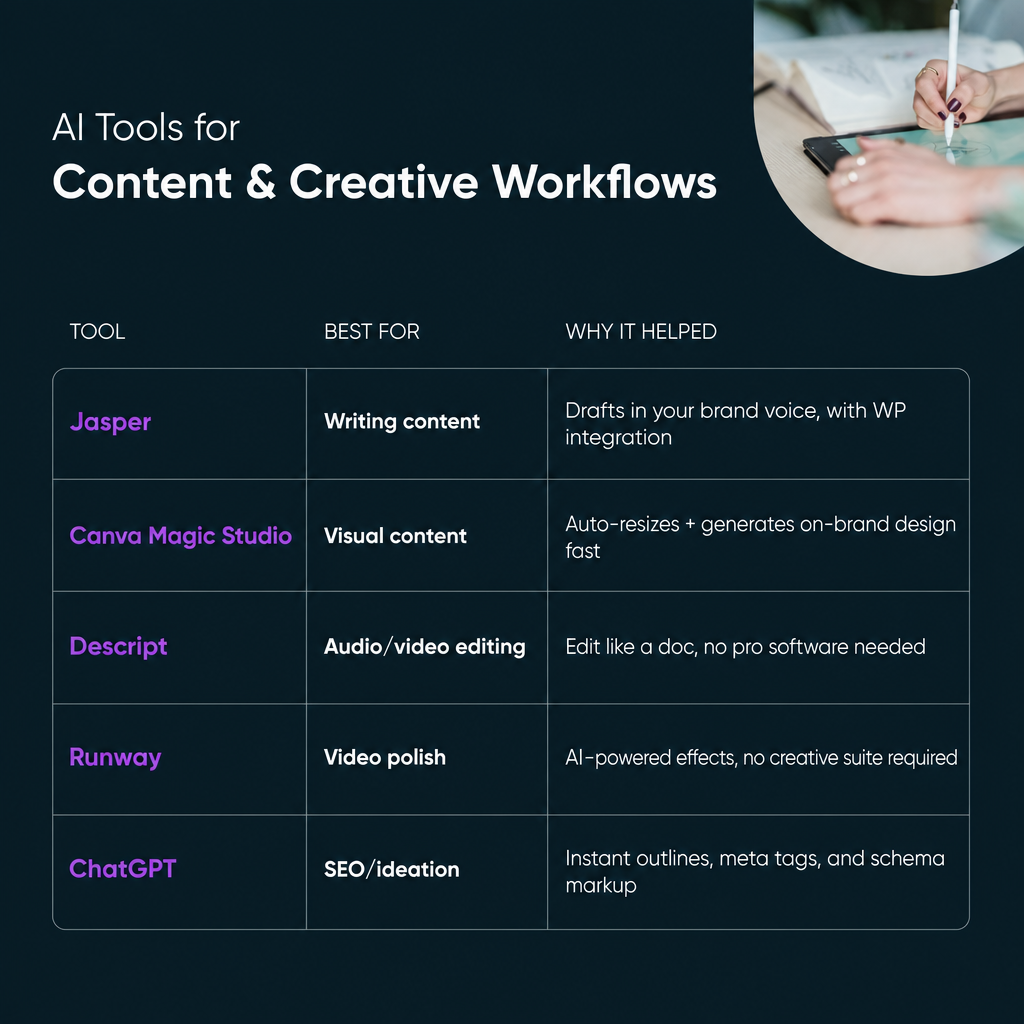
- Jasper: The most complete AI writing platform for small businesses. It generates blog outlines, ad copy, and long-form drafts while maintaining your brand’s tone of voice. It connects to WordPress through Zapier, Make, or its browser extension, moving finished drafts into WordPress without copy-paste loops between platforms.
- Canva Magic Studio: Brings that same time savings to design. Its one-click resizing and Magic Media AI image generator produce on-brand visuals across social channels in minutes. For business owners who can’t justify a full-time designer, Canva’s automation means every campaign asset matches your brand without a learning curve.
- Descript: Turns audio and video editing into word processing. You can cut filler words, trim pauses, or overdub voice errors just by editing text. It’s ideal for podcasters or online course creators who want pro-level polish without mastering Premiere or Audition.
- Runway: Handles heavier lifting, like background removal, color correction, and video generation. It’s perfect for e-commerce brands turning product shots into scroll-stopping clips.
- ChatGPT: The OG earns its spot for brainstorming, outlining, and automating metadata. Using it to generate schema markup or meta descriptions for WordPress posts can slash hours from your SEO workflow.
AI can’t replace creativity, but it can remove the barriers that keep you from it. In our testing, these tools cut content production time by half or more when used well — enough to let small teams spend more time on original work.
Which AI workflow automation tools actually saved time?
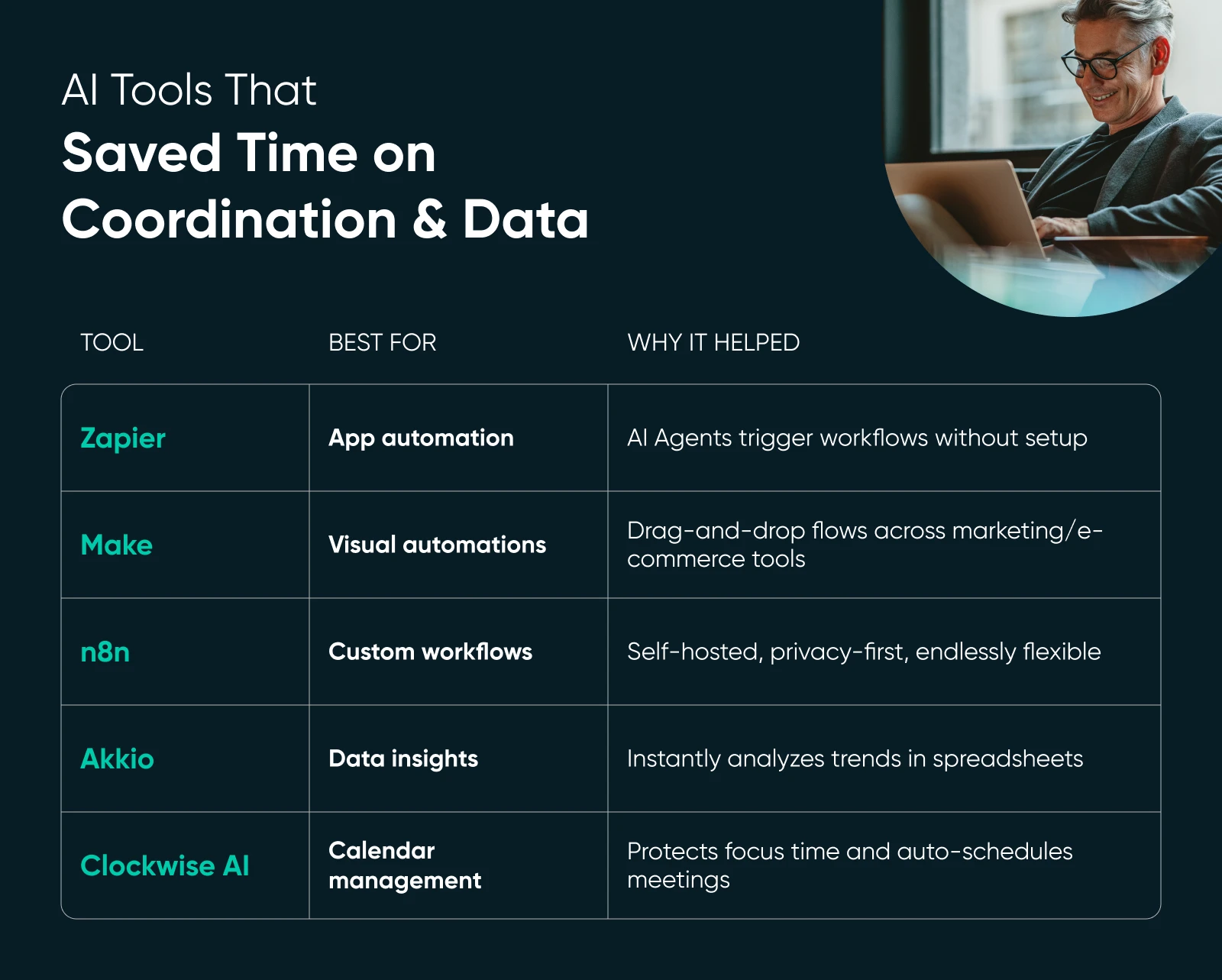
When it comes to backend operations, AI tools can help you coordinate multi-tool workflows, manage schedules, and make data analysis feel effortless. The best tools acted like digital operations managers. They were invisible when things worked right, but impossible to live without once we saw how much time they could save us.
Tools we liked:
- Zapier: Still the go-to for connecting dozens of business apps into one automated system. Once you’ve trained them with instructions, Zapier Agents can take actions across thousands of apps on their own. For small agencies juggling client onboarding forms, CRM updates, and invoicing, it simply ties everything together while you focus on higher-value work, and we don’t need to tell you what a massive relief that is.
- Make (formerly Integromat): Stands out for its visual, drag-and-drop interface that lets you design complex automations without coding. It’s ideal for marketing and e-commerce teams managing multiple platforms, giving you a bird’s-eye view of every trigger and task in real time.
- n8n: Takes automation further for teams that care about data privacy and control. This source-available (fair-code) platform allows self-hosting, so you own your automations and data. Developers can customize every flow, from product updates to customer notifications, without third-party lock-in.
With this kind of automation, the goal isn’t flashy dashboards or endless integrations. It’s removing invisible friction that eats away at your day. When your workflows run cleanly in the background, your business (and your brain) loads faster. And these apps deliver.
The best AI productivity tools we tested, by workflow
After a full week of testing, one pattern was unmistakable: The AI tools that eliminated context switching, not just automated tasks, delivered the biggest productivity gains. In every workflow, the winners were tools that smoothed out decisions and moved information between systems without asking for extra clicks or oversight.
Here’s what the results looked like when we compared outcomes across our three main workflows:
| Workflow | Top Tool | Why It Won | Time Saved |
| Communication | Fireflies.ai | Auto-summarized meetings and assigned next steps instantly, reducing manual note-taking and tracking down next steps (and their owners). | ~30 minutes per meeting |
| Content creation | Jasper | Produced editable, on-brand drafts with minimal revisions. Connected to WordPress via Zapier, which sped up publishing. | 2–3 hours per blog post |
| Team coordination | Zapier + n8n | Automated tons of backend workflows while maintaining data accuracy and privacy. | About 4 hours per week so far, but we haven’t reached the upper limits of these tools’ capabilities |
FAQ: your top AI productivity questions, answered
What is the most powerful AI productivity tool?
There’s no universal winner. The most powerful tool is the one that automates your biggest time sink. Zapier and Make excel at multi-app workflows, while Jasper dominates for content. The key is choosing software that fits your workflow instead of forcing a new one.
Are AI productivity tools safe for business use?
Most leading tools are secure when used correctly. Look for clear data policies, encryption, and SOC 2 or GDPR compliance. n8n and other self-hosted options give you full control if you’re handling sensitive information.
How can I measure productivity gains from AI?
Track time saved or completed outputs before and after adopting a tool. If your weekly report or client email sequence takes 30% less time, that’s a measurable return. Focus on consistency and look for small, repeatable gains.
Do I need technical skills to use AI productivity tools?
Not at all. Platforms like Zapier, Make, and Jasper are designed for non-developers, using plain-language prompts and visual builders. The best AI tools make complex automation feel like using a to-do list, not writing code.
Can AI tools integrate with WordPress?
Absolutely. Many platforms connect directly or through APIs. You can automate publishing via Jasper, manage forms with Zapier, or generate schema markup using AI assistants.
Can an AI note-taker really save you time?
Yes. AI note-takers like Fireflies.ai, Otter.ai, and tl;dv turn calls into searchable transcripts, summaries, and action items minutes after you hang up. In our testing, Fireflies.ai saved about 30 minutes per meeting by cutting manual note-taking and follow-up tracking.
Productivity is about doing less, better
The best AI productivity tools are simpler than you’d think. They just help you easily take care of the repetitive, brain-draining stuff that keeps you from the creative or strategic parts of your business — no fancy dashboards or floods of notifications required.
Used well, AI becomes a focus toolkit, something that protects your attention instead of fighting for it. It drafts your follow-ups, organizes your notes, builds the spreadsheet, or tags the client file so you can spend your time thinking, designing, or building. Sure, it boosts productivity, but more importantly, it’s sustainable.
At DreamHost, we’ve always believed the right technology should feel invisible. Whether it’s a hosting stack or a workflow stack, simplicity wins every time. The future of productivity won’t belong to the people doing the most, but to those who’ve learned to delegate the noise and focus on what actually matters.