
Pinterest isn’t a platform for decor, weddings, and recipes anymore. Adobe’s 2025 survey found that 39% of consumers already use Pinterest as a search engine, and 36% start their searches there instead of Google — figures that climb to 47% and 39% among Gen Z.
That shift matters because of what people are doing there: they come to Pinterest to actively discover new products and brands, often while planning a purchase. The businesses still treating it as a decor-and-recipes niche are quietly handing that intent to competitors.
What Is Pinterest?
Pinterest is a visual search engine. It hit 619 million monthly users at the end of 2025 and the audience skews strongly toward purchase-ready intent (details in the next section).
Compared to other social networks, with Pinterest, you publish to an index. Content gets filed, discovered through search, and resurfaces repeatedly over months and years just like it does with Google.
But apart from the content lifespan and user base, Pinterest also has a high buying intent.
Who’s On Pinterest?
Women make up more than 70% of Pinterest users worldwide, which is why home, beauty, food, fashion, and parenting brands consistently find strong audiences there. But what the stereotype misses is the age shift happening underneath those numbers.
Gen Z comprises 42% of global Pinterest users, and they search and save more than any other generation on the platform. The platform’s fastest-growing audience is younger than the cliché suggests, which is quite useful to think of, if your product targets anyone under 35.
For brands outside the obvious lifestyle categories, the question to ask is not whether your product fits the Pinterest stereotype but whether there is a visual, aspirational angle to what you sell.
For example, productivity tools have found traction through workspace setup content. B2B software brands reach their audience through planning templates and workflow visuals. The category matters less than whether the use case can be shown.
How Pinterest Decides What to Rank
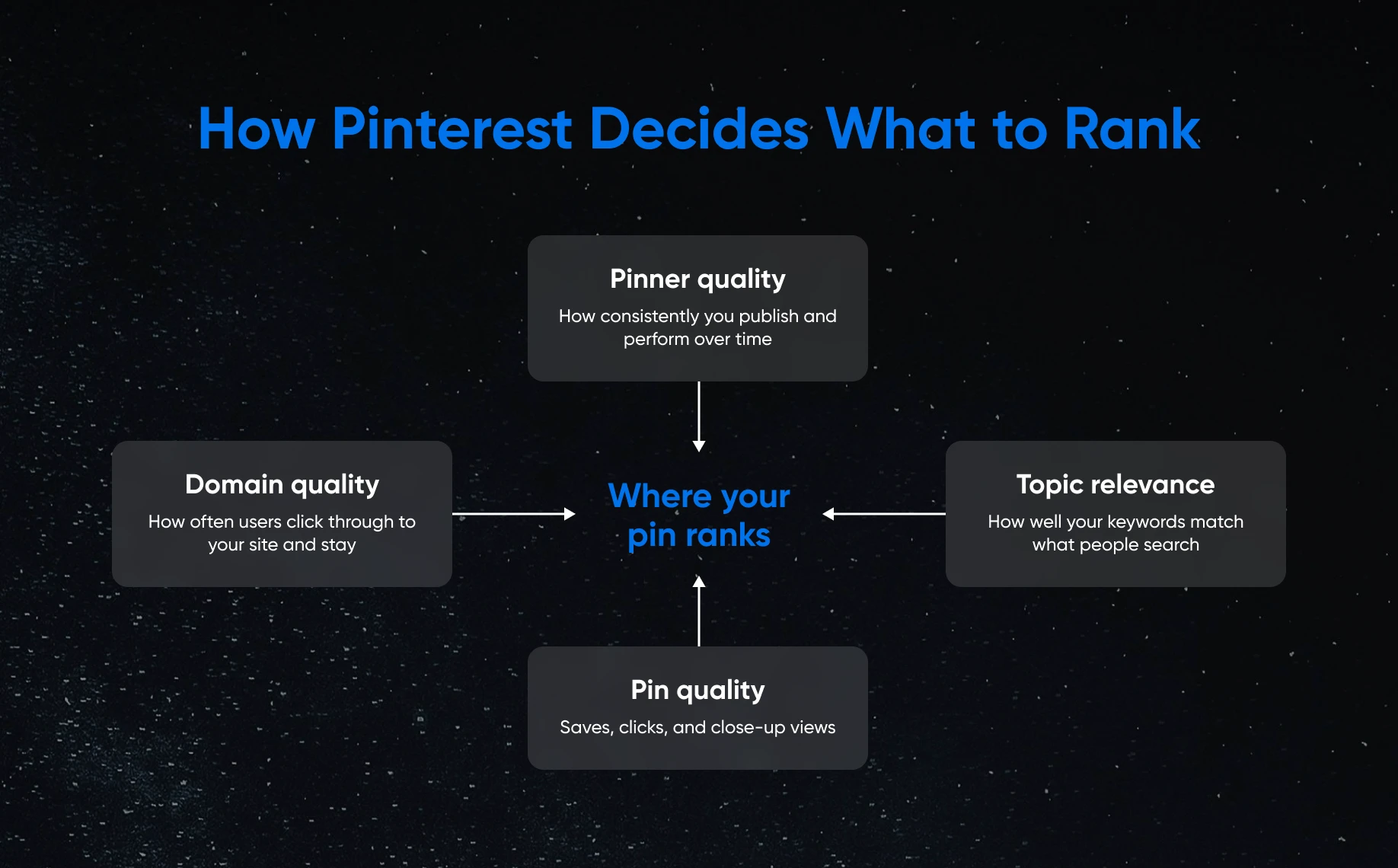
There’s a lot that goes on behind the scenes, but from a bird’s-eye-view perspective, Pinterest’s algorithm ranks pins based on four signals, according to how the platform describes its own system.
- Domain quality: Pinterest tracks how often users click through from your pins to your website and what they do when they get there. A site that earns repeat clicks and engagement from Pinterest visitors is treated as more credible, and that credibility flows back to your pins’ rankings.
- Pin quality: Saves, clicks, and close-up views signal to Pinterest that a pin is worth showing to more people. Saves carry particular weight because when someone saves a pin, they are often planning a purchase, a project, or a future decision. A saved pin stays in circulation in Pinterest’s index long after the original post date.
- Pinner quality: Pinterest monitors how consistently an account publishes fresh content and how well that content performs over time. Accounts that post regularly and earn consistent engagement are treated as more authoritative than accounts that post in bursts and go quiet.
- Topic relevance: Pinterest matches the keywords in your pin titles, descriptions, board names, and alt text against what users are searching for. Unlike older social platforms where keyword stuffing once worked, Pinterest’s algorithm now reads for natural language. A description that reads as if a human wrote it, using the words a searcher would type, outperforms one that strings together keyword phrases.
Tailwind’s 2025 research found that pins with alt text earned 25% more impressions, 123% more outbound clicks, and 56% more profile visits on average than pins without it.
Pinterest’s job is to match that half-formed intent to an idea, and your pin is competing to be that idea.
Researching Keywords on Pinterest
Pinterest’s own search bar is a free keyword research tool, sitting in plain sight.
Then you have Pinterest Trends, the platform’s own forecasting tool, which adds a second layer to your data analytics.
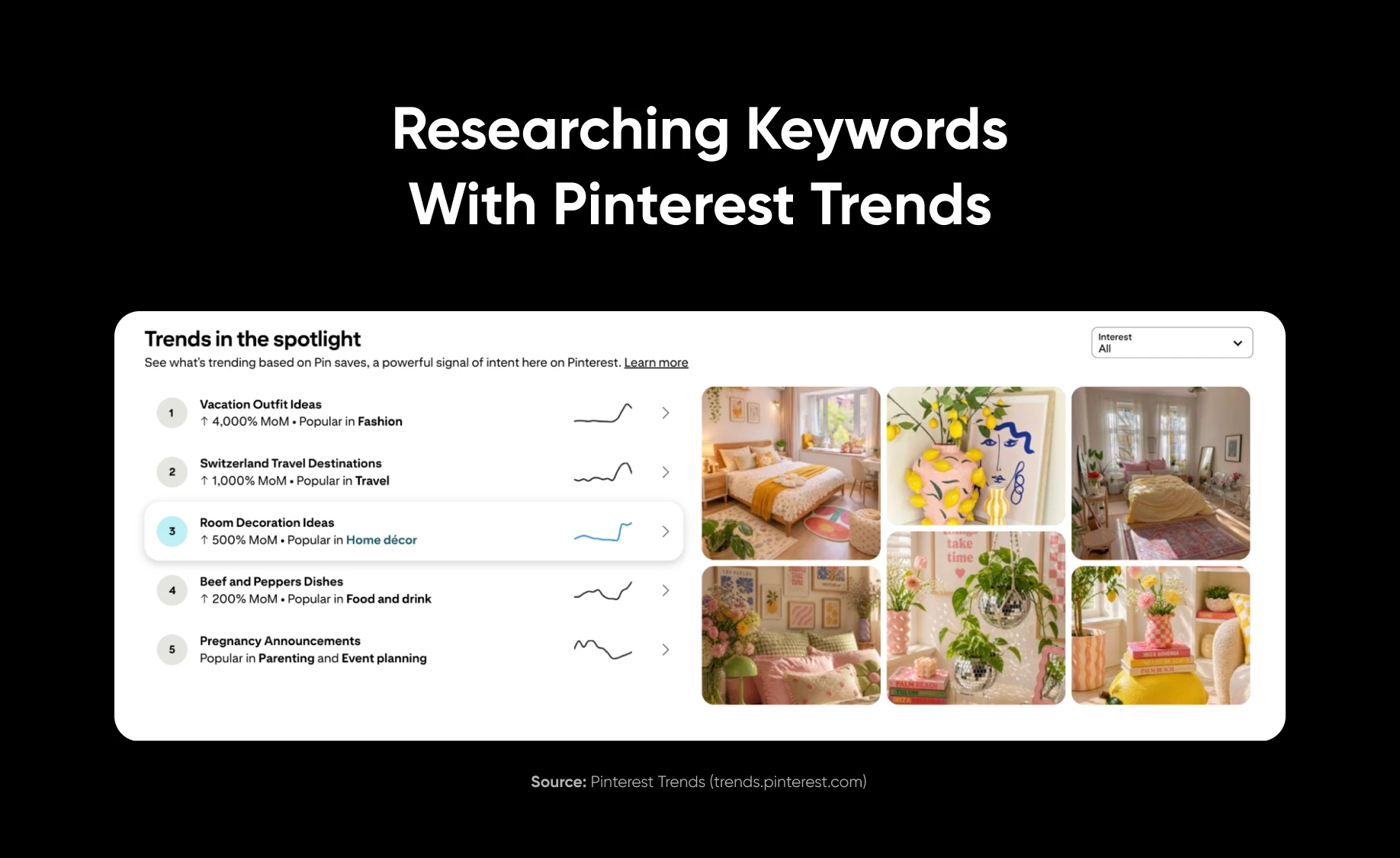
It shows you which searches are rising months ahead of the season, and Pinterest has a track record: of the trends in its yearly Pinterest Predicts report, 88% have come true over the past six years, and trends on the platform last almost twice as long as trends that start elsewhere.
Pinterest users are, by habit, planning, saving ideas for a wedding eight months out or a kitchen remodel next spring. A seasonal pin posted in July for a December trend will usually outperform the same pin posted in November, after the planners have already moved on.
Once you have the search phrases, build the pin to match it directly.
Building a Pin for Your Brand
Pinterest is a visual search engine, which means the image is also the ad.
A pin that looks like a product photo from an e-commerce catalog will underperform against a pin that shows the product in a context that matches what the searcher was imagining.
- Image specs: Vertical images at a 2:3 ratio, ideally 1000 by 1500 pixels, are the standard. More than 85% of Pinterest usage happens on mobile, so a vertical image fills the screen rather than shrinking into a thumbnail.
- Text overlay: Adding a few words directly onto the image that name the benefit or the outcome, not just the product, consistently outperforms bare product shots. A pin for a desk organizer that overlays the words “5 steps to a clear desk by Friday” is targeting search intent, not just showing a product.
- Alt text: Fill this field every time. As noted above, the data on this from 2025 is clear enough to make it non-negotiable.
- Descriptions: Write 100 to 200 words in natural language, use your primary keyword phrase early, and write for the searcher rather than the algorithm. Pinterest can detect over-optimization attempts.
- Board placement: The board where you first save a fresh pin shapes Pinterest’s understanding of that content. Saving a pin to an unrelated board because it has more followers dilutes Pinterest’s ability to categorize the content accurately and hurts distribution. Save each new pin to the most specifically relevant board first.
- The landing page: Send the click to a page that mirrors the exact promise on the pin. A pin about a specific desk organizer should land on that organizer’s product page, not the store’s homepage. A searcher clicked because of one specific promise, and if the landing page requires them to hunt for it, they will leave before finding it.
Using Rich Pins on Pinterest
Rich Pins automatically pull real-time data from your website, including article titles, product pricing, and availability.
To set up Rich Pins, add Open Graph or Schema markup to your website’s <head> section, then validate through Pinterest’s Rich Pins validator. Once validated, pins can be used to display real-time information like live price and stock status directly on the pin, which increases both click-through rate and purchase confidence.
A shopper who sees an in-stock product at a visible price in the pin itself is closer to buying than one who has to click through just to find out if the item is available.
Setting up rich pins involves adding Open Graph or Schema markup to your website, verifying your domain on Pinterest, and applying through the Verified Merchant Program. Pinterest’s own documentation walks through the technical steps. The effort is a one-time investment that benefits every product pin you publish afterward.
Pinterest Board Strategy
Boards are Pinterest’s filing system for your content, and they carry their own keyword signals that influence how individual pins rank.
You need to organize them the same way you’d organize content on your blog (in categories, collections, groups, etc.).
Start by naming each board the way a searcher would type a query. For instance, “Sustainable Home Office Ideas” is a searchable board name, but something like “Inspired Spaces” is quite vague. The first version tells Pinterest’s index exactly what content lives there and matches real search queries.
Then, write a full board description. The description gives Pinterest additional keyword context and gives a human searcher a reason to follow the board. Keep it under 500 characters and use the same natural-language approach as pin descriptions.
And more importantly, to build context for the algorithm on what the board actually carries, pin consistently. Pinterest’s 2025 algorithm updates made board context a direct ranking factor, meaning boards that receive regular fresh pins are treated as more authoritative than boards that go stagnant.
Five to ten boards organized around your core product categories, each receiving consistent fresh content, will outperform twenty boards that each have a few pins and no activity.
What Metrics to Check Before You Move On
Pinterest Analytics shows three numbers worth tracking: impressions, saves, and outbound clicks. Only one of them tells you about money, and it is outbound clicks, because that is someone actually leaving Pinterest for your site.
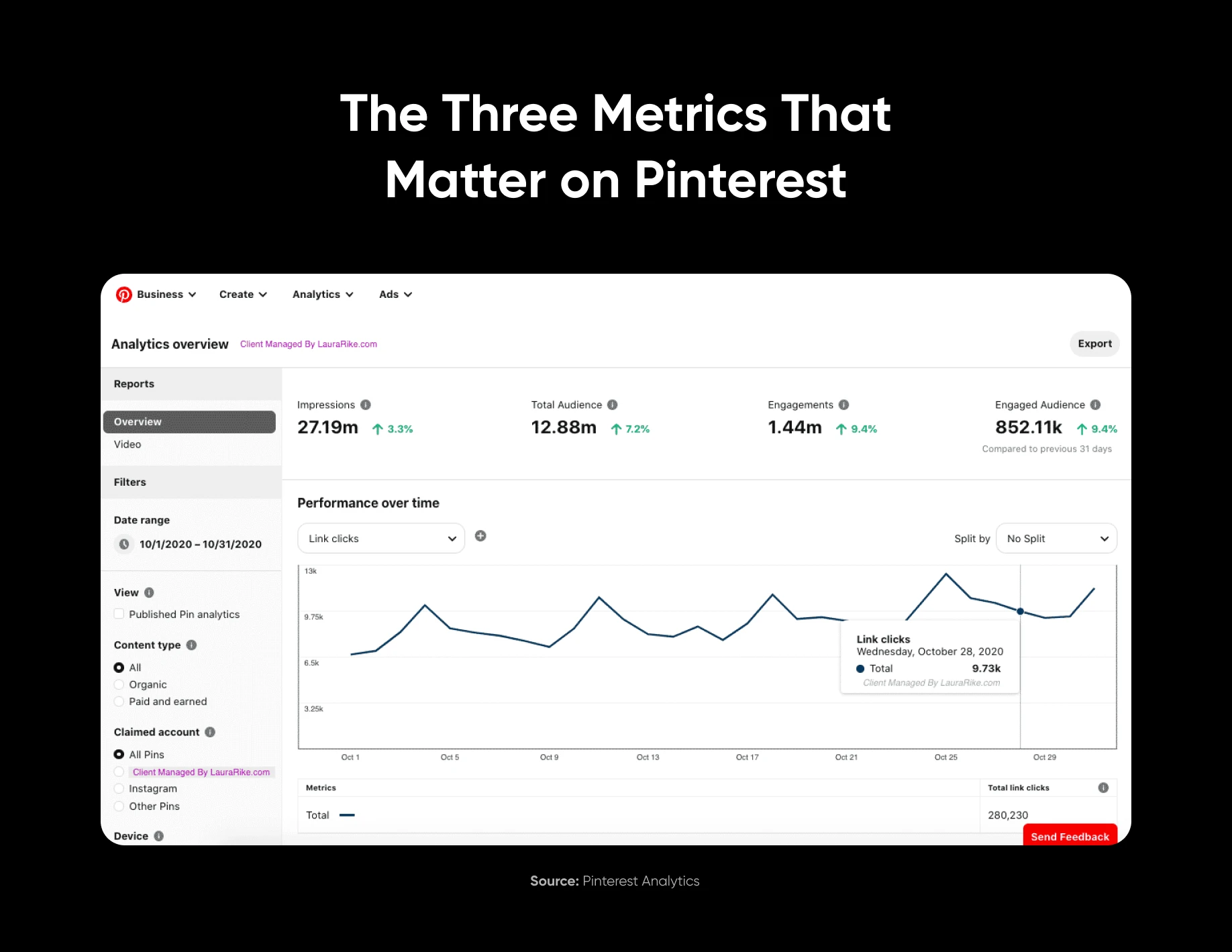
Remember not to get caught up in vanity metrics if you’re building on Pinterest to sell something. A pin can rack up thousands of saves from people building mood boards who never buy anything, while a pin with a sharper, more specific promise sends a steady trickle of buyers to your website.
And add the Pinterest tag to your site so outbound clicks tie directly to sales, turning the guesswork into a clear ranking of which pins actually earn money rather than just applause.
Tools for Pinterest Keyword and Analytics Work
Research:
- Pinterest’s own search bar and Trends tool; free.
- Pinterest Predicts annual report; free, published each November.
- Tailwind’s keyword suggestions; free tier available, paid for deeper data.
Scheduling and fresh content at scale:
- Tailwind; the most widely used Pinterest scheduling tool, with native analytics integration.
- Buffer and Later; both support Pinterest scheduling at lower price points.
Tracking performance:
- Pinterest Analytics; free, built-in.
- Pinterest Tag; free, requires installing a snippet on your website.
- Google Analytics with UTM parameters on your pin links; free, ties Pinterest traffic to on-site behavior and conversions.
Treat Pinterest Like Search, Not Social
The businesses that win on Pinterest are the ones that stop treating it like a social feed and start treating it like the search engine it is. Every choice here flows from that shift — researching the phrases people actually type, building vertical pins that answer a specific search, naming boards the way a searcher would, and pointing each click at a page that keeps the pin’s promise.
The fundamentals most accounts skip are where the advantage hides. Filling in alt text, writing descriptions in plain language, and saving each pin to its most relevant board are small, unglamorous tasks — and the data shows they consistently separate pins that get found from pins that disappear.
Unlike a social post that peaks in an hour, a well-built pin keeps surfacing in search for months, quietly pulling in buyers long after you published it. Measure the number that reflects that — outbound clicks, not saves — and you’ll know which pins are earning their place and which are just collecting applause.