
The Services page on your website has one job: to remove doubt and make the next step feel obvious.
OK, maybe that’s two jobs, but you catch our drift.
Your Services page is critical.
By the time someone lands on it, they’re probably no longer just casually browsing.
They’re ready to take action.
Which means they’ll either be diving into your services — or moving on to a competitor.
A well-crafted Services page answers visitor questions, explains why you’re a good fit, and shows people how to start working with you.
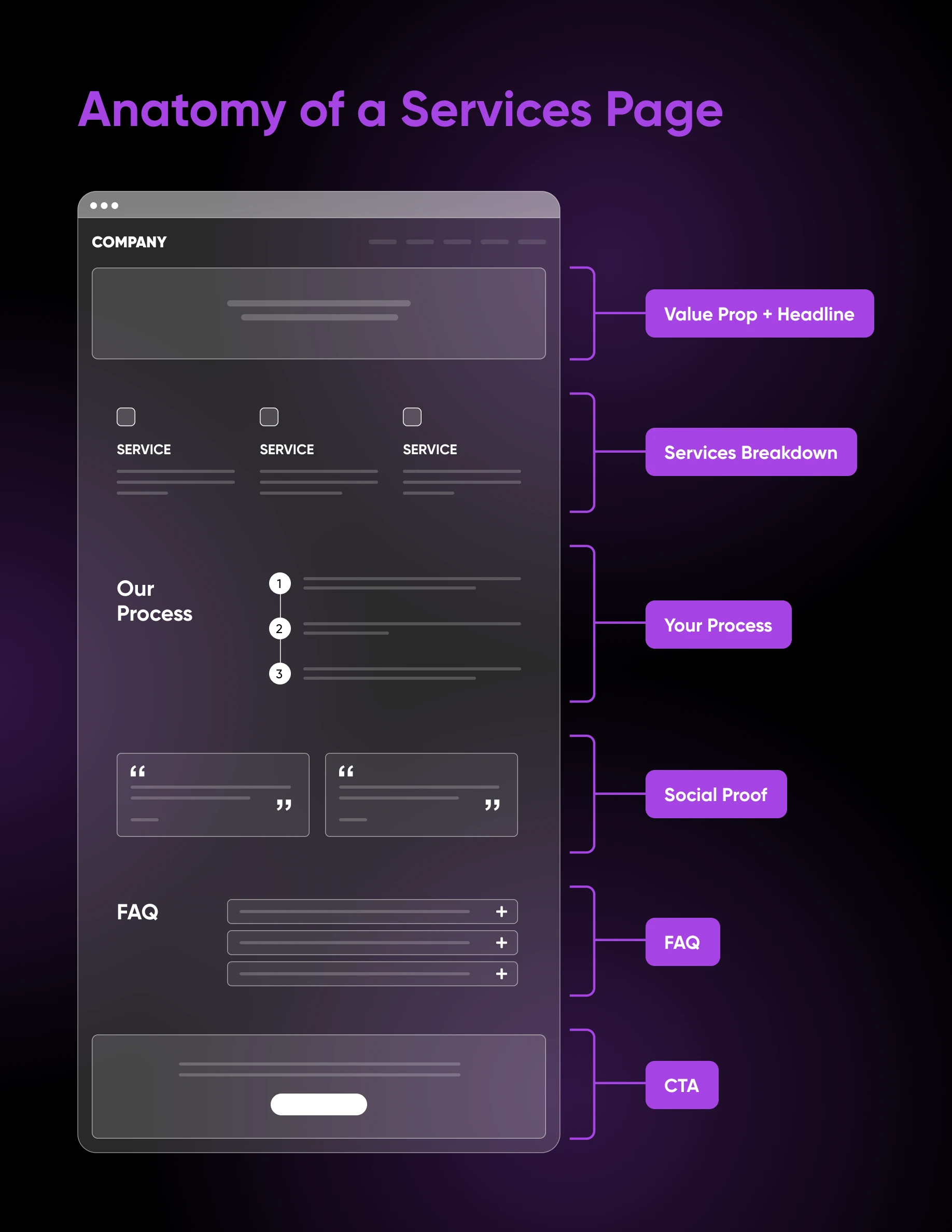
To write a services page that converts, open with a clear value proposition (what you do, who you help, the result you deliver), break services into scannable sections focused on outcomes, explain your process, add trust signals like testimonials, offer pricing guidance, answer common questions in an FAQ, and close with low-friction calls to action.
Why your business needs a services page
When someone lands on a Services page, they’re signaling that they’re far enough along in their user journey that they intend to make a purchase, just as soon as they find the right option.
Because of this, a Services page is a critical tipping point at which visitors decide whether to become customers or remain casual clickers.
It’s important to put time and effort into designing it to attract and convert the exact type of clientele you want to serve.
How to write a services page that converts
Don’t know where to start sprucing up the Services page? Think about the following factors to create a solid Services page that generates clarity, credibility, and action on your small biz website.
Kick it off with a clear value proposition
The very beginning of your Services page should immediately explain what you do and why someone should choose you to do it for them.
Visitors judge a website’s visual appeal within 50 milliseconds (Lindgaard et al., 2006), so your very first headline must communicate value instantly.
A strong headline typically includes three elements:
- The service you provide.
- The audience you help.
- The outcome you deliver.
So while “Professional Marketing Services” may be true, a much more powerful and clear headline to slap across the top of your Services page would be: “Data-Driven Marketing Strategies That Help Small Businesses Generate More Qualified Leads.”
The latter explains both the service and the result.
Below this strong opener, slide in a short supporting paragraph that explains what makes your business different. Highlight impactful factors, like your years of experience, specialized expertise, and results you’ve delivered for clients.
For example, a landscaping company might write: “Since 2012, we’ve helped homeowners across Denver transform their outdoor spaces with sustainable landscape design and expert installation.”
This opening section needs to function as your hook. If visitors immediately understand the value you offer, they’re far more likely to continue reading.
Dive into your services
Once visitors understand your value, the next step is to clearly present the services you offer.
Many businesses make the mistake of writing long paragraphs describing every single thing they do.
And that’s overwhelming for visitors who want to scan the page to find content that is relevant to them.
- Break your services into clear sections with descriptive headings.
- Each section should contain a short description explaining what the service includes, who it’s for, the results clients can expect, and any other unique details.
How should you explain your process?
Walk visitors through how a project with you unfolds, step by step. One of the biggest reasons people hesitate to hire service providers is just a lack of clarity.
What will working with you be like? How long will it take? When will you need the client’s input, and how will you keep them informed?
Adding some details around how you work through your core services can reduce uncertainty and build confidence.
Tie in trust signals
Trust is essential for service businesses because customers take a risk every time they send money to someone on the internet, site unseen.
It’s your job to outfit your website in a way that makes them believe that you can deliver what you promise.
A great way to do so is by tying in what is known as social proof, which comes in the form of testimonials, client logos, industry certifications, and more.
Another persuasive element you can include on your Services page is examples of completed projects. These are powerful because they transform abstract promises into demonstrated outcomes. Instead of saying “We improve SEO,” you get to show exactly how you did it.
Optimize the page for readability
Even the best content won’t work if it’s difficult to read.
These design tips will make for a much more pleasant Services page:
- Use clear headings and subheadings so readers can quickly scan the page.
- Break text into short paragraphs instead of large blocks.
- Leave plenty of white space so the content feels approachable.
- Use contrast to help testimonials and CTAs stand out and capture attention as visitors scroll.
Then there’s the length to consider.
Best practice for website pages is to keep them between 200 and 1,000 words, of course, depending on the topic and the page’s purpose.
Communicate your message and next steps clearly, but avoid overwhelming readers with endless details.
Include visual elements
Including visual elements on your Services page makes it more credible and engaging.
Strong visuals can include photos of your team, before-and-after images of projects, screenshots of results or dashboards, and graphics that explain your process. These visuals make the page more engaging and help visitors better understand what you offer.
The key is to use authentic visuals rather than generic stock photos whenever possible. Real photos of your work and your team help build trust and make your services feel more tangible to potential customers.
Should you include pricing on your services page?
Yes — we believe including at least some pricing information is helpful. There doesn’t seem to be much standardization in any industry on this, and the choice is yours, but even partial pricing sets expectations so no one’s time is wasted.
Being transparent about pricing builds trust and also helps filter out leads who cannot afford your services.
There are a couple of approaches you can take here:
- “Starting at” pricing works well for packaged services: For example, stating that website design services start at $2,500. Price ranges are helpful for services that vary by scope, such as a typical drywall project running $1,000 to $3,000, per HomeGuide (September 2025).
- When services are highly customized, a “Contact for a Quote” approach may be necessary: But it should always be accompanied by context explaining why pricing is individualized. Pairing this with a strong call-to-action, such as “Get your personalized estimate today,” may reduce hesitation.
Add an FAQ section
We’re big proponents of using FAQ sections for two reasons:
- They proactively answer consumer questions, building confidence and keeping visitors on your site.
- And they can also improve search visibility because they often align very closely with the questions people type into search engines.
If you’re interested, here are some questions to consider answering on your Services page:
- How much does the service cost?
- How long does the process take?
- What industries do you work with?
- Do you offer guarantees?
- How do we get started?
Tap into services SEO
Your Services page can pull double duty because it can also help potential customers discover your business through search engines.
- Include your main services-related keyword in the page title, headline, and subheadings.
- Write a clear meta description summarizing what visitors can expect.
- Use internal links to connect your Services page to relevant blog posts or resources, which helps both users and search engines.
If you’d rather not track all of this by hand, the DreamHost SEO Toolkit turns this on-page work into a guided checklist, with keyword tracking and 1-click title and meta description optimization inside WordPress.
One more shift worth planning for: AI Overviews and chat assistants may surface service-buying answers directly. Clear, self-contained answers, named specifics, and a solid FAQ make your page easier for those systems to understand and cite.
Also, don’t be afraid of all the details we’ve asked you to fill in.
A longer Services page leaves lots of room for search engine optimized content, and also allows you to include all of the elements we’ve described here without leaving visitors with unanswered questions.
How do you write CTAs that reduce friction?
Calls-to-action transform interest into action, but they must feel intuitive and low-risk.
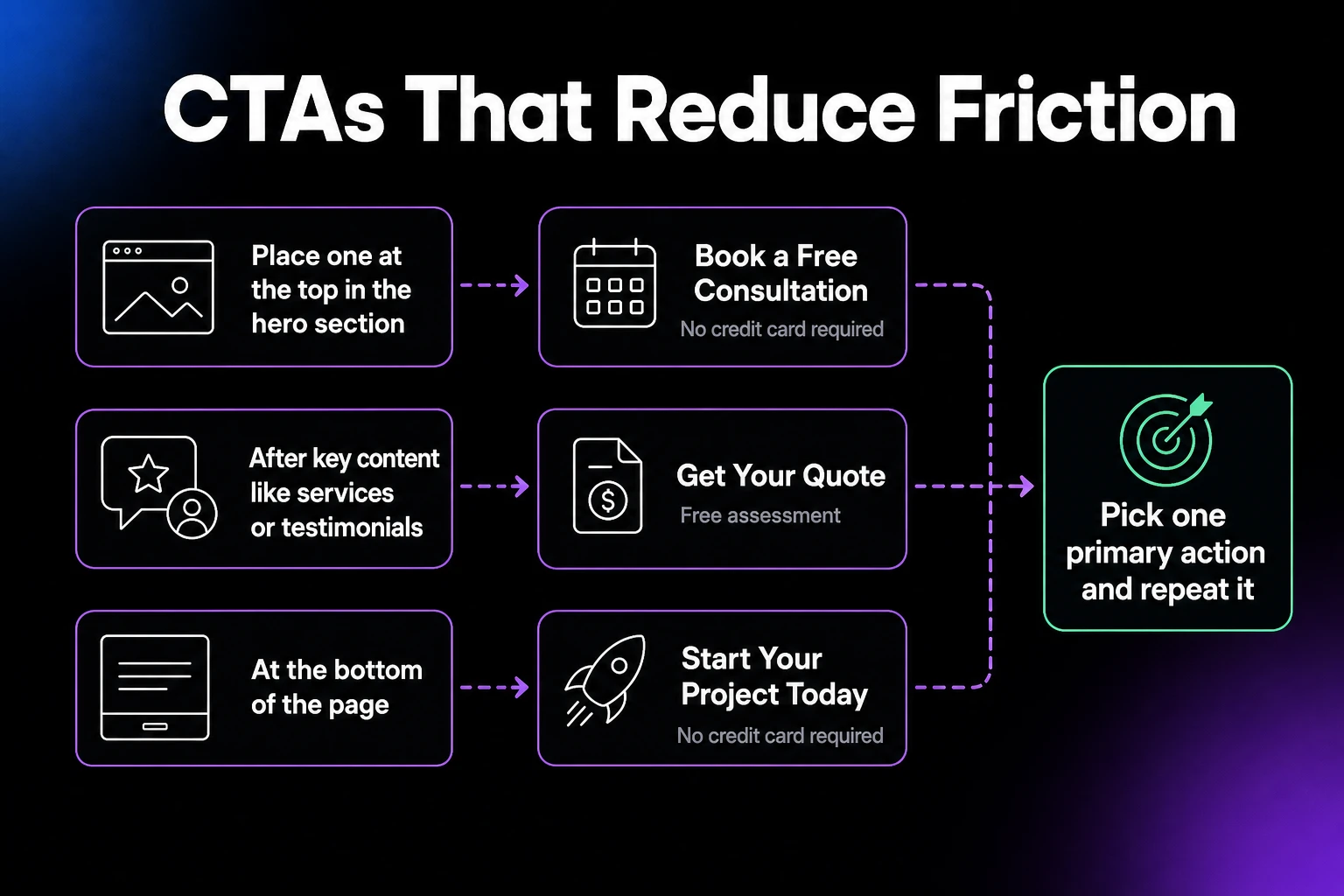
CTAs should appear strategically throughout your Services page. Consider placing one at the top in the hero section, after important content like services or testimonials, and at the bottom of the page to ensure a next step is always visible.
The language of your CTAs should be action-oriented and specific about what happens next. For instance: “Book a Free Consultation,” “Get Your Quote,” or “Start Your Project Today.”
You can also reduce anxiety with phrases like “No credit card required” or “Free assessment,” which encourage engagement without too much commitment.
All that said, avoid overwhelming users with too much language and too many choices. Pick one primary action and repeat it; piling on competing CTAs splits attention.
Services page FAQs
How long should a services page be?
Aim for 200 to 1,000 words, depending on the topic and the page’s purpose. That’s long enough to answer your visitors’ main questions and support SEO, but short enough to stay scannable.
What should a services page include?
A clear value proposition, scannable service sections that focus on outcomes, an overview of your process, trust signals like testimonials and case studies, pricing guidance, an FAQ, and low-friction calls to action.
Should a services page show pricing?
Yes, when you can. “Starting at” prices or ranges set expectations and filter out mismatched leads. If your work is fully custom, explain why pricing is individualized and invite visitors to request a quote.
What’s the difference between a services page and a landing page?
A services page is a permanent part of your site that describes everything you offer. A landing page supports one campaign or offer, usually with a single CTA and minimal navigation.
Turn interest into action on your services page
When you write a Services page that clearly communicates what you do, who you help, and the results you deliver, you make it easier for visitors to see themselves working with you.
Use our suggested structure to break down your services, explain your processes, and answer common questions. Then, layer in trust signals, authentic visuals, and thoughtful pricing guidance to instill confidence. Finish up with strong CTAs to give visitors a clear next step.
Your Services page shouldn’t be a passive piece of content, so follow our guide to make it a reliable driver of conversions and revenue.

Is Your Website Driving Potential Customers Away?
First impressions happen in under 50 milliseconds. This 42-page playbook gives small business owners practical tactics to look as credible as the big players — no agency, no redesign budget required.
Get The Playbook