WordPress 6.2 “Dolphy,” released on March 29, 2023, brought a reimagined Site Editor (out of beta) with a new Browse mode, a distraction-free writing mode, the Style Book, split Settings and Styles tabs, Openverse media in the Inserter, custom CSS controls, and new header and footer patterns bundled with Core.
The release shipped one day after its planned March 28 date, and WordPress has since moved on (the 7.0 series is the current, actively maintained line as of mid-2026), but this recap covers everything 6.2 added. The WordPress core development team first laid out this work in its Roadmap to 6.2, published February 6, 2023, previewing the release that’s recapped below. This release, like the ones that have come before it, focused on making work within the content management system more user-friendly.
Refinements and significant improvements, as well as ease of use, were the main focus areas of WordPress 6.2. Among those improvements were a revamped approach to navigating between templates and template parts, an additional way to manage menus with the Navigation block, and the ability to import widgets to block themes.
Full-Site Editor
The Full-Site Editor is a tool that enables you to modify block theme templates using blocks. It came out of beta in WordPress 6.2.
The base block experience also received improvements, including features like a new distraction-free writing mode and a scaled block settings experience.
Let’s dive right in and check out everything WordPress 6.2 delivered.
Site Editor features in WordPress 6.2
With the 6.2 release, the Site Editor centers the entire structure of your site starting with the homepage. Whereas in the past you’d be dropped into a single template, various features now come together to make it easier to navigate across your site and take the actions you want (and the interface has continued to evolve in the releases since). In addition, you’ll be able to:
New Site Editor Features
- Experience a refreshed Site Editor with the new Browse mode.
- Easily identify template parts and reusable blocks with added colorization.
- Write without interruption with the specially designed distraction-free editing mode.
- Insert media directly from your Media Library using the Inserter.
- Quickly add images from Openverse to your posts using the Inserter, with the option to disable this feature.
- Keep an eye out for the updated Block Settings icon, an indicator of additional forthcoming changes.
- Migrate your widgets to block themes with ease.
- View your list view and document information all in one unified panel.
Distraction-Free Mode
Reimagined Site Editor
Block improvements in WordPress 6.2
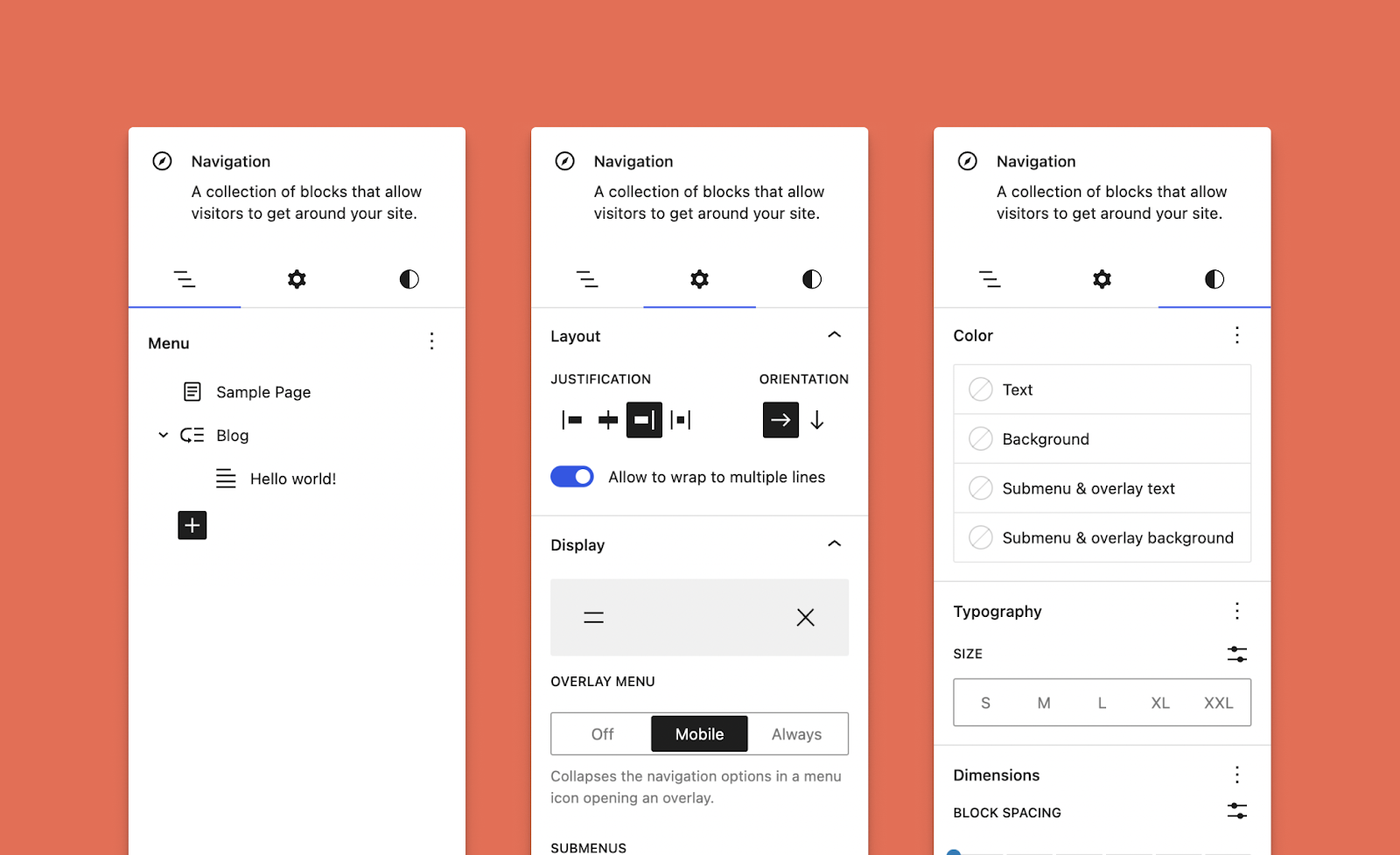
Individual blocks, particularly the Navigation block, have also received some desperately needed upgrades. Like many other features and functions of WordPress, their capabilities and the user experience have continued to improve. Furthermore, overall block settings have been iterated upon with more complex blocks in mind, with a split between Styles and Settings tabs.
New Block Features
- Enhance your editing experience with the new list view for the Navigation block, accessible within the block settings sidebar.
- Limit editing of the Navigation block’s inner blocks (links and submenus) for a more curated experience.
- Enjoy the convenience of various in-built fallbacks for the Navigation block.
- Elevate your block customization with split Styles and Settings, optimized for compatibility with a growing range of design tools.
- Keep blocks at the root level in sight with the “Sticky” block position option in the inspector.
- Fine-tune the width of blocks within a Row block.
- Easily choose between a row or stacked layout during Group block setup.
- Use the aspect ratio tool for custom image dimensions.
- Modify captions for Audio, Video, and Image blocks directly from the block toolbar with ease.
Block pattern updates in WordPress 6.2
Block Patterns have been part of WordPress since version 5.5. They’re a collection of predefined blocks that you can insert into pages and posts and customize with your own content. They make it possible to quickly and easily create standout pages on your WordPress site with very little effort.
In WordPress 6.2, a redesign of the patterns Inserter makes it easier to pick and choose between patterns, including newly bundled Header and Footer options. Developers and Site Builders who create and provide patterns can expand where they can be used, including an option to register patterns specifically for templates.
New Block Patterns Features
- Simplify your pattern selection with the improved Pattern Inserter and refined categorization.
- Effortlessly switch between Header and Footer patterns bundled with Core.
- Specify the templates where patterns can be used by registering them for specific template types. For instance, an Error 404 pattern should only be used with the 404 template.
- Select from a growing collection of Query Loop patterns directly from the block, with a cleaner setup process.
Design features in WordPress 6.2
WordPress 6.2 builds on the strong foundation provided by theme.json and the Styles Engine. If you’ve struggled with site design in the past and felt overwhelmed by the learning curve of previous WordPress releases, don’t panic!
The new features and enhancements allow users to experiment with different styles, preview the changes in real time, and apply them globally or locally as needed, making the entire design process more intuitive and efficient. So, even if you have never felt confident in your site design skills, WordPress 6.2 is here to help.
New Design Features
- Create a cohesive look for your site with the Style Book, which allows you to view and style all blocks at once.
- Preview the impact of your design changes with an inline view of blocks while working with Styles.
- Get a more comprehensive glance at your template when choosing a style variation.
- Quickly make sitewide changes to a single block across your site using the “Apply Globally” control in the Advanced block settings.
- Speed up your design process by copying and pasting block styles for consistent designs.
- Customize your entire site or individual blocks with custom CSS controls.
- Make edits to block style variations from within Styles.
- Set a minimum fluid font size in theme.json for more flexible typography.
- Add shadow preset support via theme.json.
Performance improvements in WordPress 6.2
WordPress 6.2 shipped measurable performance gains: front-end load times improved 14–18% for block themes and 2–5% for classic themes, per the WordPress.org release announcement (March 29, 2023). Beyond what we’ve laid out above, the release also brought a faster plugin and theme upgrade process, further iteration on PHP 8.2.x support, and the expected round of general bug fixes and enhancements.
Altogether, these features expanded the WordPress experience when 6.2 shipped, and the releases since have kept building on them.
WordPress 6.2 FAQs
When was WordPress 6.2 released?
WordPress 6.2 “Dolphy” was released on March 29, 2023, one day after its planned March 28 date. It was the first major WordPress release of 2023, covering over 900 enhancements and fixes, per WordPress.org.
What are the main features of WordPress 6.2?
WordPress 6.2 introduced a reimagined Site Editor with Browse mode, a distraction-free writing mode, the Style Book, split Settings and Styles tabs, Openverse media in the Inserter, custom CSS controls, and header and footer patterns bundled with Core.
Is WordPress 6.2 still the latest version?
No. WordPress has shipped several major releases since 6.2, and the 7.0 series is the current, actively maintained line (WordPress 7.0.2 arrived July 17, 2026). Only the most recent release is officially supported, so update if you’re still on 6.2.
How do I update to the latest version of WordPress?
Go to Dashboard → Updates in your WordPress admin and click the update button, or download the latest version from WordPress.org. Back up your site first, and test big updates on a staging site when you can.