Could AI really write full apps and take coder jobs? Here’s a realistic look at what AI coding tools can and can’t do in 2026 — and how developers stay relevant.
Will AI replace developers? The short answer
No — not wholesale. AI coding tools now handle repetitive work like boilerplate, tests, and bug detection, but they can’t replace human judgment, system architecture, or accountability for complex software. The realistic outcome is that developers’ daily tasks will shift, but the profession itself isn’t going away.
You’ve probably heard people talk about ChatGPT and other new AI chatbots. They converse on various topics shockingly well. And yes, they can solve many coding problems, too.
But is AI an existential threat to developers’ careers? Or will it become just another tool to augment programmers’ capabilities?
In this guide, we’ll examine what AI can actually do in software development today, where the technology still falls short, what it means for web developers specifically, and how you can future-proof your skills.
ChatGPT and LLMs: understanding AI technology
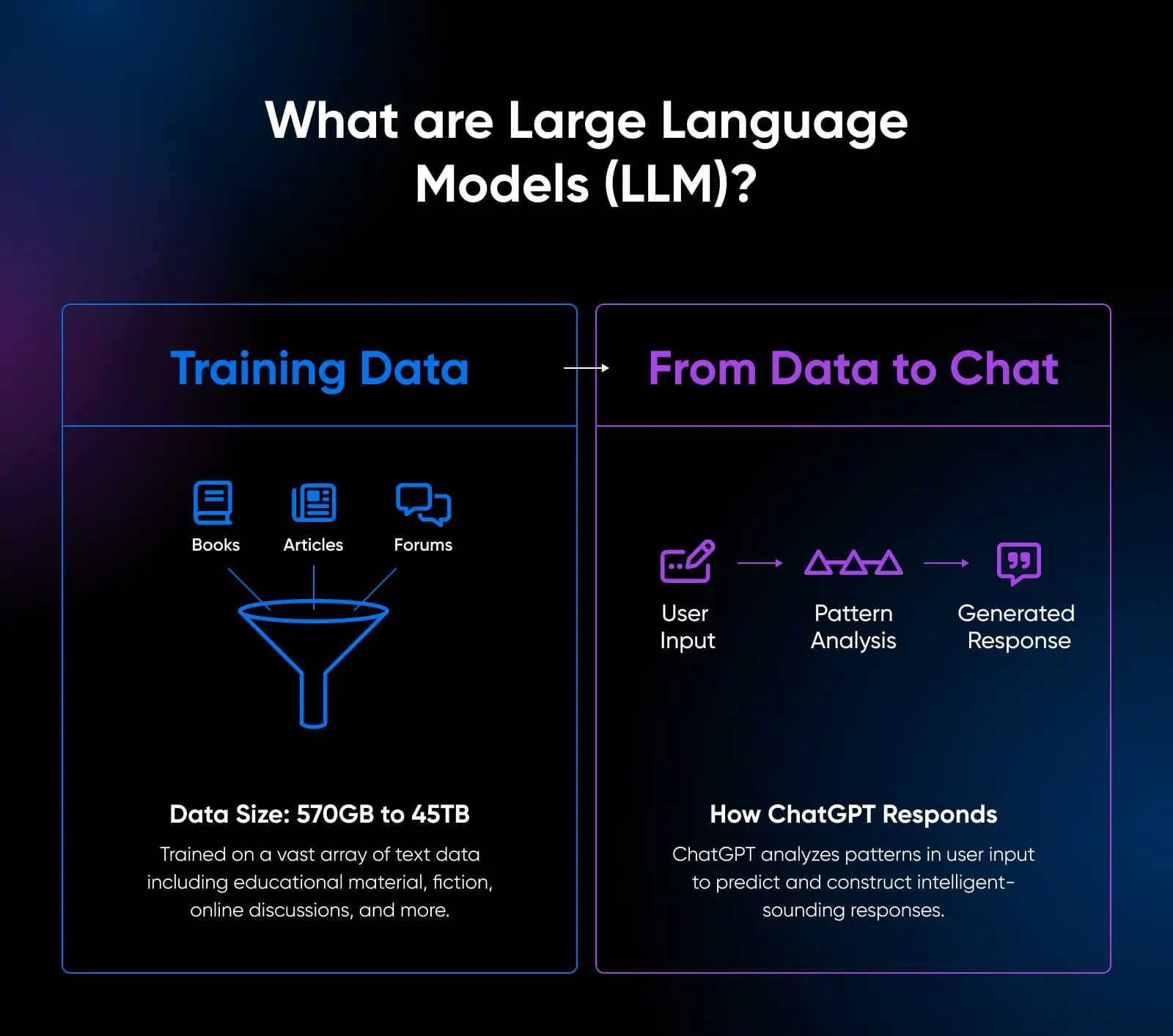
Chatbots like ChatGPT aren’t “thinking” programs. They don’t understand language or coding. They predict intelligent-sounding responses by finding patterns in giant piles of online text data.
Programmers call them “large language models” (LLMs), a fancy word for a text predictor on steroids.
To put the “large” into perspective, GPT-3 — the ancestor of the model behind the original ChatGPT — was trained on roughly 570GB of filtered text, distilled from 45TB of raw Common Crawl data, spanning internet forums, books, and online writing, per the GPT-3 paper (Brown et al., 2020). OpenAI hasn’t disclosed the training-set size for ChatGPT itself.
This huge body of text data allows ChatGPT to generate passages, answer questions, and even write code based on text prompts. Its knowledge comes entirely from these pre-existing texts rather than any real-world comprehension.
So, while ChatGPT seems adept at conversing, its intelligence has limitations.
- It can lose track of context: early ChatGPT held only a few thousand words, and while current models handle far more (GPT-5’s API supports a 400,000-token context window), large codebases can still exceed it.
- It has no real-world experience.
- Even the newer reasoning models that work through problems step by step can make confident mistakes no engineer would.
- It has a hard time understanding complex code.
Yet, this technology keeps advancing rapidly. So, how do ChatGPT and other LLMs perform on coding tasks today?
Can ChatGPT write functional code?
ChatGPT can produce running code in JavaScript, Python, SQL, Bash, and other languages when prompted appropriately. It’s a novice coder, but you can keep prompting it to correct errors to get working code.
For simple coding problems, ChatGPT provides impressive versatility and allows you to save time creating basic code that you’d otherwise write manually. In these cases, LLMs definitely save time for coders.
However, its code is often inefficient or overlooks edge cases because it does not have the full context of the problem. In fact, ChatGPT sometimes even cautions that its sample code requires thorough review before application.
So, we know for sure that LLMs aren’t flawless coders yet. But the pace is worth respecting: ChatGPT launched on November 30, 2022 — less than four years ago — and we’ve already gone from novelty chatbots to reasoning models and agentic coding assistants.
Development tasks that AI can handle
While ChatGPT cannot fill a senior developer’s shoes, it offers straightforward utility in making coders more efficient. Let’s look at how ChatGPT can augment you as a coder and remove the regular, more laborious processes.
Automating repetitive tasks
For seasoned developers, writing CRUD apps, simple scripts, and backend boilerplate code ranks among the most tedious aspects of the job.
With AI, you can eliminate this drudgery through automated code generation. Rather than manually coding basic user registration systems repeatedly, an AI model could instantly produce functioning prototypes tailored to each project’s database schema.
AI’s utility for repetitive coding will only grow as higher-level abstractions continue entering common use through frameworks like React and Django.
Natural language processing
Product managers often compose specs in everyday prose like “Users should be able to update their saved payment info.” Programming such loosely defined behaviors leaves ample room for misalignment with stakeholders’ expectations.
With current frontier LLMs like OpenAI’s GPT-5 series, AI can help interpret free-form client requests to frame thorough technical requirements.
Using client documents and conversations, LLMs can help translate requests to executable semantics for coders. LLMs can help surface ambiguities to address upfront rather than mid-project as you optimize your prompts.
Detecting bugs
AI models trained on volumes of open-source code can also excel at reviewing software for defects. In 2021, researchers at Microsoft built BugLab, a self-supervised model that learned to detect and fix bugs without labeled data.
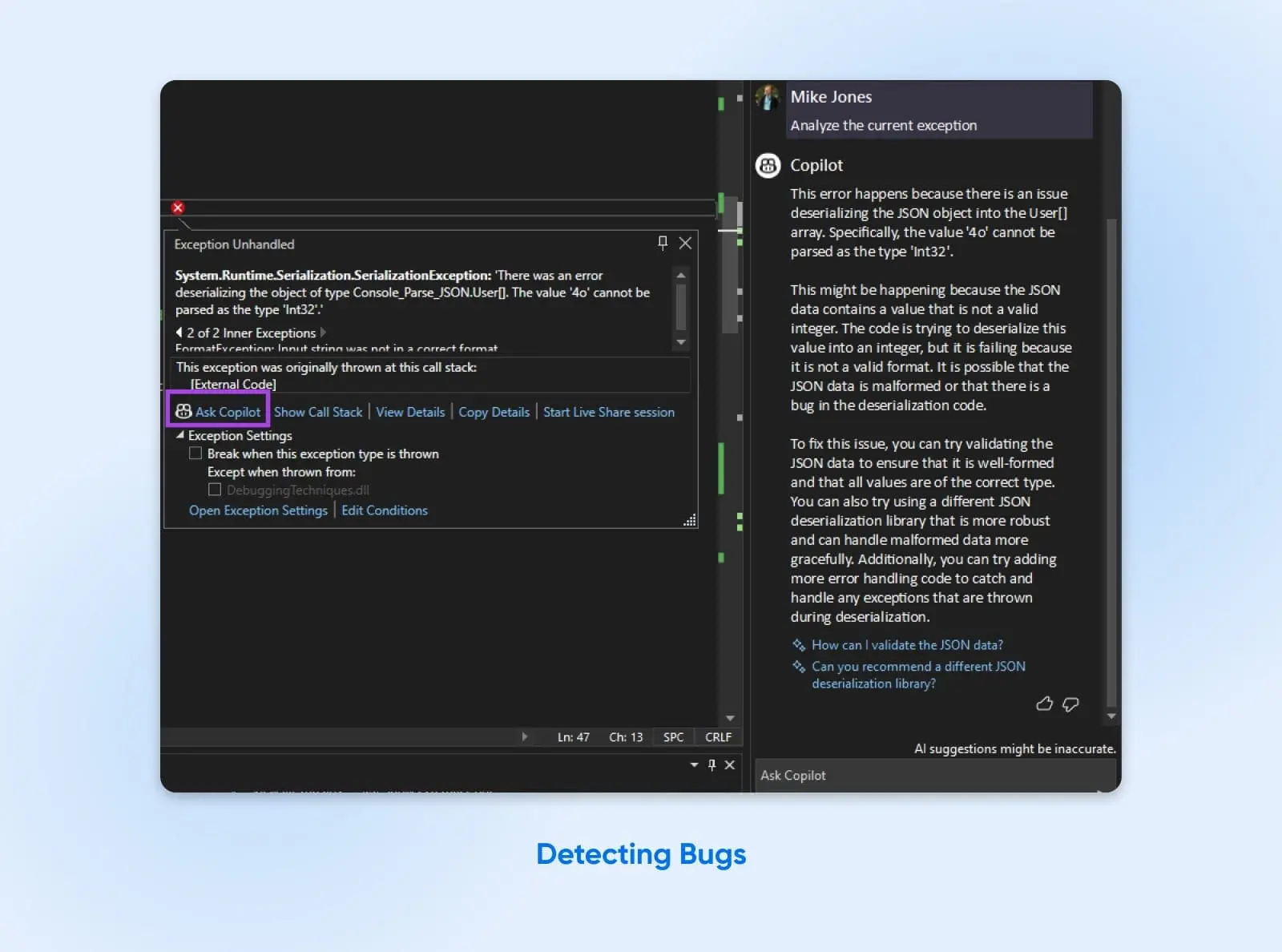
As a programmer, you could employ this AI coworker to quickly analyze commits for faulty logic, deprecation errors from outdated dependencies, and even security flaws. Rather than manually poring over thousands of lines, you’ll get annotated suggestions on what needs fixing.
Predicting issues
Beyond reactive bug finding, sufficiently advanced AI can predict issues before they emerge based on the code you’re writing. It can do so by continually checking the code and identifying if it could fail at any point through execution.
Or, for libraries and frameworks with many downstream dependents, AI companions may spot upcoming breaking changes before releases. This helps you smooth transitions and minimize disruptions proactively without additional resource usage.
Better project and timeline estimation
Speaking of resource use, people chronically underestimate how long software projects will take. We either tend to be too optimistic or forget about risks. This causes projects to end up going over budget and behind schedule.
AI tools are starting to help by looking at data from past projects to see how long similar ones took, pulling context from across your toolchain to inform delivery estimates.
Of course, AI cannot predict everything that can go wrong, but considering the amount of data it analyzes before estimating timelines, it can be a great starting point. Over time, as the tools get more data, the estimates should improve.
Optimizing your code
It’s great to have a second pair of eyes for your code. It can help you identify issues with code logic, find better and simpler ways to get the same output, and even optimize for speed.
While programmers continually invest effort into refining systems for speed and efficiency, tweaking code through trial and error becomes tedious.
LLMs can provide optimization suggestions to help you quickly optimize and refactor code.
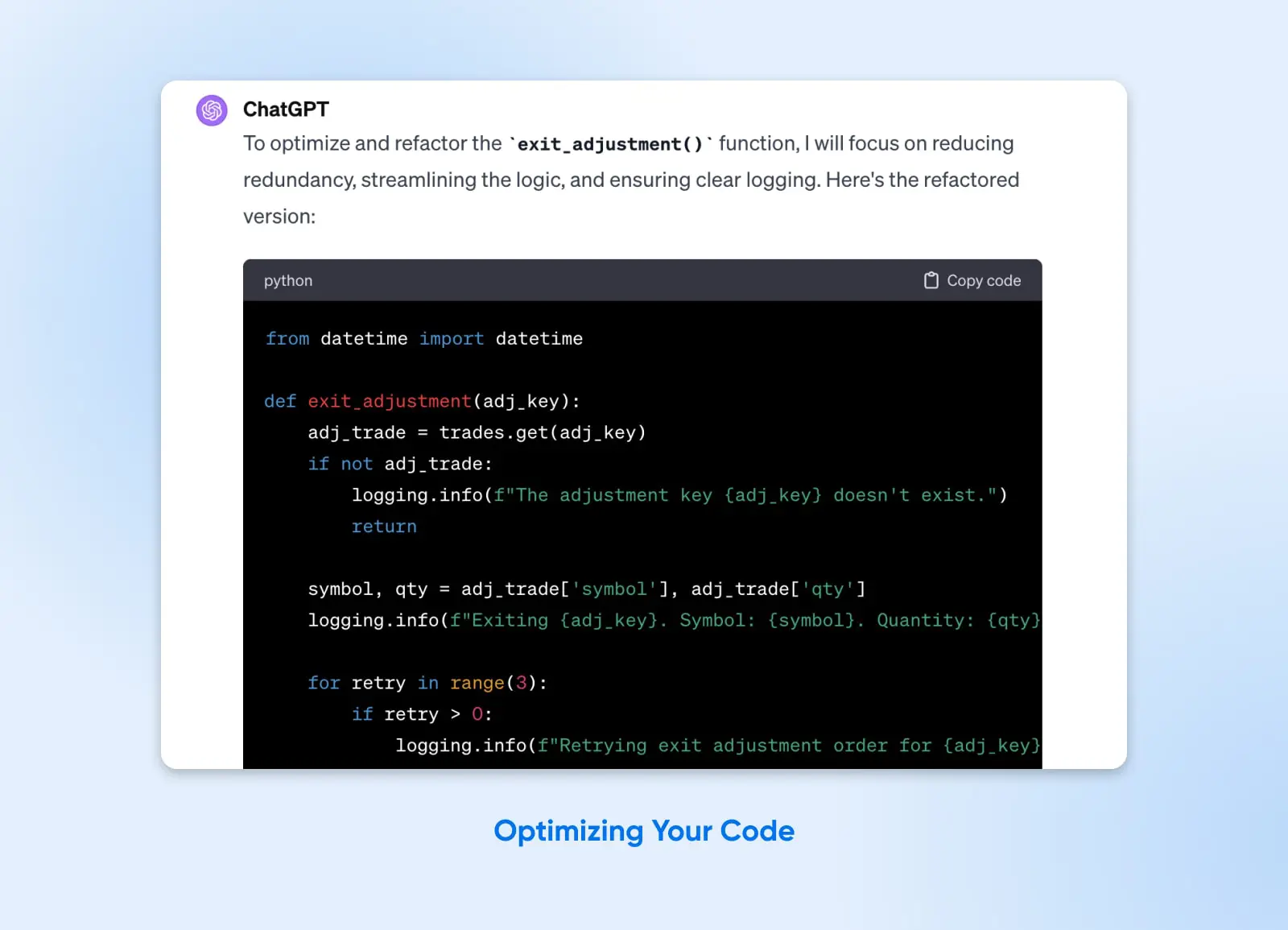
Rather than blind guesswork, you’ll have AI readily pinpointing low-hanging fruit to target for maximum gains. It may advise splitting monoliths into microservices, adding indexes for costly queries, or upgrading frameworks for modern best practices.
The limitations of AI tools in development
Should developers feel threatened by AI’s utility in automating rote coding and supplemental development tasks?
Current technology has proven inadequate even for moderately complex programming jobs. As such, core aspects of the developer workflow seem destined to stay human-driven for the foreseeable future.
Poor quality code
Code produced entirely by ChatGPT or similar models tends to suffer from subtle flaws. While usable, the code does not consider the variety of edge cases you may know, and without logical reasoning, it relies solely upon what you ask it to do.
Here’s an experiment done by a GitHub user. You can see that ChatGPT does a great job explaining and breaking down a problem:

But then it goes on to give only partially correct code where it skips the logic for setting the answer to 0 when n is 1.
To make sure all the edge cases are taken care of, the code needed us to add this if condition, as you can see in the screenshot below.
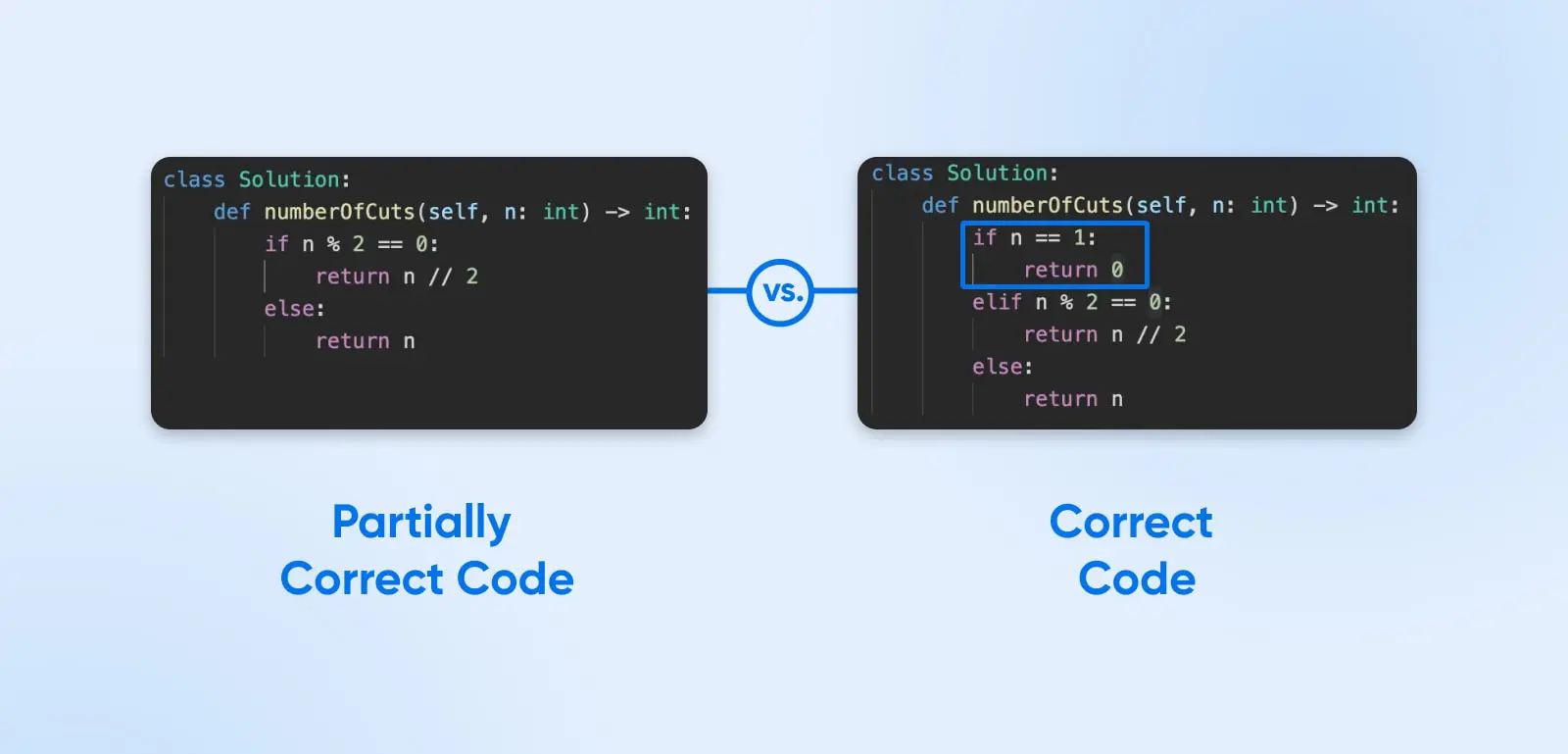
The lesson isn’t that ChatGPT code always breaks. It’s that passing a quick test proves less than it seems: generated code can miss edge cases exactly like this one, and unhandled edge cases are what take apps down in production.
Until AI radically advances, generated code will remain too shoddy for most real-world applications without heavy oversight and editing. There’s a quieter cost, too: code you didn’t write is code you understand less well, which makes it harder to debug and extend later. A practical bar: if you couldn’t defend a generated change in code review, have the model explain it line by line, or rewrite it yourself before merging.
Potential security risks
Alongside stability issues, code written by language models introduces alarming security risks. Since AI cannot always consider edge cases, your code may open up to exploitable bugs and security risks. OpenAI itself warned at GPT-4’s launch (March 2023) that its models can generate “buggy code.”
For instance, if you’re developing a web app and do not adequately clean user inputs, hackers can exploit those to gain access to your database through SQL injections and XSS attacks.
None of this makes AI-generated code unshippable. It makes it unreviewed code, and unreviewed code has never been shippable. Before anything generated reaches production:
- Have an experienced developer review every AI-generated change.
- Back it with automated tests before it merges.
- Run it in a staging environment first.
- Check its input handling against the OWASP guidance linked above, the same way you would a junior developer’s first pull request.
Can’t solve novel problems
To displace human programmers rather than assist them, AI needs to tackle new problems. LLMs largely associate prompts with patterns encountered during training, and it shows when a problem is unfamiliar. In a 2023 Purdue University study published at CHI 2024, researchers found that 52% of ChatGPT’s answers to 517 Stack Overflow programming questions contained incorrect information — a test of the GPT-3.5-era ChatGPT, but a caution that still applies to unreviewed AI output today.
Even so, the study’s participants preferred ChatGPT’s answers 35% of the time due to their comprehensiveness and well-articulated style — and overlooked the misinformation in them 39% of the time.
Only when models can deduce reasonable solutions and think beyond the basic steps, like people, can they drive development alone. Until then, their value remains confined to accelerating known tasks rather than trailblazing.
AI still doesn’t understand code like you do
Current models can genuinely work through many problems step by step, and they sometimes solve tasks they haven’t seen before. What they lack is a human engineer’s grounded understanding of the system: why a constraint exists, what the business actually needs, and who is accountable when the code fails. Their reasoning is unreliable in a particular way — a model can ignore a critical constraint without noticing, because nothing in the prompt made that constraint loud.
Here’s a low-stakes example. Ask a model to “speed up this slow query,” and it may helpfully add an index without knowing the table takes heavy writes, so the index will slow every insert. The suggestion sounds right, compiles, and passes a quick test. Only someone who understands the whole system catches the trade-off.
That’s the shape of the oversight job: engineering hinges on human judgment about context and constraints. Until AI carries that context itself, use it to augment your workflow and keep the judgment calls, like whether that index belongs there at all, in human hands.
The future role of AI in programming
Though AI currently has major limitations, the pace of growth in this space is phenomenal. Between 2019 and 2022, LLM output went from barely coherent to routinely fluent. In the few years since, we’ve gone from chat-window code snippets to reasoning models and agentic tools that plan and execute multistep coding tasks.
The nature of programming is already evolving. GitHub Copilot now runs agent sessions that take on whole tasks rather than just completing lines. Amazon Q Developer (which absorbed Amazon CodeWhisperer on April 30, 2024) can implement features, write tests, and refactor code on its own. Alongside them sit AI-first code editors like Cursor, agentic coding tools like Anthropic’s Claude Code, and full-app generators like v0 and Bolt.
How current AI coding models compare
As of July 2026, OpenAI’s GPT-5.6 Sol leads llm-stats.com’s coding leaderboard with a coding index of 50.1, just ahead of Anthropic’s Claude Fable 5 at 48.4. One caveat before the table: the coding index is a composite score (blind human votes in live coding arenas plus benchmark results across code generation, debugging, and software engineering), not a literal accuracy percentage.
| Model | Coding index (llm-stats.com, July 2026) | Strongest suit | Watch out |
|---|---|---|---|
| GPT-5.6 Sol (OpenAI) | 50.1 | Highest combined arena + benchmark score; largest context window among the top-ranked models | Leader as of July 2026; rankings shift monthly, so recheck before standardizing on it |
| Claude Fable 5 (Anthropic) | 48.4 | Close second on the combined coding score | Arena wins don’t guarantee a fit for your stack; test it on your own repository |
| Claude Mythos Preview (Anthropic) | 46.6 | Early-access preview with strong early signal on research and retrieval tasks | Evaluation only; pricing and availability can change, so keep it out of production |
| GPT-5.5 (OpenAI) | Below the top 3 | Strong all-around scores, best-in-class tool calling, and a 1.1M-token context window | Premium pricing ($5 in / $30 out per million tokens); verbose without tight prompts |
| Claude Opus 4.8 (Anthropic) | Below the top 3 | Reliable on multistep tasks where errors compound: agents, refactors, large repository work | Highest output price of any frontier model ($5 in / $25 out per million tokens); slower than smaller siblings |
| GPT-5.6 Terra (OpenAI) | Below the top 3 | Best value: lowest input price among the top-ranked models | Scores below Sol; pick it for cost-sensitive workloads, not the hardest problems |
Also worth keeping straight: these are models, not products. GitHub Copilot, Cursor, and Claude Code are the editors and agents you actually work in, and most let you swap the model underneath. Treat any leaderboard as a snapshot — rankings shift monthly as new models ship, so recheck the source before you commit a team to one.
What this means for web developers
Generators like v0 and Bolt can scaffold a working front end from a plain-English prompt, and React website generation is the single most-voted arena on llm-stats.com’s coding leaderboard. That’s genuinely useful for prototypes and landing pages. But a generated prototype is not a production website. AI accelerates the scaffolding; accessibility, performance, security hardening, integrations, and long-term maintenance still need a human web developer.
Is learning to code still worth it?
Yes. The entry path has changed: much of the rote work junior developers once learned on is now automated, so the bar for a first job is higher. But demand hasn’t collapsed — the U.S. Bureau of Labor Statistics projects 15% employment growth for software developers, quality assurance analysts, and testers from 2024 to 2034, much faster than the average for all occupations. Fundamentals still matter, because reviewing and directing AI output requires understanding what it wrote.
Coding will transform from manual typing to directing generative AI systems, with people providing context, vision, oversight, and troubleshooting.
This hybrid model allows AI to handle tedious coding busywork while developers focus on high-level system architecture, complex problem-solving, creativity, and preventing issues.
So, while tasks shift, software builders aren’t getting replaced entirely. The profession, however, will look radically different in several years.
How to future-proof your career in code
Rather than panic about the AI takeover, aspiring and current developers should recognize language models for what they are: assistants rather than replacements. Here are tips to keep your skills relevant:
Learn prompt engineering
Maximizing the usefulness of ChatGPT and GitHub Copilot hinges on effective prompt composition. Unfortunately, prompt engineering is currently more of an art than science.
But expecting engineers to hand-code everything as previous generations did does not make sense anymore. It’s better to let new developers use the new tools at hand.
Veteran coders should spend time experimenting with language models using different inputs and build intuition for what works. Remember, every LLM has a unique style, and it’s good to understand them, considering they’re becoming part of daily workflows.
Hone your problem-solving skills
Human creativity and intuition remain indispensable since software development tackles open-ended problems. It goes far beyond mechanically translating specs into code.
No amount of raw coding speed can substitute for devising insightful solutions or crafting simple architectures in complex environments. So focus on the know-how, creativity, and in-depth understanding of your industry while offloading rote work to AI counterparts.
Learn to empathize with users
Remember that code gets written to serve people’s wants and needs. As AI grows more capable of assuming lower-level programming duties, developers should double down on the strengths machines lack, namely empathy.
Prioritize roles like product managers or UX designers that stress understanding audiences and building for humans. Bring user-first thinking to the forefront even while collaborating with AI coders on implementation details.
Study machine learning
For those excited to push boundaries, exploring machine learning offers insight into the latest AI advances with widespread applications. Neural networks now underpin solutions from image processing to predictive analytics.
Grasping how models function, train, and interface with software systems can also help you open up new possibilities in your career. Consider supplementing computer science fundamentals with data science and ML coursework.
FAQ
Will AI replace programmers in 5 years?
No. In five years, AI will likely handle more repetitive coding tasks but not fully replace human judgment and oversight for creating complex software systems. Developers may see their roles shift with AI assistants but will still architect solutions and constraints.
Will AI replace web developers?
Unlikely. AI app generators can scaffold a front end fast, but production websites still need humans for accessibility, performance, security, and long-term maintenance. Web developers who fold AI tools into their workflow are better positioned than those who ignore them.
Is learning to code still worth it?
Yes. AI has automated some of the rote work juniors once cut their teeth on, so the entry bar is higher. But understanding code is exactly the skill that lets you direct and review AI output — fundamentals plus AI fluency beat either alone.
Will AI ever replace developers?
Complete replacement seems unlikely even with advanced future AI, given software’s ever-evolving demands and the creativity intrinsic to solving novel problems. Simple coding eventually gets commoditized, but not high-value strategic thinking. Developers who learn to use AI effectively rather than compete against it will remain employed.
Adapt rather than panic
The practical verdict hasn’t changed since the top of this page. Use AI for drafts, boilerplate, tests, and the rest of the repetitive work; it’s genuinely good at that and improving fast. Keep humans responsible for architecture, code review, security, and long-term maintenance, because that’s exactly where generated code still fails.
And don’t adopt a tool because it’s new. Adopt it because it earns its place by surviving the same review process the rest of your code does. Developers who work that way aren’t the ones AI replaces — they’re the ones deciding what it ships.