
You’ve been watching your Zapier bill climb for six months.
Every new workflow adds another line item, and every step counts as a task. The monthly invoice now costs more than your project management tool.
You start Googling alternatives and land on n8n, an automation platform you can self-host on your own virtual private server (VPS), for between $4 and $10 per month.
Unlimited workflow executions. No per-task pricing. No surprise bills when your automations take off.
The setup takes about an hour. And yep, we walk you through the whole thing.
What Is n8n and Why Are People Self-Hosting It?
n8n is a workflow automation platform that lets you connect apps, move data between services, and build complex automations through a visual editor. Think of it as the engine behind “when X happens, do Y and Z,” except you’re dragging nodes and drawing connections instead of writing code.
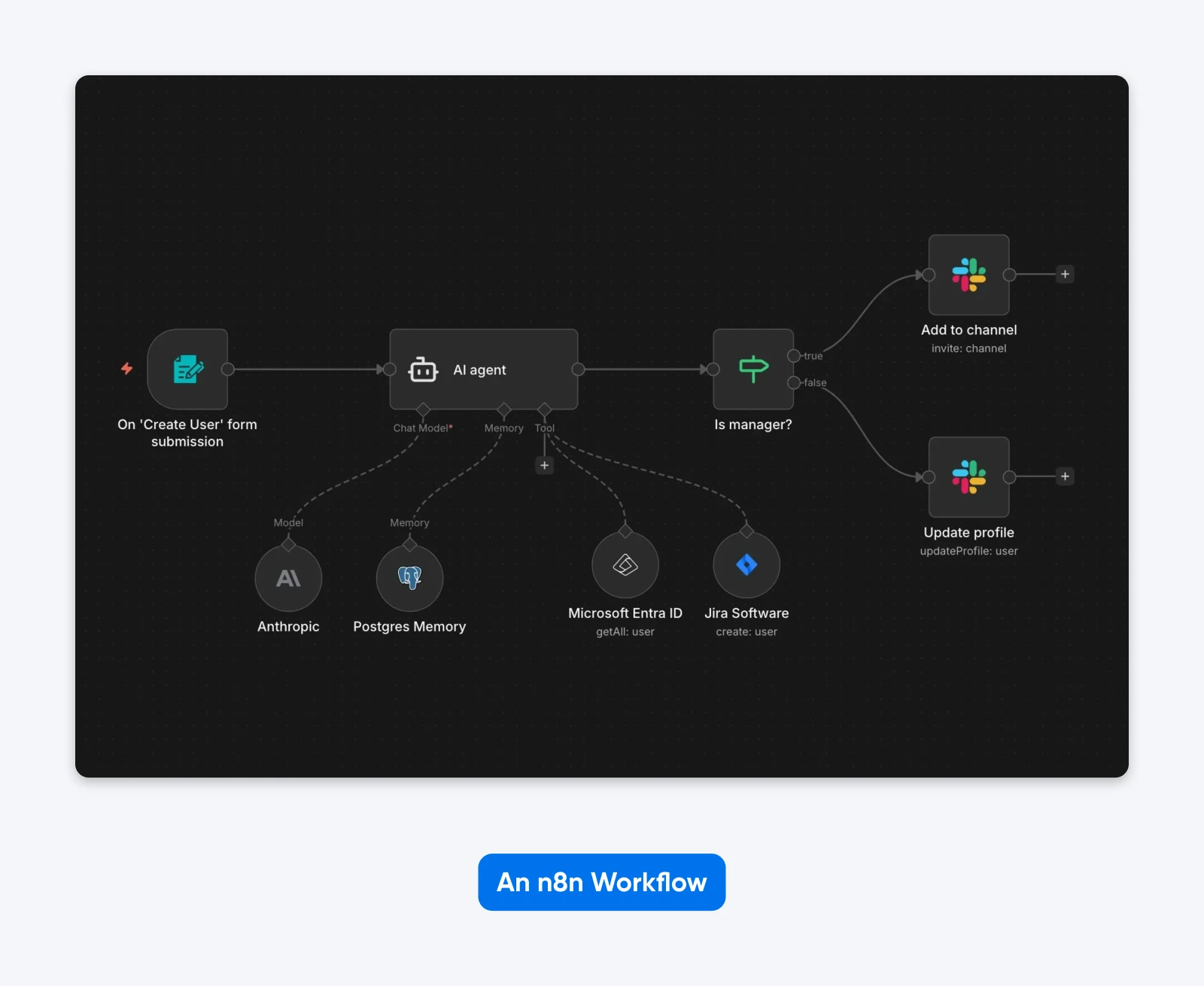
With 180,000+ GitHub stars and over 100 million Docker pulls, it’s become one of the most popular self-hosted automation tools out there.
The platform runs under a Sustainable Use License, which is worth understanding before you commit. It’s not traditional open source (not OSI-certified), but it’s not locked down either. You can run it freely for your own business. You just can’t resell it as a hosted service.
“…Everybody can use [n8n’s source] totally for free… What is, however, different in our license is that people cannot commercialize our code.” – Jan Oberhauser, n8n CEO, as told to Sequoia
People self-host n8n because the economics flip once you move past basic usage. n8n Cloud starts at $20/month for 2,500 executions on the Starter plan, and if you’re running any real volume, those limits show up fast.
On your own VPS? Unlimited executions, full data ownership, fixed costs. Your server runs the same whether you fire off 100 workflows or 10,000.
What Can You Automate With n8n?
The 400+ built-in integrations cover a wide range, and community-built nodes push the total into the thousands. n8n is part of a growing ecosystem of open-source alternatives to SaaS tools, covering everything from CRM to project management.
Some common setups:
- CRM and lead routing. Sync contacts between your CRM, email platform, and Slack when new leads come in.
- Webhook-triggered workflows. Respond to events from payment processors, form submissions, or GitHub commits in real time.
- Data pipeline automation. Pull data from APIs, transform it, and push it into databases or spreadsheets on a schedule.
- AI agent chains. Connect LLMs with your internal tools to build custom AI assistants that can search, summarize, and act on your data.
(That last one is where your server resources start to matter — more on that in the specs section.)
How Much Does Self-Hosting n8n Cost?
Self-hosting n8n on a VPS costs between $4 and $10 per month, depending on your provider and plan.
That’s the full infrastructure cost: server, storage, and bandwidth. The n8n software itself is free.
Compare that to running n8n from their own cloud:
| Plan | Monthly Cost | Execution Limit |
| n8n Cloud Starter | $20/month | 2,500 executions |
| n8n Cloud Pro | $50/month | Custom execution count |
| n8n Cloud Business | $800/month | 40,000 executions |
| Self-hosted VPS | $4–10/month | Unlimited |
The gap widens when you factor in how n8n counts usage. n8n charges one execution per workflow trigger, regardless of how many steps that workflow contains. Other popular automation platforms count each step as a separate task.
So, a five-step workflow running 100 times per day is 3,000 n8n executions per month, but 15,000 tasks elsewhere.
Real users back this up. An analysis by ExpressTech found annual savings of $636–684 for a setup running approximately 7,000 executions per month across four workflows. The payoff period was two to three months.
The Hidden Costs of Self-Hosting
The dollar savings are real. But self-hosting isn’t free in every sense.
Here’s what it costs you:
Your time. Plan on 1–2 hours a month for routine updates, backups, and log checking. Heavier setups with AI-powered automations will demand more.
OAuth setup friction. Connecting services like Google Workspace or Microsoft 365 requires configuring OAuth credentials, roughly 10–20 minutes per provider. Google’s OAuth consent screen is particularly annoying; production use requires app verification that can take days. (If you’ve ever watched a loading spinner while Google reviews your “internal testing” app, you know the feeling.)
SSL renewal failures. Let’s Encrypt certificates are free and automate renewal nicely — until they don’t. DNS changes or process interruptions can cause silent failures. This is the kind of thing that works perfectly for 89 days and then breaks at 2 AM on day 90.
Initial setup time. Budget one to two hours for the first deployment if you’re comfortable in a terminal. Never SSH’d into a server before? Add some ramp-up time on top of that.
What Server Specs Does n8n Need?
The minimum spec for getting n8n running is 2GB RAM, 2 CPU cores, and 20 GB of storage. That’s enough for testing and light development. For production, 4 GB to 8 GB of RAM is the sweet spot.
Also, remember that n8n is memory-bound, not CPU-bound. RAM matters more than processing power. It uses roughly 100MB of memory at idle, but active workflows spike depending on data volume and how complex your nodes get.
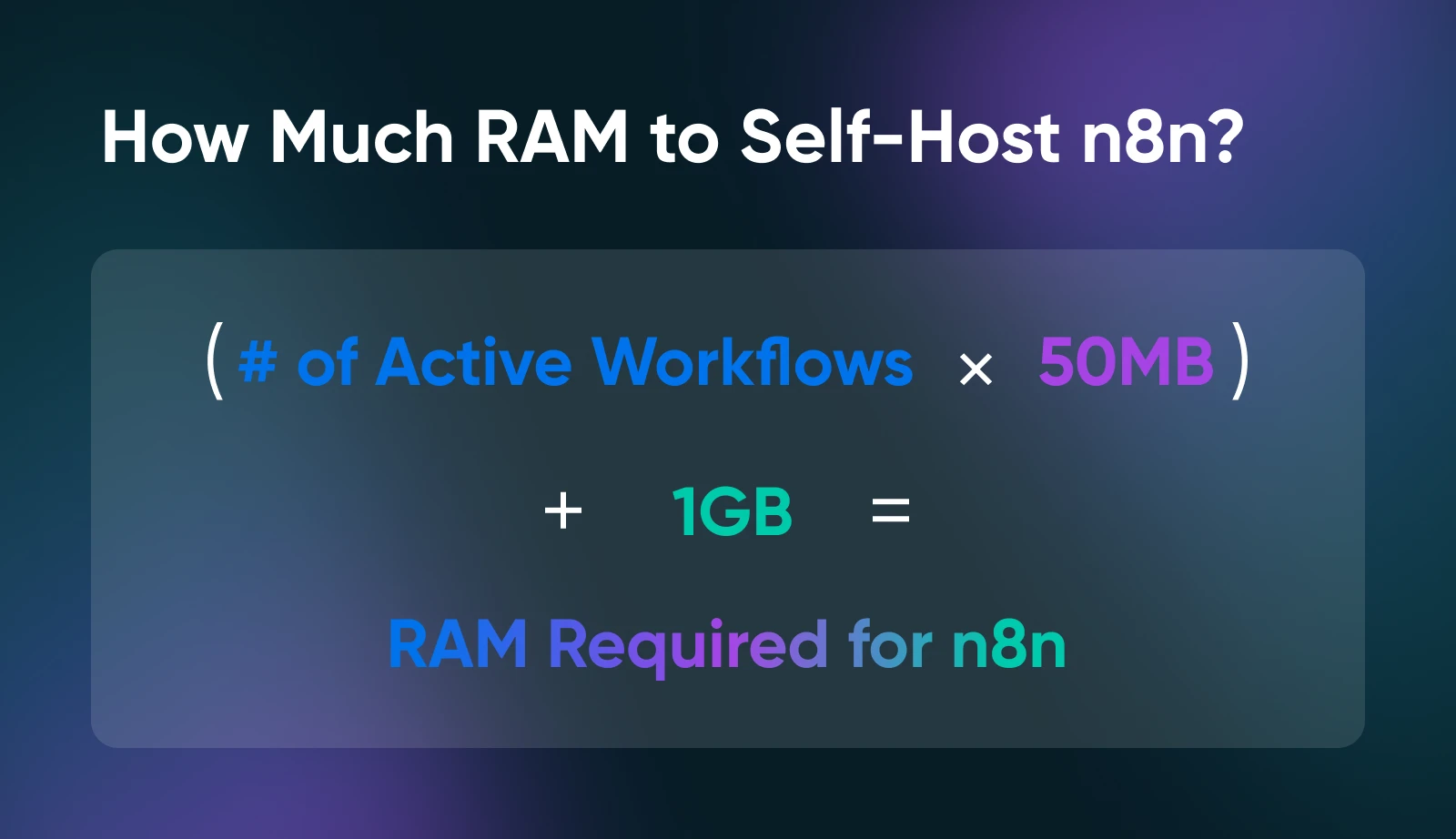
Here’s some quick napkin math:
Count your active workflows, multiply by 50MB, and then add a gigabyte for the n8n application itself plus PostgreSQL overhead. That’s your RAM baseline.
New to VPS hosting? Start with DreamHost’s beginner’s guide to VPS to understand the basics before sizing your server.
Which VPS Should You Choose for Self-Hosted n8n?
4GB RAM covers most n8n self-hosters running up to 100 workflows with webhook triggers. Step up to 8GB for heavy usage, AI nodes, or browser automation.
So, here are your options:
| Use Case | RAM | Recommended Plan | Notes |
| Personal automations, <20 workflows | 2GB | DreamHost Self-Managed VPS Stack 2 | Minimum viable. Gets tight with AI nodes or browser automation. |
| Small team, 20–100 workflows, webhooks | 4GB | DreamHost Self-Managed VPS Stack 4 | Sweet spot for most self-hosters. Recommended starting point. |
| Heavy usage, AI nodes, queue mode | 8GB+ | DreamHost Self-Managed VPS Stack 8 | For production workloads with browser automation or local AI models. |
A few specs worth paying attention to beyond RAM: NVMe storage makes a real difference for PostgreSQL performance. That’s because Database I/O is typically the bottleneck, not the CPU. Unmetered bandwidth matters if you’re running webhook-heavy workloads with a constant stream of incoming HTTP requests.
And full root access isn’t optional. If your VPS hosting plan doesn’t offer it, n8n can’t run Docker, manage its database, or configure its own services. Shared hosting won’t work here.
DreamHost is a web hosting provider that’s been running open-source infrastructure for over 25 years. Our Self-Managed VPS Hosting plans check all the essential boxes — NVMe SSD storage, unmetered bandwidth, and full root access — making it a natural fit for running n8n.
Oh, and one thing to file away in the back of your mind for later: as your usage grows, n8n supports queue mode, a scaling architecture that separates the UI from workflow execution using Redis as a message broker. Benchmarks from n8n’s documentation show a 7x performance jump when you make the switch.
How Do You Set Up n8n on a VPS?
Deploying a self-hosted n8n instance takes five steps and about an hour. At DreamHost, we recommend using Docker Compose. It bundles n8n, PostgreSQL, and a reverse proxy (a server that sits between the internet and your application, handling SSL and routing) into a single configuration file.
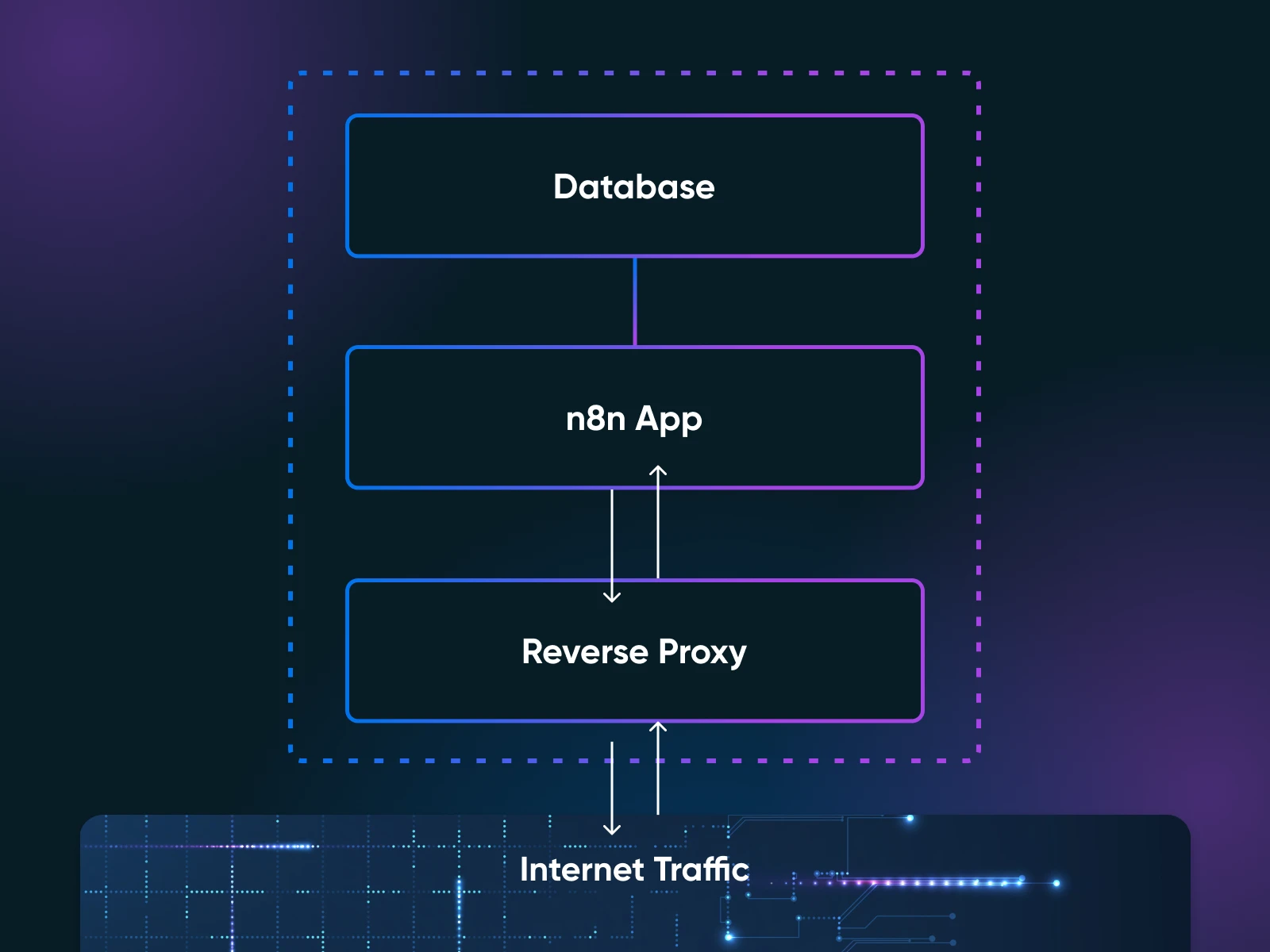
Here’s the high-level process:
- Provision a VPS with Ubuntu 22.04 or newer and SSH access
- Install Docker and Docker Compose on the server
- Create a docker-compose.yml file that defines three services: n8n, PostgreSQL, and a reverse proxy like Nginx, Traefik, or Caddy
- Configure environment variables, which control everything from your n8n admin credentials to the database connection string and your encryption key
- Run the command
docker compose up -dand you’re live!
One configuration file, one command. The n8n Docker Compose documentation walks through every line of the compose file.
Here’s roughly what the compose file looks like, stripped to essentials:
services:
    n8n:
      image: n8nio/n8n:1.72.1
      restart: unless-stopped
      ports:
        - "5678:5678"
      environment:
        - DB_TYPE=postgresdb
        - DB_POSTGRESDB_HOST=postgres
        - DB_POSTGRESDB_USER=n8n
        - DB_POSTGRESDB_PASSWORD=your_db_password
        - N8N_ENCRYPTION_KEY=your_encryption_key
        - EXECUTIONS_DATA_MAX_AGE=168
      depends_on:
        - postgres
      volumes:
        - n8n_data:/home/node/.n8n

    postgres:
      image: postgres:15
      restart: unless-stopped
      environment:
        - POSTGRES_USER=n8n
        - POSTGRES_PASSWORD=your_db_password
        - POSTGRES_DB=n8n
      volumes:
        - postgres_data:/var/lib/postgresql/data

  volumes:
    n8n_data:
    postgres_data:
That’s n8n and PostgreSQL running together with persistent storage. For production, you’d add Nginx, Traefik, or Caddy as a third service in front of n8n to handle SSL.
(Start with PostgreSQL from day one. SQLite works for testing, but migrating from SQLite to PostgreSQL later is painful in the “I wish I’d done this right from the start” way. Save yourself that particular headache.)
The n8n Docker Compose documentation covers that reverse proxy layer in full.
What You Will Need Before You Start
Before you begin, you’ll need:
- A VPS with root access running Ubuntu 22.04 or newer, with at least 2GB RAM (4GB recommended)
- A domain name pointed to your server’s IP address (for SSL and accessing the n8n editor)
- Docker and Docker Compose installed on the server
- Basic terminal comfort — you should know how to SSH into a server, edit a file, and run commands
- About 1–2 hours for the initial setup
One more prerequisite that isn’t on any official list: back up your N8N_ENCRYPTION_KEY the moment it’s generated. This key encrypts all your stored credentials, including every API key, OAuth token, and database password you’ve connected. Lose the key, and you’re rebuilding every single integration from scratch (and regretting your life choices).
Copy it somewhere safe, separate from your database backups.
How Do You Keep a Self-Hosted n8n Instance Secure?
A self-hosted n8n instance is as secure as the server it runs on, and you’re the one who controls that server.
Security comes down to six things. None of them is complicated individually, but skipping any one of them leaves a real gap.
- HTTPS through a reverse proxy. Never access the n8n editor over plain HTTP. Use Nginx, Traefik, or Caddy with a Let’s Encrypt certificate. Caddy handles SSL automatically, which is one less thing to configure.
- Firewall lockdown. Configure UFW (Uncomplicated Firewall) to allow only three ports: SSH (22), HTTP (80), and HTTPS (443). Never expose n8n’s default port 5678 directly to the internet.
- Docker network isolation. Keep PostgreSQL and n8n on an internal Docker network. Your database port should never be reachable from the outside.
- Strong authentication. Use a strong admin password. For internet-facing instances, reduce the default session duration to force re-authentication every few hours.
- Regular updates. Pull the latest n8n Docker image and restart. Read the changelog first, because n8n updates can include breaking changes.
- Automated backups. Back up your PostgreSQL database and your encryption key on a schedule. Test your restores occasionally. A backup you’ve never tested is a hope, not a plan.
One more thing to watch out for that’s not necessarily security-related but will make a big difference. n8n stores the input and output of every node in every execution, indefinitely, by default. That’s useful for debugging, but it’ll quietly bloat your database until you notice things getting sluggish.
Set `EXECUTIONS_DATA_MAX_AGE=168` in your environment variables to automatically prune execution data older than seven days.
What Are the Trade-Offs of Self-Hosting vs. n8n Cloud?
Self-hosting n8n gives you unlimited executions and full data control for $4–10/month. n8n Cloud gives you zero maintenance and manages SSL/OAuth for $20–800/month. The choice comes down to whether you want to own your automation infrastructure or pay someone else to run it.
The n8n documentation puts it this way: “n8n recommends self-hosting for expert users. Mistakes can lead to data loss, security issues, and downtime. If you aren’t experienced at managing servers, n8n recommends n8n Cloud.”
Here’s how the two options compare:
| Factor | Self-Hosted | n8n Cloud |
| Monthly cost | $4–10 (VPS) | $20–800 |
| Executions | Unlimited | 2,500–40,000 (by tier) |
| Setup time | 1–2 hours | Minutes |
| Maintenance | 1–2 hours/month | Zero |
| Data location | Your server | n8n’s infrastructure |
| Updates | Manual (Docker pull) | Automatic |
| SSL/OAuth | You configure it | Built-in |
| Scaling | Add RAM, or use queue mode with Redis workers | Upgrade plan tier |
There’s also a middle ground worth knowing about. Managed hosting platforms like PikaPods (starting around $3/month) and Elestio (~$17/month) let you run self-hosted n8n without managing the server yourself. You get most of the cost and control benefits and none of the sysadmin responsibility.
But here’s the bigger picture. With n8n Cloud, a platform can change pricing, pause your workflows when you hit a limit, or sunset features you depend on.
With self-hosted, your automation infrastructure belongs to you. Full control, full responsibility.
Making the Final Call
Self-hosting makes sense when three things line up:
- You’re running enough automations that cloud execution caps would pinch
- You want your workflow data on infrastructure you control
- You (or someone on your team) is comfortable spending an hour or two a month on server work
Otherwise, n8n Cloud is a reasonable call. Paying $20 a month to avoid ever thinking about Docker logs is a fair trade, especially for a small team that just wants their automations to run.
But once you’re ready to cross the self-hosting threshold, the math gets decisive fast. A modest VPS with 4GB of RAM will run a production n8n instance for years with minimal care. Start small, upgrade as your workflows grow, and keep full control of your stack.
That last part matters more than it might seem. You can always move up to a bigger server. It’s a lot harder to untangle yourself from a SaaS platform after it changes its pricing around the workflows you’ve already built.

Own Your Entire Stack. Apps, AI, Databases, and More.
Keep every credential and conversation on a server you control, with NVMe speed and unmetered bandwidth built in.
Explore Self-Managed VPS PlansFrequently Asked Questions About Self-Hosting n8n
Is n8n really free to self-host?
The n8n software is free to use on your own server under the Sustainable Use License. You can run it for any internal business purpose without paying n8n a licensing fee. The “free” part is the software; you’ll still pay for your server, which runs $4–10/month on a basic VPS.
The license does restrict one thing: you can’t take n8n and resell it as your own hosted automation service. For running your own workflows, though, it’s free.
What are the minimum system requirements for n8n?
You need at least 2GB of RAM, 2 CPU cores, and 20GB of storage to run n8n. That’s enough for testing and light use. For production workloads with 10–20 active workflows, opt for 4GB of RAM.
DreamHost’s Self-Managed VPS Stack 4 plan provides 4GB RAM with NVMe SSD storage and full root access for running self-hosted applications like n8n. See Self-Managed VPS hosting plans for details.
Use PostgreSQL instead of SQLite for production, and SSD storage isn’t optional for decent database performance.
Can I migrate from Zapier to n8n?
Don’t expect a one-click import. There’s no direct migration tool between the two platforms, so you’ll be rebuilding your workflows in n8n’s visual editor from scratch.
The good news: n8n covers most of the same services through its 400+ built-in integrations, so your existing automations can almost certainly be recreated. Community members report this takes a few hours for typical setups, less if your workflows are simple, more if you’ve built complex multi-step sequences.
How do I update a self-hosted n8n instance?
Pull the latest Docker image, and restart your containers. The whole process takes under five minutes. Back up your PostgreSQL database before major version updates using `docker exec` into the PostgreSQL container and `pg_dump`, or use your existing backup script.
Pin your Docker image to a specific version tag (like `n8nio/n8n:1.72.1` instead of `n8nio/n8n:latest`) so updates only happen when you decide.
Careless updates break things. Common culprits: multiple docker-compose.yml files in different folders, and images that got silently overwritten and ended up tagged as none. Read the changelog before you pull.
Is self-hosted n8n secure enough for business data?
Self-hosted n8n can be more secure than cloud-hosted, because your data never leaves your server. No third party stores your API keys, workflow logic, or execution data. The trade-off is that security becomes your responsibility.
Follow the six-point checklist from the security section above: HTTPS, firewall, Docker isolation, strong auth, regular updates, and encrypted backups. The n8n team maintains a security hardening guide covering additional production considerations.
