
When Claude Sonnet 4.5 launched in September 2025, it broke a lot of the existing prompts. This wasn’t because the release was buggy; Anthropic had simply rebuilt how Claude follows instructions. That rebuild stuck: every release since, up through Claude Sonnet 5 (June 2026), keeps the same literal, instruction-first behavior.
Earlier versions would infer your intent and expand on vague requests. Claude 4.x and newer models take you literally and do exactly what you ask for, nothing more.
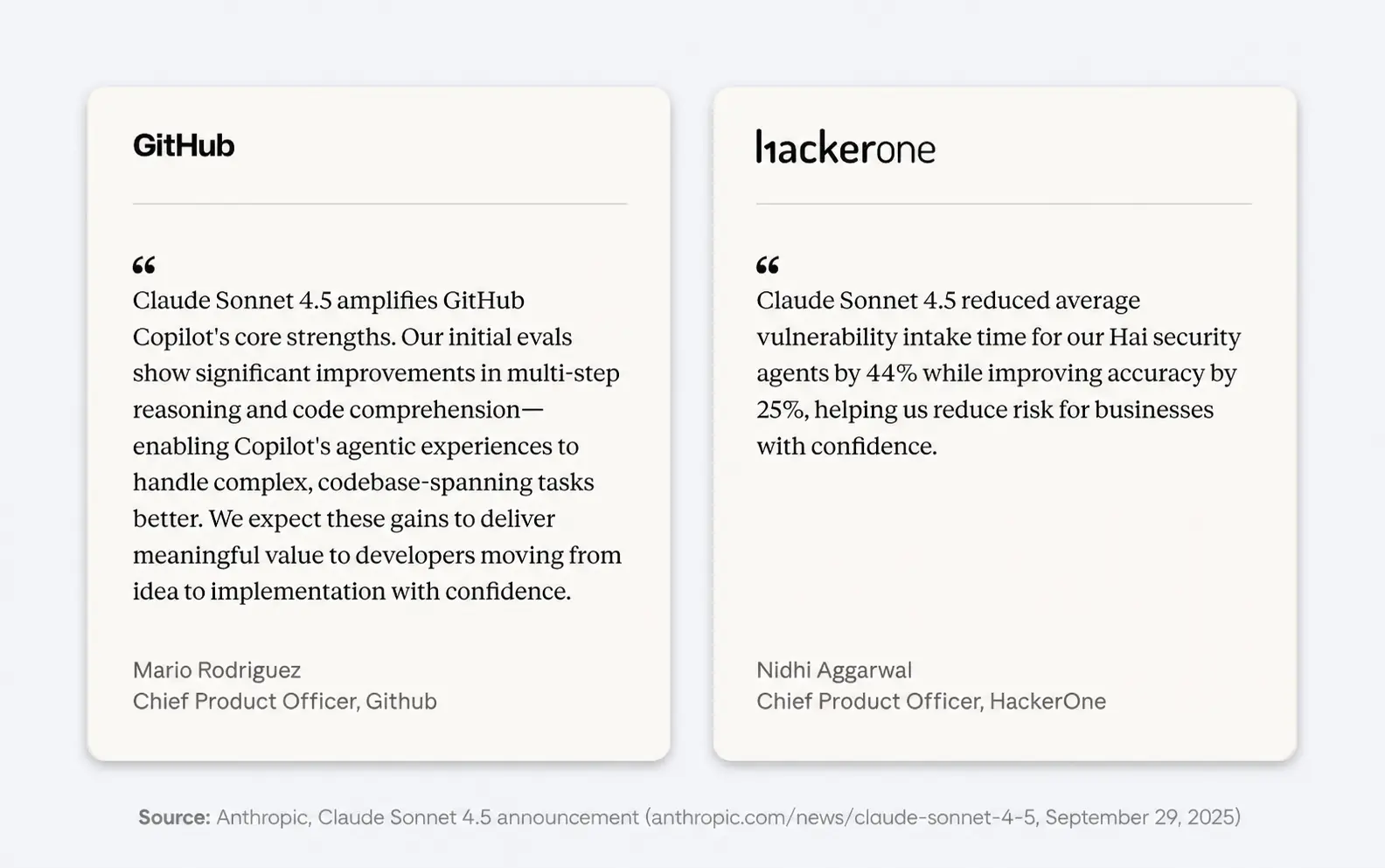
To understand the new methods, we evaluated 25 popular prompt engineering techniques against Anthropic’s docs, community experiments, and real-world deployments to find which prompts actually work better with Claude 4.x and newer models. Five made the cut: structured XML/JSON prompts, extended thinking, explicit requirements, few-shot examples, and putting context before your question.
What Changed in Claude 4.5 That Broke Existing Prompts?
Claude 4.5 and newer models prioritize precise instructions over “helpful” guessing.
The previous versions would fill in the blanks for you. If you asked for a “dashboard,” they assumed you wanted charts, filters, and data tables.
Claude 4.5 takes you literally. If you ask for a dashboard, it might give you a blank frame with a title because you didn’t ask for the rest.
Anthropic clearly states: “Customers who desire the ‘above and beyond’ behavior from previous Claude models might need to more explicitly request these behaviors with newer models.”
So, we need to stop treating the model like a magic wand and start treating it like a literal-minded employee.
The AI website builder that turns conversation into designer-level sites. Free with hosting.
Start Free Trial
5 Claude prompt engineering best practices that actually work
Based on our research, these five techniques consistently delivered noticeable improvements in Claude’s performance for the tasks we threw at it.
1. Structured and Labeled Prompts
Anthropic’s own system prompts use structured prompting everywhere. Simon Willison dug into the Claude 4 system prompts (May 2025) and found them organized into clearly labeled sections covering behavior, artifacts, search instructions, and the model’s knowledge cutoff.
In fact, you could edit “Styles” to see Anthropic’s structured prompting in action.
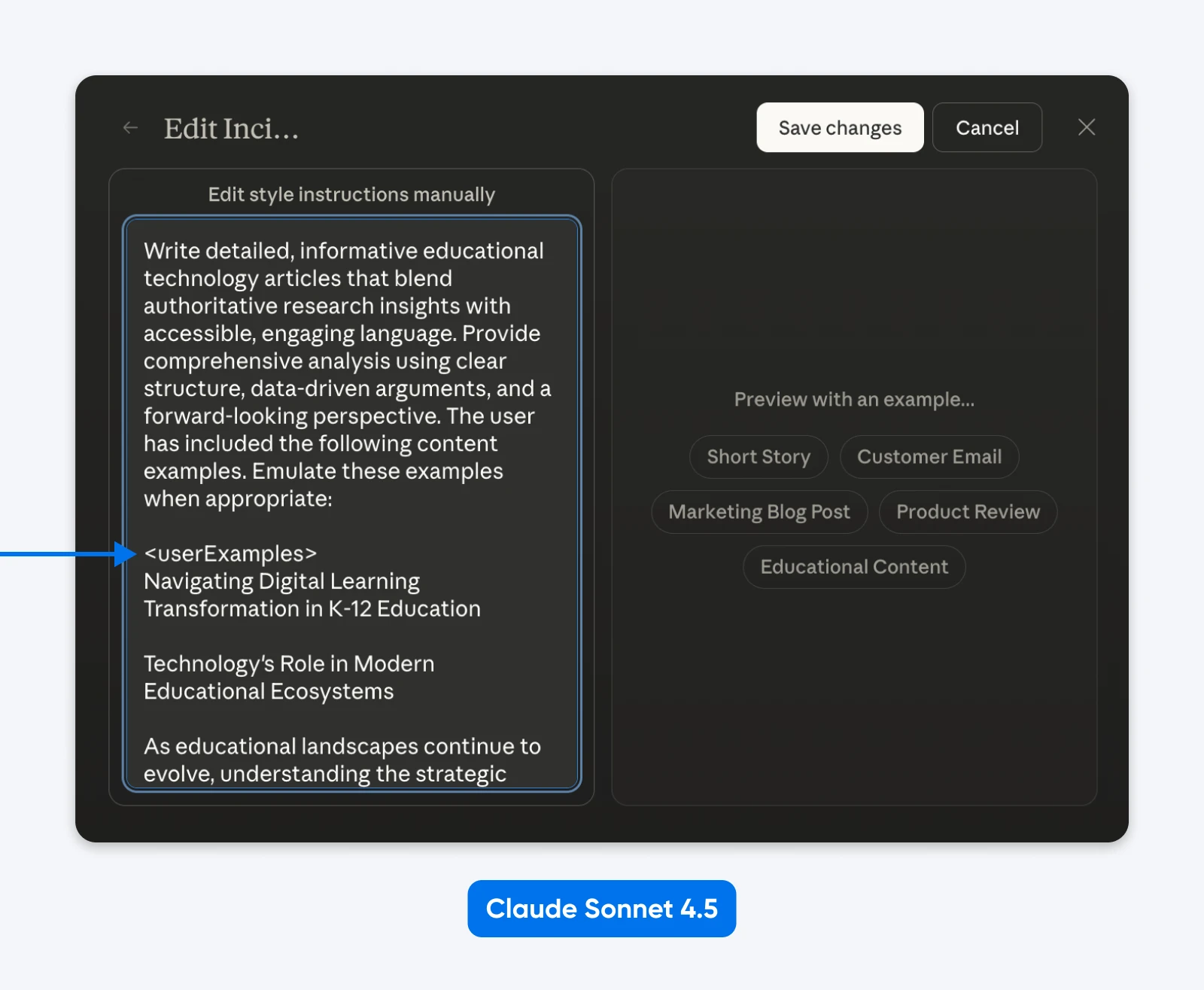
What we can infer is that Claude was trained on structured prompts and knows how to parse them. XML works great, so does JSON or other labeled prompting.
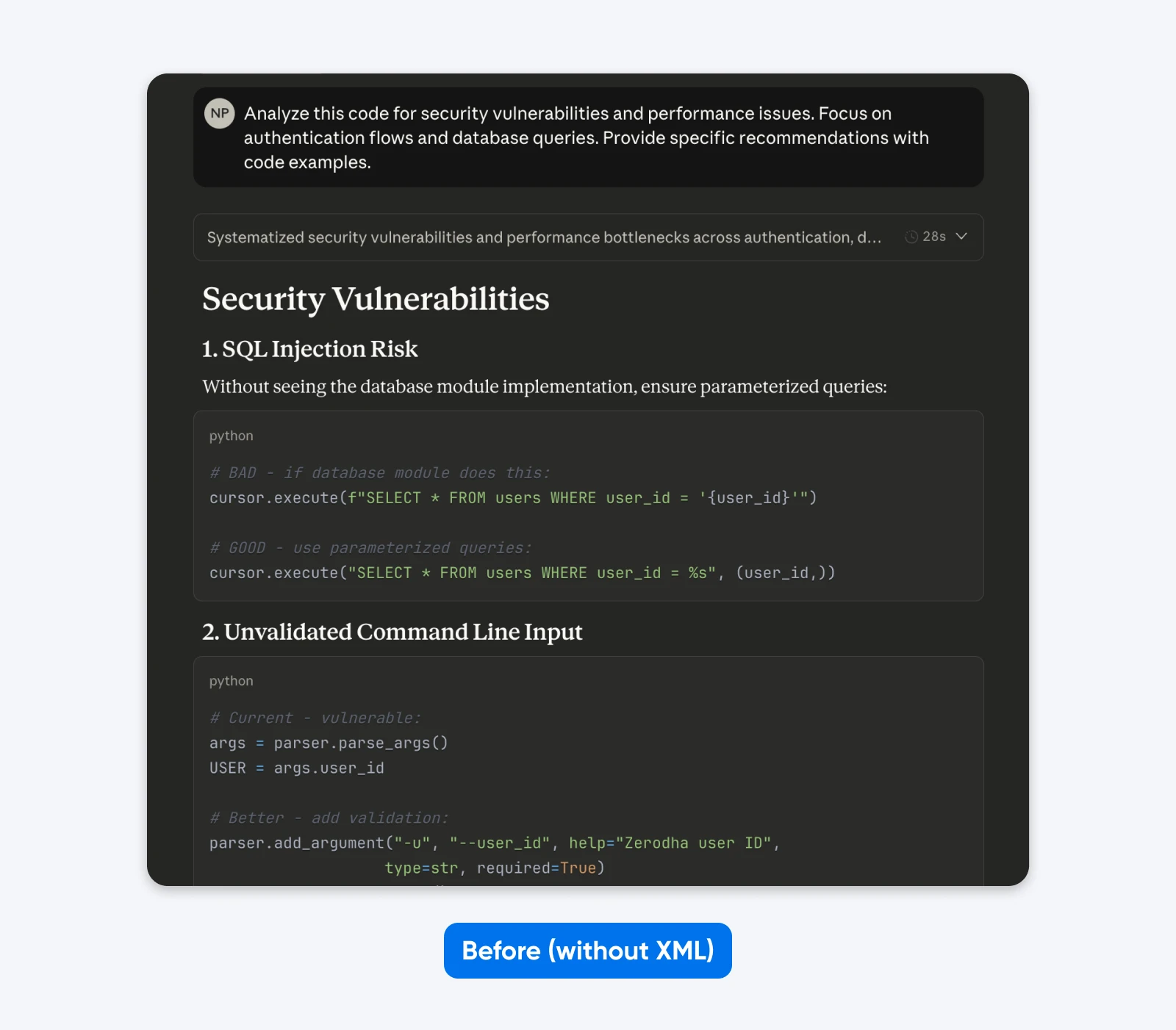
Before:
Analyze this code for security vulnerabilities and performance issues. Focus on authentication flows and database queries. Provide specific recommendations with code examples.
After (structured prompt):
<task>Analyze the provided code for security and performance issues</task>
<focus_areas>
– Authentication flows
– Database query optimization
</focus_areas>
<code>
[your code here]
</code>
<output_requirements>
– Identify specific vulnerabilities with severity ratings
– Provide corrected code examples
– Prioritize recommendations by business impact
</output_requirements>
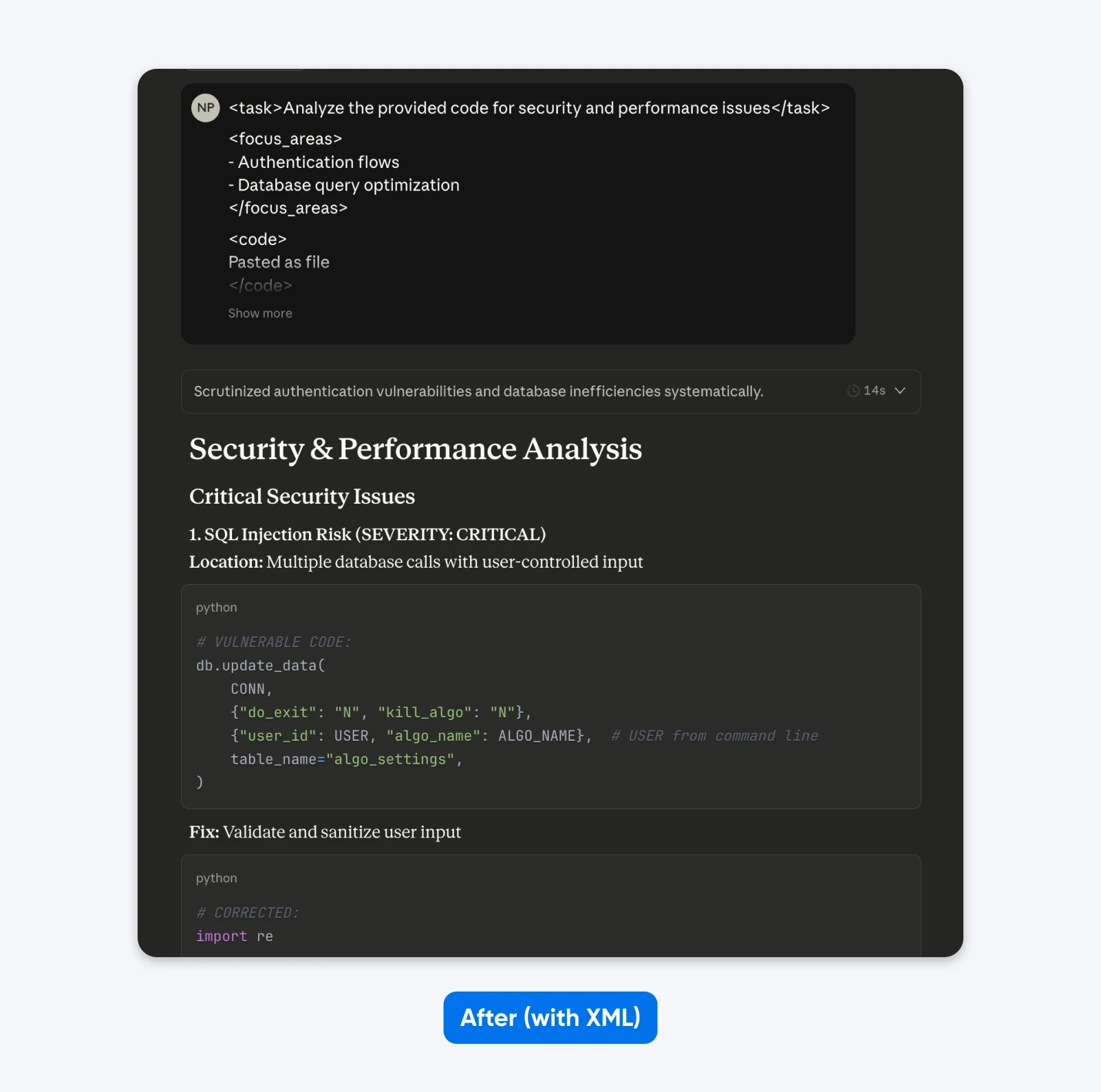
If you compare these outputs, you’ll notice that the structured prompt gives an output with more context to help you understand and fix the security issues in the code. It explains the issue, tells what the fix does, and then provides the code fix.
Alternative Formats That Work:
JSON:
{
"task": "Review authentication code",
"focus_areas": ["Password hashing", "Session security", "SQL injection"],
"context": "Healthcare app, HIPAA required",
"output_format": "Risk, impact, fix, severity per vulnerability"
}
Clear Headers:
TASK: Review authentication code for vulnerabilities
FOCUS: Password hashing, sessions, SQL injection
CONTEXT: Healthcare app requiring HIPAA compliance
OUTPUT FORMAT: Risk → HIPAA impact → Fix → Severity
All three work equally well.
When structured prompts work best:
- Multiple prompt components (task, context, examples, requirements)
- Long inputs (10,000+ tokens of code or documents)
- Sequential workflows with distinct steps
- Tasks requiring repeated reference to specific sections
When to skip structured prompts: Simple questions where plain text works fine.
Effectiveness rating: 9/10 for complex tasks, 5/10 for simple queries.
2. Extended Thinking for Complex Problems
Extended Thinking delivers massive improvements on complex reasoning tasks with two tradeoffs: speed and token cost. Thinking consumes extra tokens, so on API workloads the accuracy gain has to justify the added spend.
Anthropic’s Claude 4 announcement showed substantial performance gains with extended thinking enabled. On the AIME 2025 math competition, scores improved significantly.
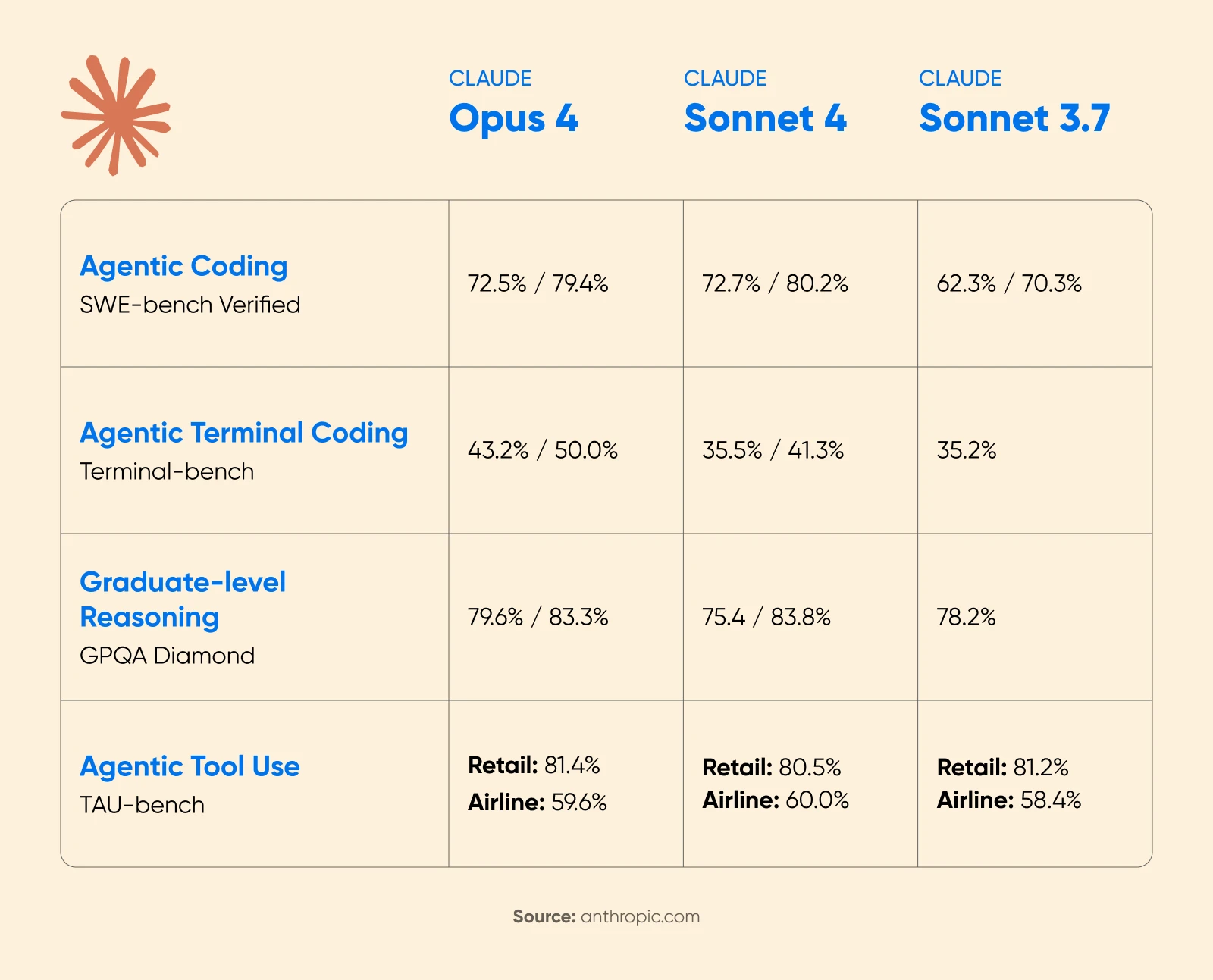
Cognition AI reported an 18% increase in planning performance with Sonnet 4.5, with Cognition CEO Scott Wu calling it “the biggest jump we’ve seen since the release of Claude Sonnet 3.6.”
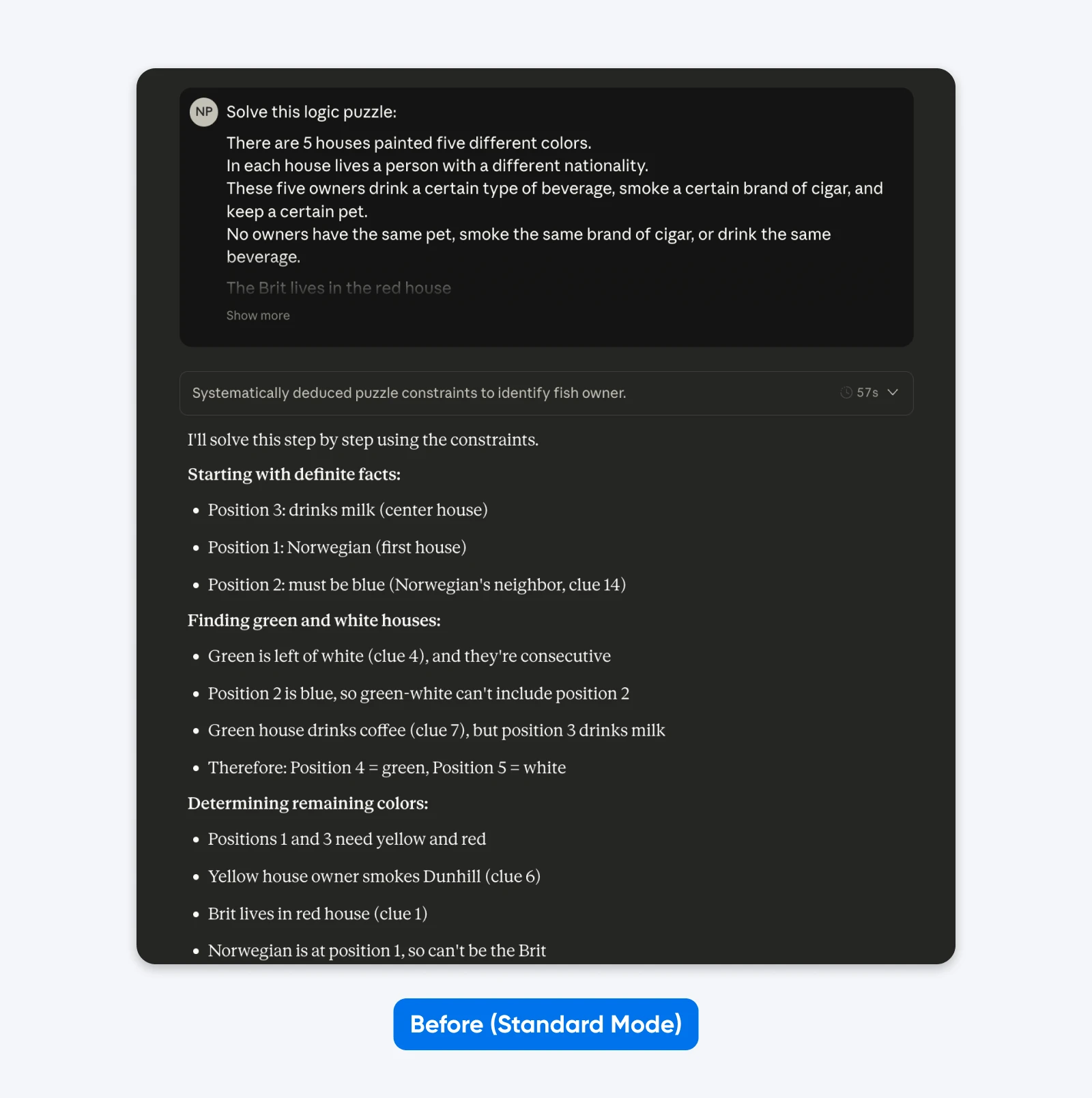
Before (Standard mode):
Solve this logic puzzle: Five houses in a row, each a different color…
After (with Extended Thinking):
Understand the logic of this puzzle systematically. Go through the constraints step by step, checking each possibility before reaching conclusions.
Five houses in a row, each a different color…
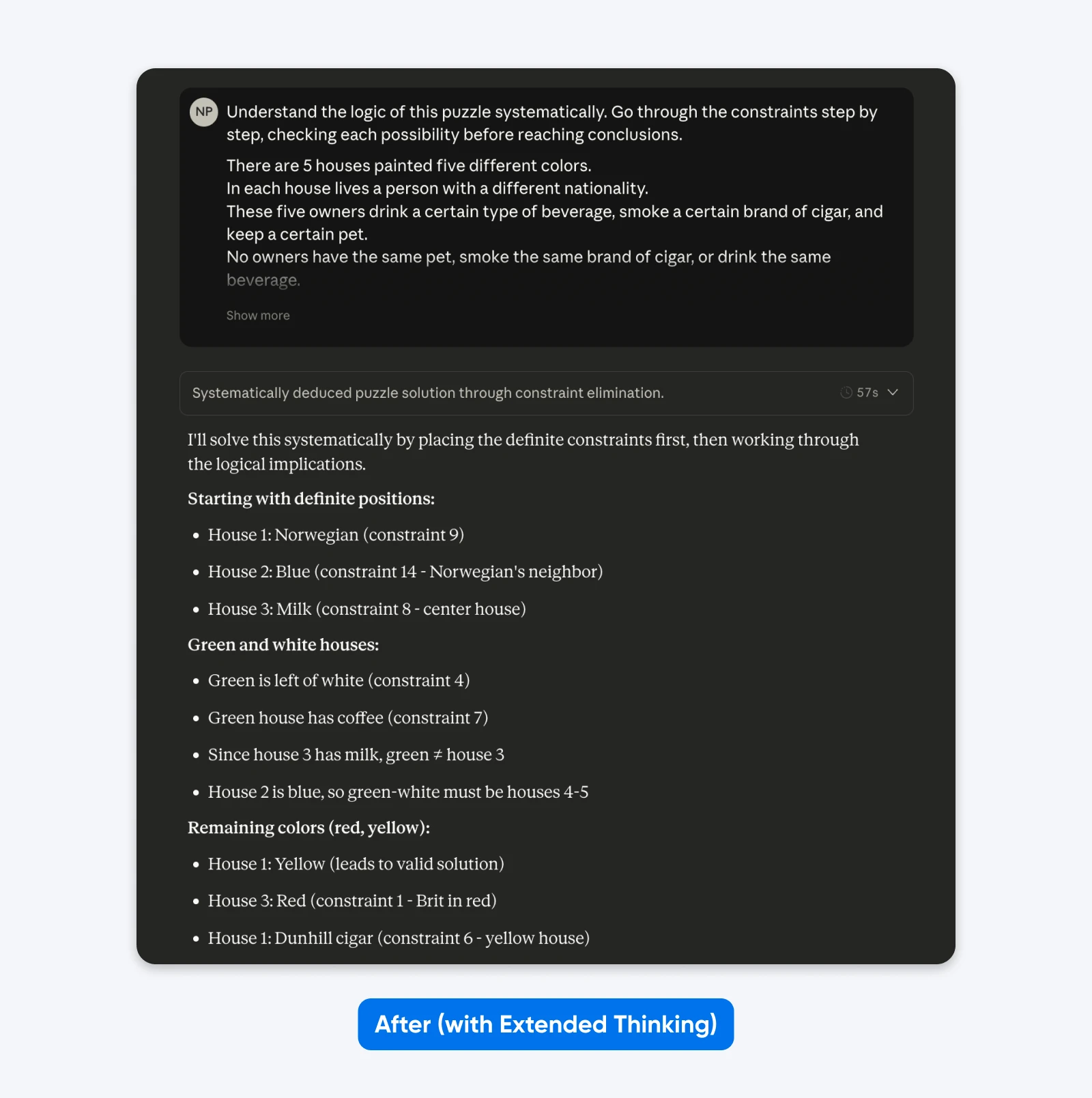
You won’t see much difference with simple prompts like the one above. But for complex, niche problems (custom codebases, multi-step logical planning), the difference becomes clear.
When extended thinking works:
- Multi-step logical planning requiring verification
- Mathematical reasoning with multiple solution paths
- Complex coding tasks spanning multiple files
- Situations where correctness matters more than speed
When to Skip: Quick iterations, simple queries, creative writing, time-sensitive tasks
Effectiveness rating: 10/10 for complex reasoning, 3/10 for simple queries.
3. Be Brutally Specific About Requirements
Claude 4 models have been trained for more precise instruction-following than previous generations.
Anthropic’s documentation says:
“Claude 4.x models respond well to clear, explicit instructions. Being specific about your desired output can help enhance results. Customers who desire the ‘above and beyond’ behavior from previous Claude models might need to more explicitly request these behaviors with newer models.”
The documentation also notes that Claude is smart enough to generalize from the explanation when you provide context for why rules exist rather than just stating commands. This means providing a rationale helps the model apply principles correctly in edge cases not explicitly covered.
Testing by 16x Eval showed that Opus 4 scored 9.5/10 and Sonnet 4 scored 9.25/10 on a Next.js TODO task when instructions clearly specified requirements, format, and success criteria (16x Eval, May 25, 2025). The models demonstrated impressive conciseness and instruction-following capabilities.
Before (implicit expectations):
Create an analytics dashboard.
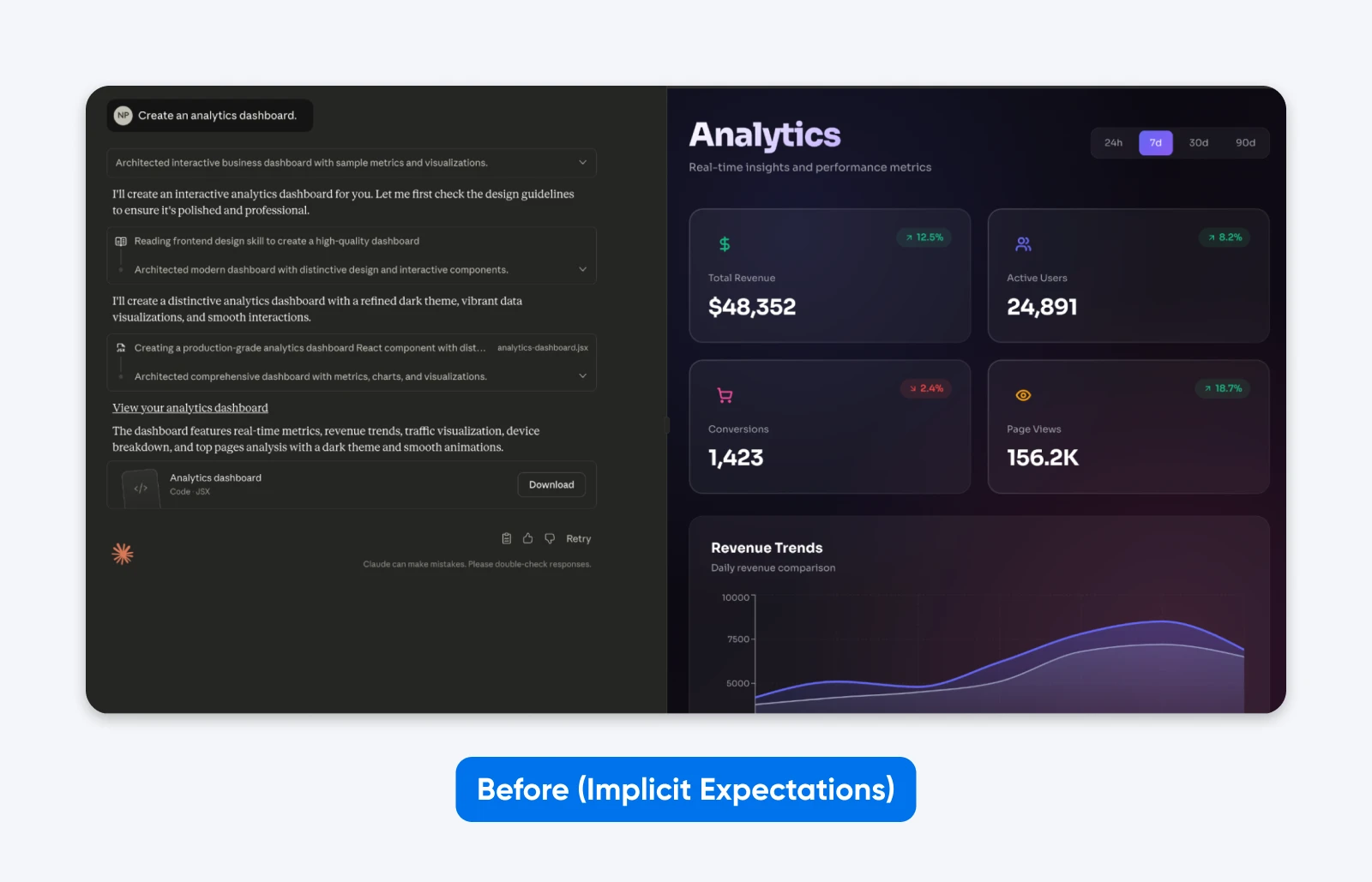
You’ll notice how this output is EXACTLY what we asked for. While Claude took a little bit of creative freedom in the aesthetics, it has no functionality.
After (explicit requirements):
Create an analytics dashboard. Include as many relevant features and interactions as possible. Go beyond the basics to create a fully-featured implementation with data visualization, filtering capabilities, and export functions.
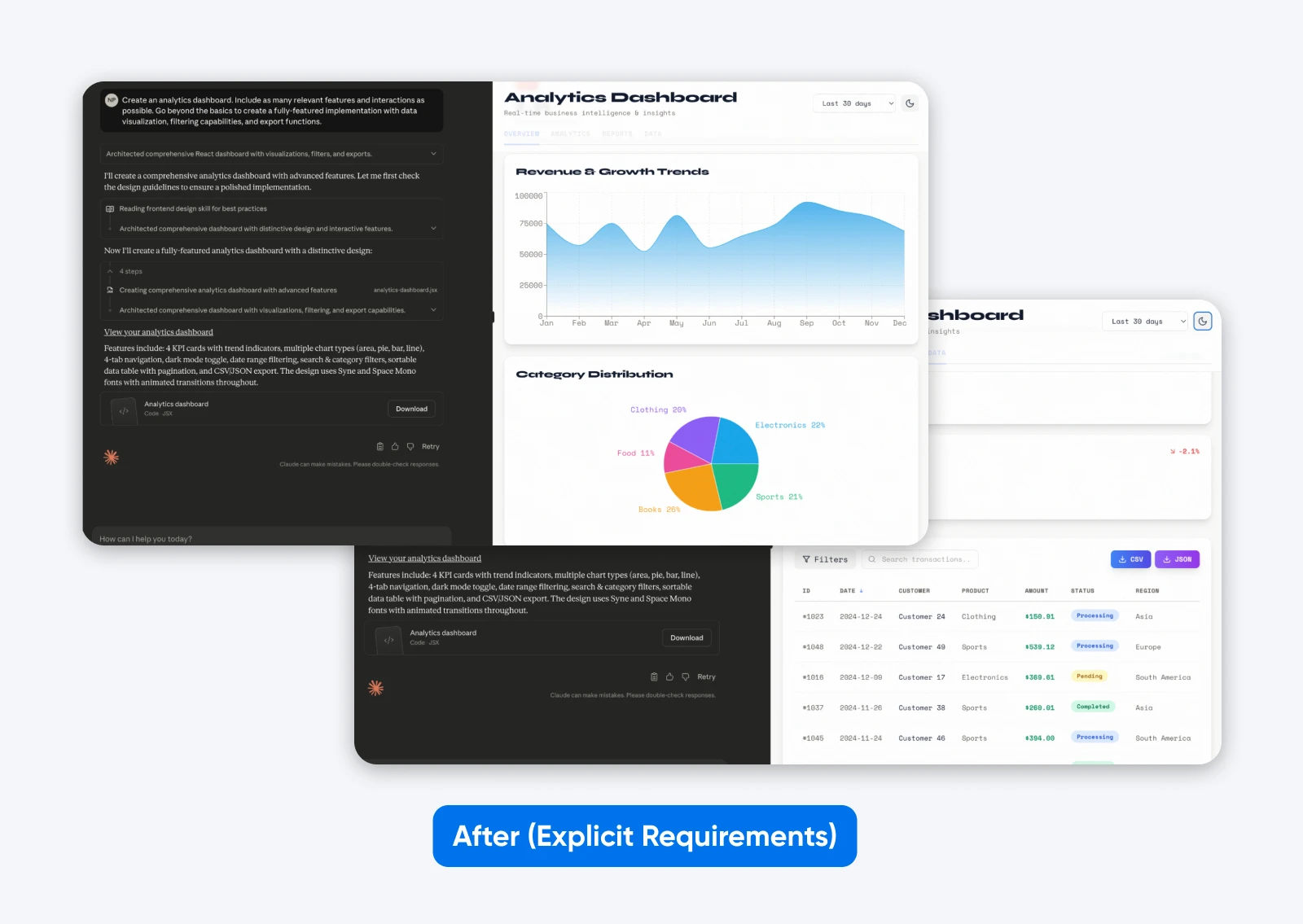
This second output with a more descriptive prompt has more features, a dashboard built on some dummy data, which is both presented graphically and in a tabular format, and it has tabs to separate all the data.
That’s what being specific does with Claude 4.x models since Sonnet 4.5.
To clarify this point even further, here’s another example showing how context improves instruction-following:
Before (command without context):
NEVER use ellipses in your response.
After (context-motivated instruction):
Your response will be read aloud by a text-to-speech engine, so avoid ellipses since the engine won’t know how to pronounce them.
Key principles for explicit instructions:
- Define what “comprehensive” means for your specific task: Don’t assume Claude will infer quality standards.
- Explain why rules exist rather than just stating them: Claude generalizes better from motivated instructions.
- Specify the output format explicitly: Request “prose paragraphs” instead of hoping Claude won’t default to bullet points.
- Provide concrete success criteria: What does task completion look like?
Effectiveness rating: 9/10 across all task types.
4. Show Examples of What You Want
Few-shot prompting provides Claude with example inputs and outputs demonstrating the desired behavior. This works, but only when examples are high quality and task-appropriate, and the impact varies dramatically by use case.
Anthropic’s official guidance emphasizes:
“Claude 4.x models pay close attention to details and examples as part of their precise instruction following capabilities. Ensure that your examples align with the behaviors you want to encourage and minimize behaviors you want to avoid.”
Anthropic recommends 3-5 diverse, relevant examples for complex tasks. More examples equal better performance.
Here’s an example of what that looks like in practice:
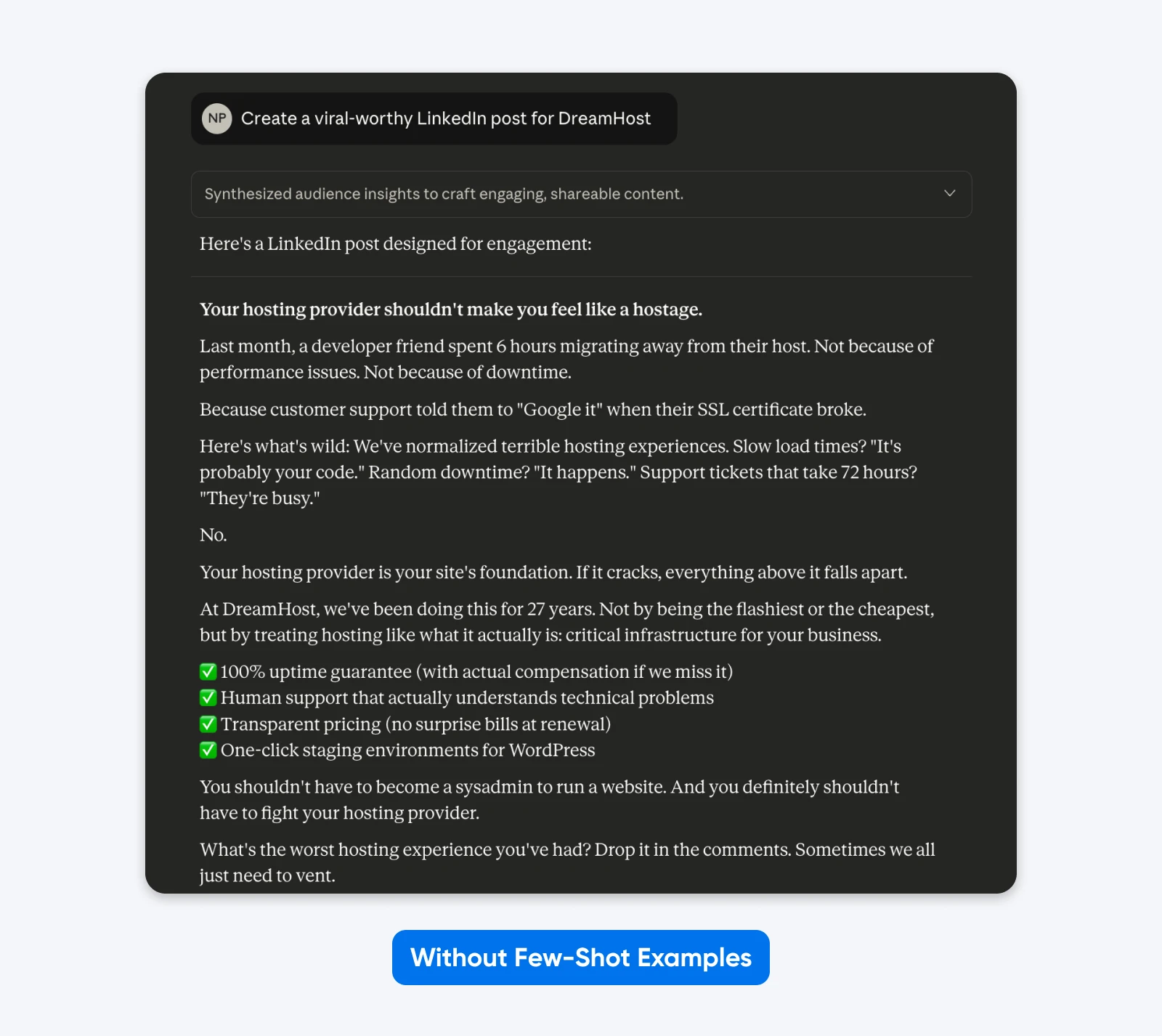
Here, Claude took creative freedom with format, emoji usage, messaging, and tone. Generic corporate speak.
Adding examples works because they show rather than tell, while clarifying the subtle requirements that are difficult to express through description alone.
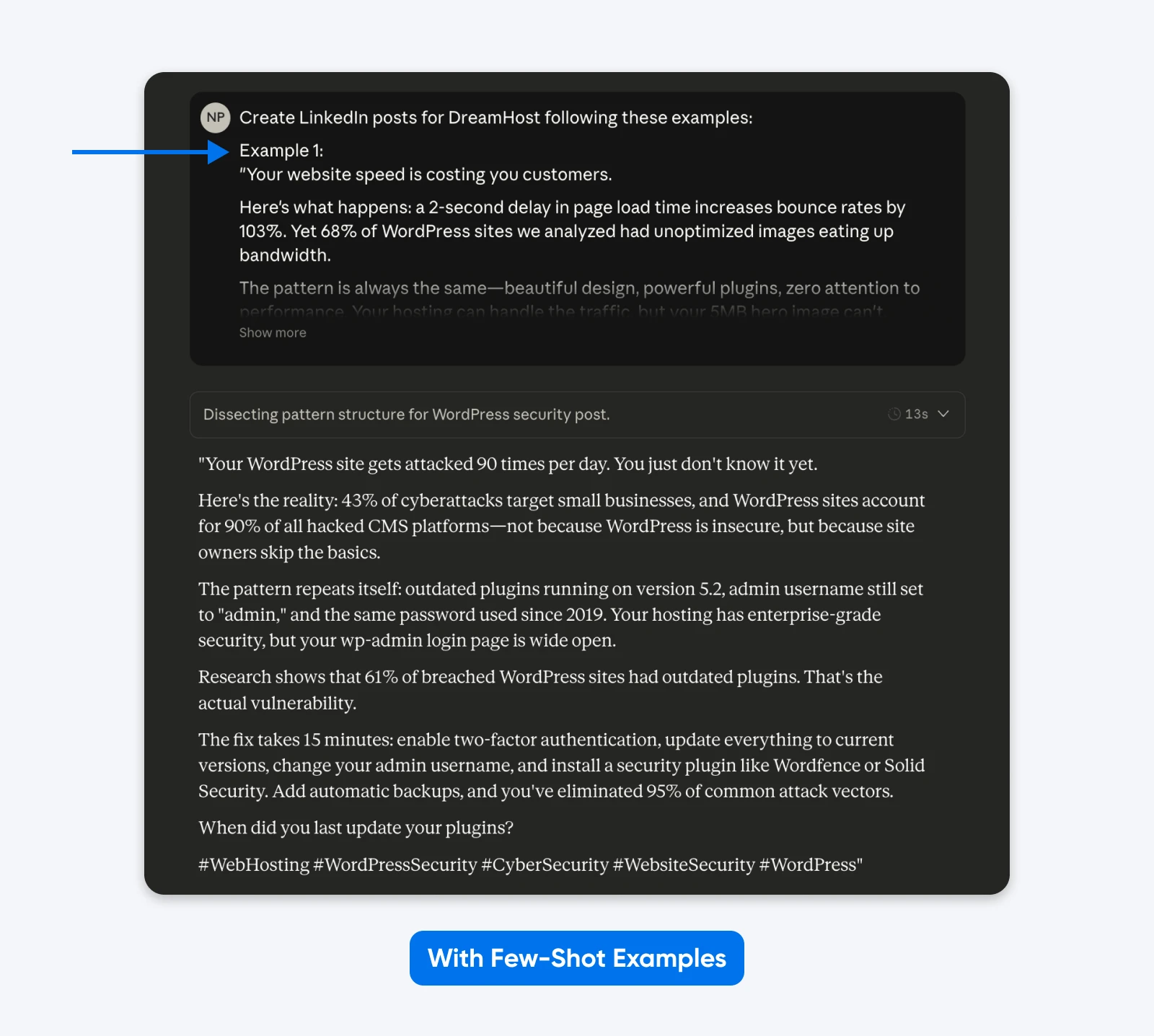
This output sticks more closely to the examples I’ve provided in the prompt. You can use the few-shot examples method to get LinkedIn posts like your best-performing ones.
How to Implement:
- Wrap examples in <example> tags, grouped in <examples> tags
- Place examples early in the first user message
- Use 3-5 diverse examples for complex tasks
- Match every detail in examples to desired output (Claude 4.x replicates naming conventions, code style, formatting, punctuation)
- Avoid redundant examples
When Examples Work Best:
- Data formatting requiring precise structure
- Complex coding patterns needing specific approaches
- Analytical tasks demonstrating reasoning methods
- Output requiring consistent style and conventions
When to Skip: Simple queries where instructions suffice, or when you want Claude to use its own judgment.
Effectiveness rating: 10/10 for formatting tasks, 6/10 for simple queries.
5. Put Context Before Your Question
Claude has a 200,000-token context window (up to 1 million in some cases) and can understand queries placed anywhere in the context. But Anthropic’s documentation recommends placing long documents (20,000+ tokens) at the top of prompts, before queries.
In Anthropic’s own tests, published in its long-context docs in 2024 (the Claude 2.1/3 era), context-first ordering improved response quality by up to 30% compared to query-first ordering, especially with complex, multi-document inputs.
Anthropic’s docs report the result without explaining the internal mechanism. Practically, placing the question after context lets the model reference all the earlier material while generating responses.
Before (query-first):
Analyze the quarterly financial performance and identify key trends.
[20,000 tokens of financial data]
After (context-first):
[20,000 tokens of financial data]
Based on the quarterly financial data provided above, analyze performance and identify key trends in revenue growth, margin expansion, and operating efficiency. Focus on actionable insights for executive decision-making.
When this matters: Long-context analysis where Claude needs to reference earlier material extensively.
When to Skip: Short prompts under 5,000 tokens.
Effectiveness rating: 8/10 for long-context tasks, 4/10 for short prompts.
Copy-paste Claude prompts for common tasks
Techniques are only half the job — sometimes you just want a prompt you can paste and run. Here are six, one per common task, each built on one of the five best practices above. Swap in your specifics and adjust from there.
Code review:
<task>Review the code below for security and performance issues</task>
<context>Production WordPress plugin, PHP 8.2, must stay backward compatible</context>
<code>[paste your code]</code>
<output_requirements>
- List each issue with a severity rating (critical, high, medium, or low)
- Show corrected code for every critical or high issue
- End with a prioritized fix list
</output_requirements>
Why it works: Labeled XML sections (technique 1) keep the task, context, and success criteria separate, so nothing is left for Claude to infer.
Content drafting:
Write a LinkedIn post announcing [your news].
<examples>
<example>[paste a post of yours that performed well]</example>
<example>[paste a second post in the same voice]</example>
</examples>
Match the tone, length, emoji use, and formatting of the examples exactly.
Why it works: Few-shot examples (technique 4) show rather than tell, and Claude 4.x and newer models replicate the details your examples model, down to formatting and punctuation.
Data analysis:
[paste the full dataset or report first]
Based on the data above, identify the three most significant trends, quantify each one, and flag anything that looks anomalous. Format: one short paragraph per trend, then a bulleted list of anomalies.
Why it works: Context-first ordering (technique 5) puts the long input at the top and the question at the end, where it performs best.
Debugging and support:
My WordPress site on Nginx and Ubuntu 24.04 returns intermittent 502 Bad Gateway errors.
If the error logs show 'upstream sent too big header', provide configuration changes for buffer sizes.
If the logs show 'upstream timed out', provide configuration changes for execution time limits.
Give exact configuration lines and explain how each change affects server memory.
Why it works: Explicit requirements plus conditional logic (technique 3) hand Claude a decision tree instead of a guessing game.
Research summarization:
[paste your sources or notes first]
Compare the sources above and write a decision brief: where they agree, where they conflict, and what a careful reader should conclude. Before including any fact, confirm it appears in at least one source, and cite which one.
Why it works: This is a verification-heavy reasoning task, exactly where Extended Thinking (technique 2) earns its extra tokens.
Plain-language rewriting:
Rewrite the text below for first-time website owners, at roughly a ninth-grade reading level. They won't know hosting jargon, so restate any technical term in plain language the first time it appears.
[paste your text]
Why it works: Context-motivated instructions (technique 3) explain who the reader is, which helps Claude generalize the rule to cases you didn’t spell out.
Once a prompt earns a permanent spot in your library, version it. The evaluation loop later in this guide shows how to prove a new prompt actually beats the old one.
What Prompting Techniques Don’t Work Anymore: Busting Common Myths
Claude 4.5’s changes invalidated several popular techniques that worked with earlier models.
1. Emphasis Words (ALL CAPS, “MUST,” “ALWAYS”)
Writing in all caps no longer guarantees compliance. Chris Tyson’s analysis, “The Day Anthropic Broke 90% of My Prompts” (The Agent Architect, October 3, 2025), found Claude now prioritizes context and logic over emphasis.
If you write “NEVER fabricate data” but the context implies you need an estimate, Claude 4.5 prioritizes the logical need over your capitalized command.
Use conditional logic instead:
- Bad: ALWAYS use exact numbers!
- Good: If verified data is available, use precise figures. If not, provide ranges and label them as estimates.
2. Manual Chain-of-Thought Instructions
Telling the model to “think step-by-step” adds little when Extended Thinking mode is on.
When you enable Extended Thinking, the model manages its own reasoning budget. Adding your own “step-by-step” instructions is redundant.
What to do instead:
Trust the tool. If you enable Extended Thinking, remove all instructions about how to think.
3. Negative Constraints (“Don’t Do X”)
Telling Claude exactly what not to do often backfires.
Research on “Pink Elephant” instructions (a February 2024 SynthLabs study of open instruction-tuned models, not Claude) shows that telling a model not to think about something can increase the likelihood it will focus on it.
Naming the forbidden concept keeps it active in the conversation, a tendency the SynthLabs team documented across instruction-tuned models.
Instead, reframe every negative as a positive command:
- Bad: Do not write long, fluffy introductions. Don’t use words like “delve” or “tapestry.”
- Good: Start directly with the core argument. Use concise, punchy language.
How To Migrate Prompts From Older Claude Models to Claude 4.x and Newer?
If your prompt library was written for Claude 3.5 or another retired model (Anthropic retired Sonnet 3.5 in October 2025), you can bring it up to date for Claude 4.x and newer models by following five systematic steps validated by developer experience.
We will use a common hosting scenario for this example. The goal is to generate a technical support response for a customer experiencing a “503 Service Unavailable” error on their WordPress site.
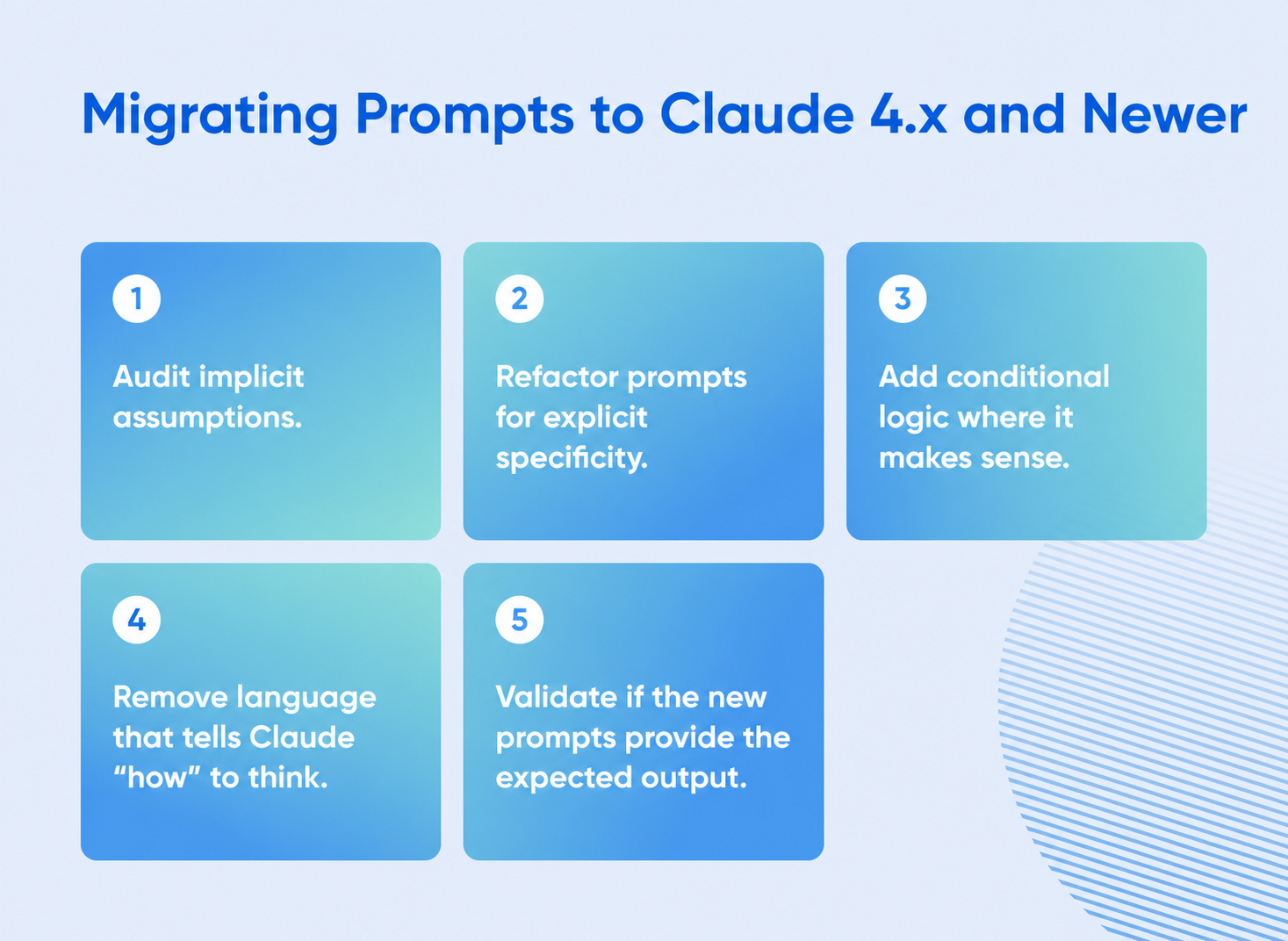
1. Audit Implicit Assumptions
Begin by identifying where the prompt relies on the model to guess the context. In older versions, the model would infer you were using the most common software stack. Claude 4.5 and newer models will not make that leap.
Legacy Prompt:
“My website is loading slowly and showing errors. You are an expert server administrator. Think step by step and tell me how to fix the configuration to make it faster.”
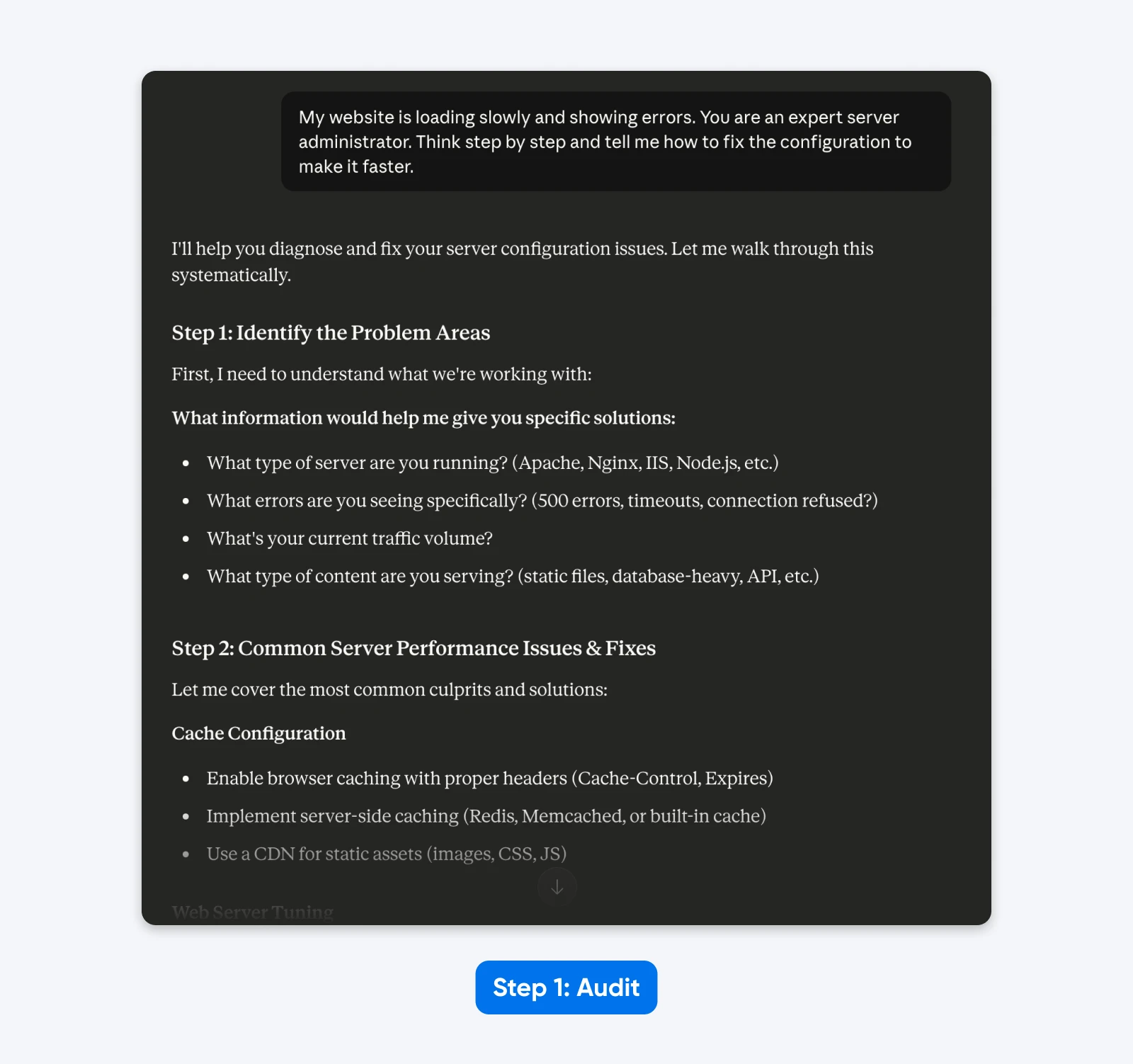
The Audit:
- “Website” implies a generic setup rather than a specific CMS (WordPress).
- “Slowly” is subjective; it could mean high Time to First Byte or slow asset rendering.
- “Errors” lacks the specific HTTP status codes needed for diagnosis.
- “Expert server administrator” and “Think step by step” are unnecessary steering instructions.
In the response, Claude 4.5 asks for more information as it’s trained to avoid making assumptions.
2. Refactor for Explicit Specificity
Now, rewrite the prompt to define the environment, the specific problem, and the desired output format. You must supply the technical details the model previously guessed.
Refactored Prompt:
“My WordPress site running on Nginx and Ubuntu 24.04 is experiencing high Time to First Byte (TTFB) and occasional 502 Bad Gateway errors. You are an expert server administrator. Think step by step and provide specific Nginx and PHP-FPM configuration changes to resolve these timeouts.”

The Result: The prompt now specifies the exact software stack (Nginx, Ubuntu, WordPress) and the specific error (502 Bad Gateway), reducing the chance of irrelevant advice about Apache or IIS. And Claude responds with an analysis and a step-by-step solution.
3. Implement Conditional Logic
Claude 4.5 and newer models excel when given a decision tree. Instead of asking for a single static solution, instruct the model to handle different scenarios based on the data it analyzes.
Prompt with Logic:
“My WordPress site running on Nginx and Ubuntu 24.04 is experiencing high TTFB and 502 Bad Gateway errors. You are an expert server administrator. Think step by step.
If the error logs show ‘upstream sent too big header’, provide configuration changes for buffer sizes. If the error logs show ‘upstream timed out’, provide configuration changes for execution time limits.”
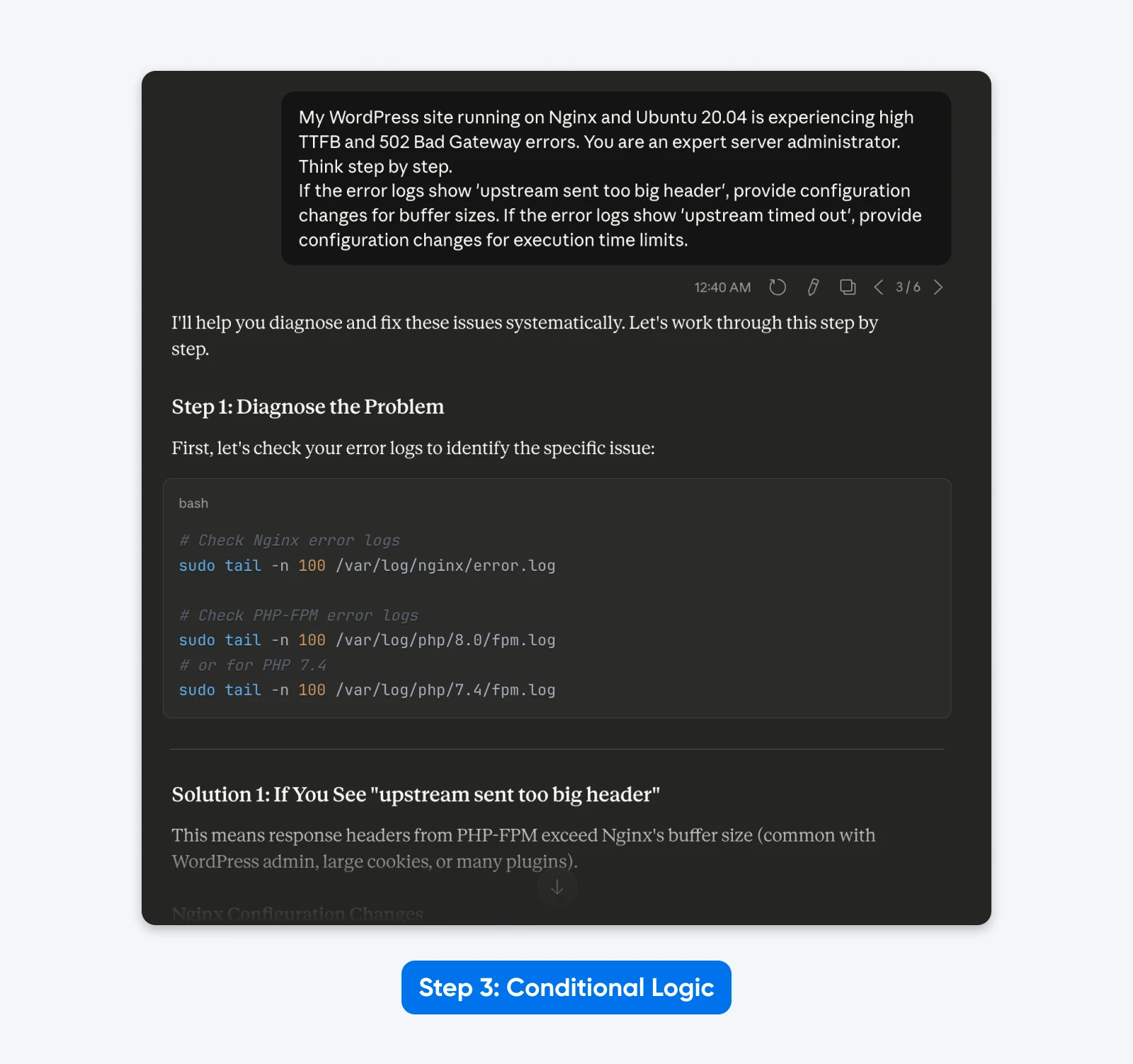
The Result: The output becomes dynamic. The model provides targeted solutions based on the specific root cause logic you defined, rather than a generic list of fixes.
4. Remove Outdated Steering Language
Legacy prompts often contain thinking instructions that users believed improved performance. These are unnecessary and redundant with Claude 4.x and newer models, as they have extended thinking.
Cleaned Prompt:
“My WordPress site running on Nginx and Ubuntu 24.04 is experiencing high TTFB and 502 Bad Gateway errors.
If the error logs show ‘upstream sent too big header’, provide configuration changes for buffer sizes. If the error logs show ‘upstream timed out’, provide configuration changes for execution time limits.”
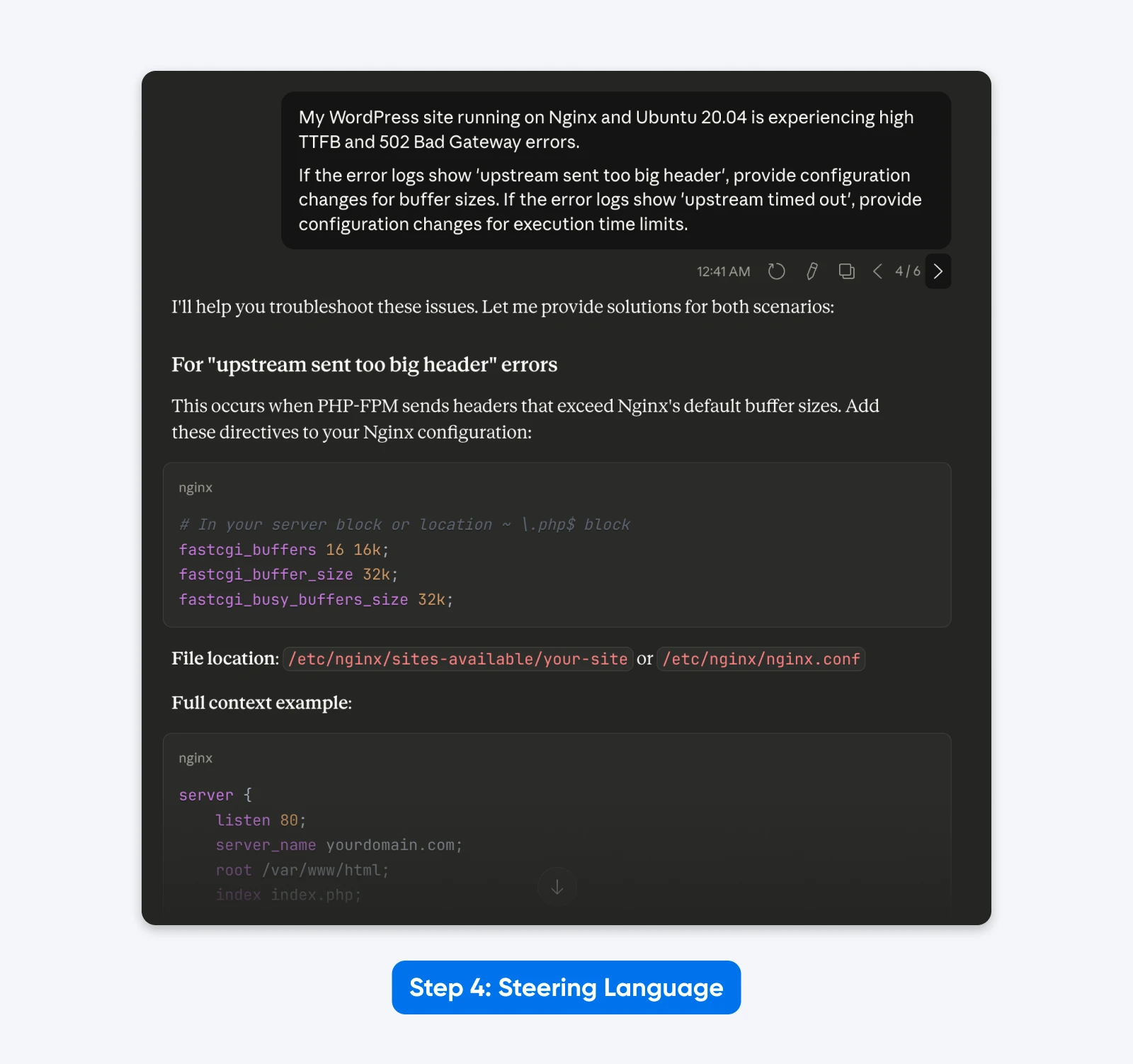
The Result: A leaner prompt that focuses purely on the technical task, removing the distraction of “You are an expert” and “Think step by step.”
5. Test Systematically
Assemble the components into a structured format using XML or clear headers. This matches the training data of the model and yields the most consistent results.
ROLE: Linux System Administrator specializing in Nginx and WordPress performance.
TASK: Resolve 502 Bad Gateway errors and reduce Time to First Byte (TTFB) for a WordPress site on Ubuntu 24.04.
LOGIC:
- If logs show 'upstream sent too big header', increase fastcgi_buffer_size and fastcgi_buffers.
- If logs show 'upstream timed out', increase fastcgi_read_timeout in nginx.conf and request_terminate_timeout in www.conf.
OUTPUT REQUIREMENTS:
- Provide exact configuration lines to change.
- Explain the impact of each change on server memory.
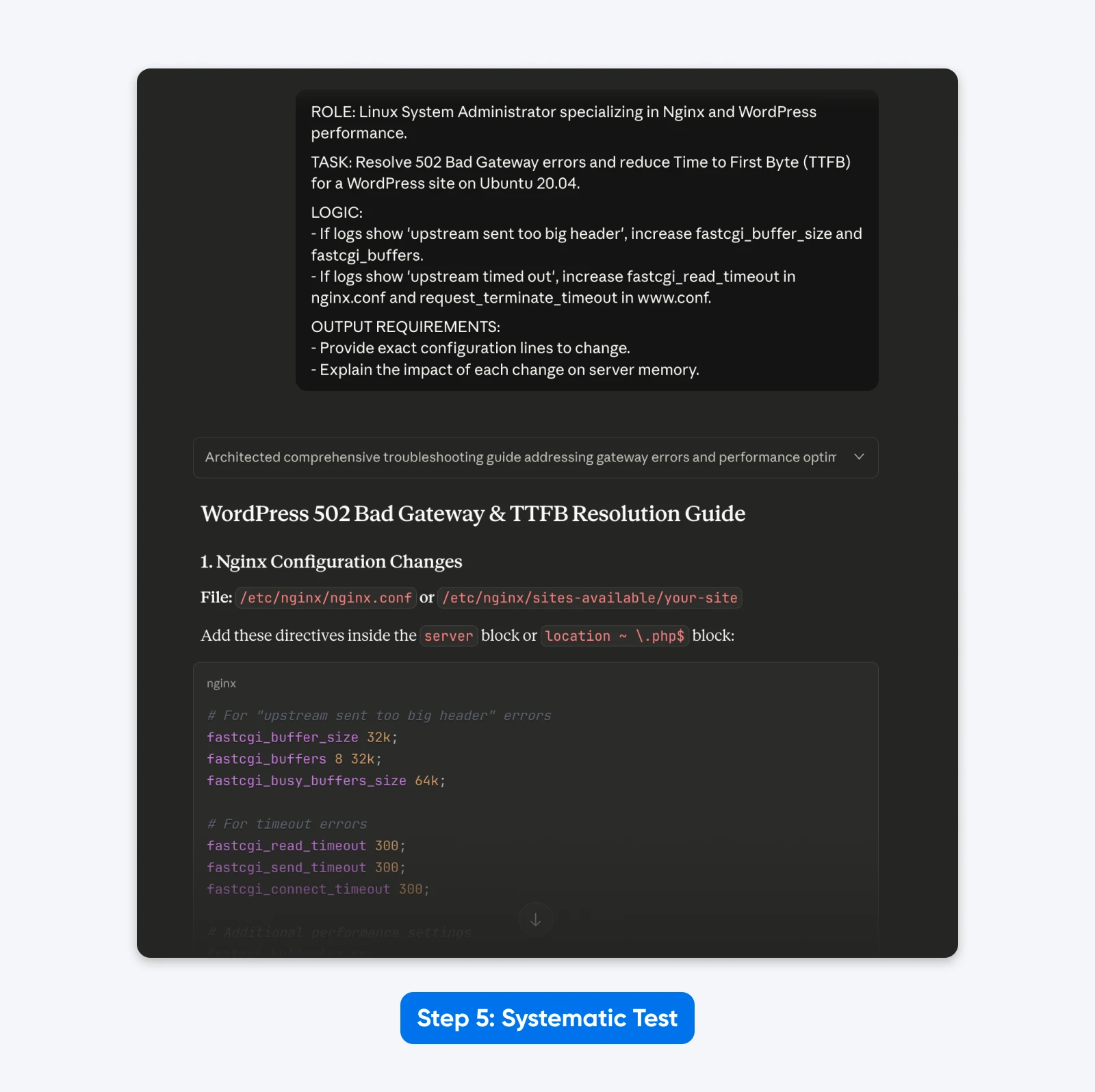
The Result: The response was more structured, allowed me to solve the problem with copy-pasteable config file data as requested, and explained the solution better.
How to prompt Claude Code and agentic workflows
Prompting no longer stops at the chat box. Anthropic’s Claude Sonnet 5 announcement (June 30, 2026) describes a model that can “make plans, use tools like browsers and terminals, and run autonomously” — and Claude Code puts that agentic behavior to work in your own projects. The five techniques above still apply, with four adjustments:
- Describe the outcome, not the steps: “Reduce the checkout page’s load time below 2 seconds, and show a before/after measurement” gives an agent a testable target. A list of micro-instructions just narrows its options.
- Build in self-verification: Ask Claude to reproduce the bug, apply the fix, then run the tests to confirm. Anthropic’s Sonnet 5 early testers describe exactly this loop — writing a reproducing test, fixing the bug, and re-checking the fix in a single pass.
- Point at reference material: Instead of describing your conventions, name a file that embodies them (“follow the patterns in components/Button.tsx”). That’s few-shot prompting with your own codebase as the example.
- Make winning prompts reusable: Save prompts that work as snippets, saved commands, or a shared team document, so a tested instruction gets reused instead of rewritten from memory.
How to tell whether a prompt change actually worked
Different output isn’t the same as better output. Before a new prompt replaces an old one, run both through a quick evaluation loop:
- Freeze a test set: Pick 3–5 real inputs you handle often, and use the same ones every time.
- Run old and new side by side: Same model, same settings, same inputs.
- Score against explicit criteria: Three or four are enough — accuracy, format compliance, completeness, tone. Score every output against each criterion instead of eyeballing the winner.
- Version the winner: Date it, note which model you tested it on, and retire the old prompt. Model upgrades are exactly when saved prompts break.
If the outputs changed but the scores didn’t, you changed the prompt. You didn’t improve it.
FAQs about prompting Claude
What is the best prompt structure for Claude?
A labeled, structured prompt: separate sections for the task, context, and output requirements, using XML tags, JSON, or clear headers. For long inputs, put the document first and the question last. Anthropic’s own system prompts use this labeled structure.
How do I prompt Claude?
Tell Claude exactly what you want. Current Claude models follow instructions literally instead of inferring intent, so spell out the task, the output format, and the success criteria, and explain why any rule exists. Vague prompts get minimal, literal answers.
Do ALL CAPS instructions work with Claude?
Not reliably. Since Sonnet 4.5, Claude weighs context and logic over emphasis, so “ALWAYS” and “MUST” become suggestions when they conflict with the apparent goal. Replace absolutes with conditional rules: “If verified data exists, use exact figures; otherwise, provide labeled estimates.”
Should I tell Claude to think step by step?
Not when Extended Thinking is enabled, because the model already manages its own reasoning budget. Without Extended Thinking, a short instruction to work through the problem systematically can still help on multi-step tasks.
Which Claude models do these techniques apply to?
All current ones. The literal instruction-following behavior arrived with the Claude 4.x line and carries through Claude Sonnet 5, released June 30, 2026, and now the default model on Claude’s Free and Pro plans.
What This Means for Your Workflow
Claude 4.x and newer models work differently from earlier generations. They follow your exact instructions instead of assuming what you meant, which helps when you need consistent results. The effort you spend on prompt engineering in the beginning will pay off if you run the same task repeatedly.
Each technique in this guide has been cherry-picked because it aligns closely with how Claude 4.x was built. XML tags, Extended Thinking mode, explicit instructions, few-shot examples, and a context-first approach work because, based on Claude’s prompting guides and anecdotal evidence, that’s likely how Anthropic has trained the models.
So go ahead, pick one or two techniques from this guide and test them on your actual workflows. Measure what changes with the evaluation loop above, and keep the methods that work in your favor. The best approach is the one backed by real data from your own day-to-day workflows.